Good content earns rankings and pulls organic traffic to your site. Most marketers already know that part. What trips people up are two quieter problems, keyword cannibalization and duplicate content, that can undercut everything you publish. Both slip into a site without anyone noticing, and both make it harder for your pages to rank.
This article breaks down what each problem is, how the two connect, and the exact steps that clear them up.
Why Two Pages Chasing the Same Keyword Hurts You
This problem shows up more often than most site owners expect, and it usually starts with good intentions. You write two solid pages on closely related topics, and without meaning to, you put them in a fight with each other for the same spot in search results. Here is what that looks like and why it pulls your rankings down.
What Keyword Cannibalization Means
Keyword cannibalization happens when two or more pages on your site go after the same or very similar keywords. Those pages then compete against each other for the same search rankings. That competition confuses search engines like Google, and it leads to lower rankings, because the engine cannot tell which page is the best answer for the keyword.
A quick example makes it concrete. You run a site that sells handmade candles, and you build two separate pages, one for “scented candles” and another for “aromatic candles.” Since “scented” and “aromatic” mean the same thing, both pages chase similar keywords and end up fighting each other in the results.
How Keyword Cannibalization Drags Down Your SEO
Keyword cannibalization hits your SEO in a few specific ways.
- Diluted link equity. When several pages target the same keywords, backlinks get split between them, which lowers the link equity each page can earn.
- Lower click-through rate. When two of your pages show up for the same query, readers get confused and grow less likely to click either one.
- Inconsistent rankings. Search engines struggle to pick the most relevant page, so your rankings bounce around.
Where Duplicate Content Comes From and Why It Costs You
Duplicate content is easy to create by accident. A product filter, a printer-friendly URL, or a description copied across pages can put the same words on several addresses at once. Before you fix it, you need to know exactly what counts as duplicate content and why search engines care.
What Duplicate Content Means
Duplicate content means large blocks of text that are identical or nearly identical, either across pages on your own site or across different sites. Sometimes it happens by accident, like a technical setup that serves the same page on several URLs. Sometimes it happens on purpose, like copying and pasting text from one page to another.
Take an online clothing store. You create separate product pages for a blue shirt in small, medium, and large. Every page carries the same description, the same images, and the same content except for the size. That repetition creates duplicate content across all three pages.
What Duplicate Content Does to Your Rankings
Duplicate content hurts your SEO for a few reasons.
- Search engine confusion. Like keyword cannibalization, duplicate content makes it harder for search engines to decide which page to rank.
- Wasted crawl budget. Search engines give each site a limited crawl budget, and duplicate pages burn through it on redundant content, which leaves less room to index your new, unique pages.
- Lost traffic. If a search engine treats another site’s version of the content as more authoritative, you can lose traffic to that site.
How Keyword Cannibalization and Duplicate Content Feed Each Other
Keyword cannibalization and duplicate content are two separate problems, but they overlap and often show up together. Both put multiple pages in competition for the same rankings, which confuses search engines and readers alike.
Sometimes one causes the other. Two pages with identical content aimed at the same keyword create duplicate content and keyword cannibalization at once. Other times they stay separate, like two pages with completely different content that still target the same keyword.
Either way, both problems drag down your SEO and hurt the reader’s experience. You want to find and fix both to get your pages ranking where they should.
Keyword cannibalization vs duplicate content
How to Fix Keyword Cannibalization and Duplicate Content
Now that you can spot both problems, here are the fixes that actually work.
Merge Overlapping Pages Into One Strong Page
When several pages target the same keyword or repeat the same content, combine them into one thorough, high-quality page. That cuts the competition between your own pages and gives readers everything in one place.
Take the handmade candles example again. Combine the “scented candles” and “aromatic candles” pages into one page that covers both terms. That single move ends the cannibalization and hands your visitors a more useful resource.
Point Search Engines to the Right Page With Canonical Tags
Some pages hold similar or duplicate content but still serve different purposes, like separate variations of a product. Add a canonical tag to tell search engines which version is the preferred one. The canonical tag marks that page as the “original” and sends the SEO benefits, like link equity, to it.
Go back to the clothing store. Add a canonical tag to the blue shirt pages in small, medium, and large, and mark one of them as the canonical version. Search engines then know which page to prioritize in the results.
Map One Keyword to One Page
Run thorough keyword research and give each page its own clear target keyword. Build a keyword map that assigns unique, relevant keywords to every page so that no two pages go after the same term. That keeps each page focused and stops search engines from getting confused.
Redirect Old Pages With 301s
Once you remove or merge pages, add 301 redirects to send users and search engines to the new page. A 301 redirect tells search engines that a page has permanently moved, and it passes the old page’s link equity to the new one. That keeps the move smooth for readers and protects the SEO work you already put in.
The Bottom Line
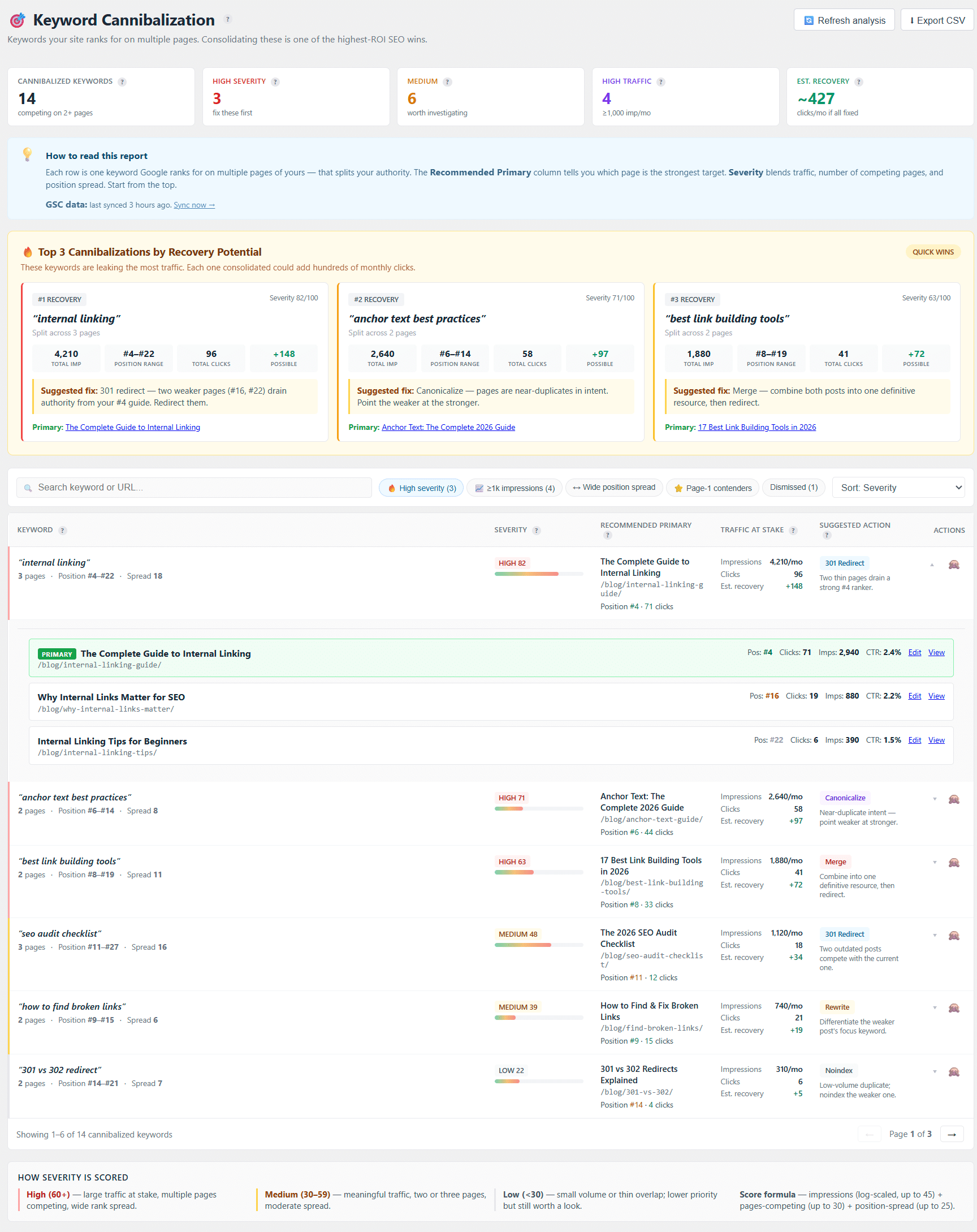
For WordPress sites, Linkilo’s Keyword Cannibalization Report handles the Search Console side directly. It syncs with Search Console and surfaces every query where two or more of your pages compete for the same ranking, scored by impressions, competing pages, and position spread.
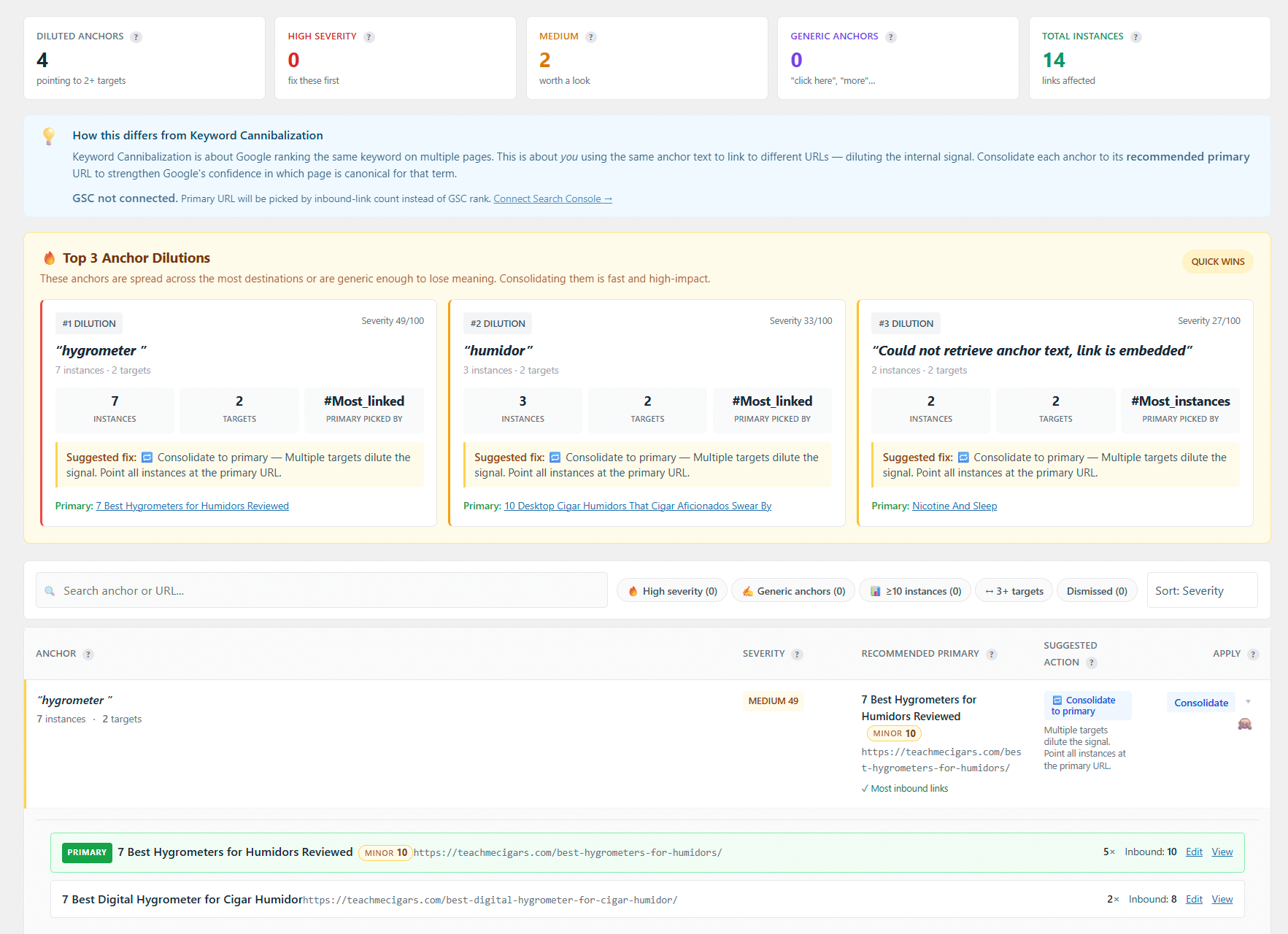
Linkilo’s Link Cannibalization Report makes it easy to spot when the same anchor text points to several URLs, a clear sign your internal links are making the cannibalization worse. It ranks those cases by recovery potential and lets you consolidate to the right page with one click.
As you work through keyword cannibalization and duplicate content, keep the principles of Experience, Expertise, Authority, and Trust (E-E-A-T) in mind. Content that shows real expertise, gives readers useful information, and marks your site as a credible source lifts both the reader’s experience and your rankings.
Handle keyword cannibalization and duplicate content early, and you end up with a well-optimized site that serves both your readers and search engines. Steady, thoughtful content plus a few smart SEO habits keep your best pages visible and ranking well.
Frequently Asked Questions
Keyword cannibalization and duplicate content, answered
+Can a page have both keyword cannibalization and duplicate content at the same time?
Yes. Two pages with identical text aimed at the same keyword create both problems at once. Fixing the duplicate text often clears the cannibalization too.
+How do I know which of my pages are competing for the same keyword?
Check Google Search Console for queries where more than one of your URLs shows up, or use a tool like Linkilo’s Keyword Cannibalization Report that pulls this straight from Search Console.
+Is duplicate content always a penalty?
No. Google rarely hands out a manual penalty for it. The real cost is split ranking signals and wasted crawl budget, which quietly hold your pages back.
+Should I delete a cannibalizing page or merge it?
Merge when both pages hold useful content, then 301 redirect the weaker URL to the combined page. Delete only when a page adds nothing worth keeping.
+Do canonical tags fix keyword cannibalization?
They help with duplicate or near-identical pages by pointing search engines to one version. For two genuinely different pages chasing the same keyword, a merge or a keyword remap works better.
Linkilo does this for you
- Redirection Manager : Catch 404s as they happen and redirect them before anyone notices the traffic went missing.
- Crawl Log File Analyzer : See exactly which pages Google and the AI crawlers actually visit, inside WordPress, with no log files to download.
- Internal Link Click Analytics : Find out which internal links people actually click, and stop guessing which ones earn their place.

Jay - Linkilo
Jay's the brains behind cool tools like Linkilo, helping marketers rock their SEO game. He's all about data-driven strategies and using AI to boost results. He's been at this for a decade and loves figuring out what works (and what doesn't) to get more leads without paying a fortune. <a href="https://www.linkedin.com/in/jay-kang-80b103309/">Linkedin</a>