Here is the short version. For SEO, Google treats 301 and 308 redirects the same, so neither one ranks better than the other. Use a 301 for almost every redirect you set up. Reach for a 308 only when you need the browser to repeat the exact same request method, so a POST stays a POST. Below is what really separates the two, what Google has said, and how to set either one on WordPress without touching a config file.
What a 308 redirect actually is
A 308 is a permanent redirect. It tells browsers and search engines that a page has moved to a new URL for good, and it passes the ranking power, the link equity, from the old URL to the new one. In that sense it does the same core job as a 301.
The one thing a 308 adds is strictness about the request method. When a browser hits a 308, it has to resend the original request exactly as it was. A form submission that came in as a POST stays a POST on the new URL.
The real difference between a 301 and a 308
Both are permanent and both pass link equity, so the split comes down to that request method.
With a 301, the browser is allowed to change the method. A POST can quietly become a GET on the way to the new URL. Most of the time that does not matter, because the pages people redirect are normal content pages that load with a GET anyway. But if the old URL handled a form or an API call over POST, a 301 can break it. A 308 holds the method in place, so the POST arrives as a POST.
What happens to a POST request
301 redirect Your POST request ↓ May arrive as GET ✗ A form submission can break | 308 redirect Your POST request ↓ Arrives as POST ✓ The form stays intact |
The four redirect types at a glance
What Google says about 308 redirects
Google’s John Mueller has been clear that there is no ranking gap between the two. He has said 308s are “technically cleaner” when you are not sure which request type a URL gets, but that for most sites, where nearly every request is a GET, the two are the same in practice.
So there is no SEO bonus waiting for you if you switch every 301 to a 308. The decision is technical, not a ranking play.
When to use a 301 and when to use a 308
Match the redirect to the job. For the redirects most site owners deal with, moved posts, changed URLs, a site restructure, a 301 is the right call and the simplest one.
Two quick examples show the split.
A store changes its URLs
You restructure an online store and the product category URLs change. Point every old URL to its new one with 301s. Shoppers land on the right page, and the rankings and link equity the old URLs earned carry over. There is no form data to preserve here, so a 301 is all you need.
An app migrates and has to keep POST requests
You move a web app to a new platform, and some of its URLs accept form submissions over POST. Here a 308 is the safer choice, because it forces the browser to resend those POST requests intact. Swap in a 301 and a submission could arrive as a GET and fail.
Which redirect for which job
Use a 301 when → You move a post or a page → You change or restructure URLs → Almost every redirect you set up | Use a 308 when → A URL accepts POST form submissions → You move an app or an API endpoint → The request method must stay intact |
How to set a 301 or 308 on WordPress without code
You already know which redirect you want. Adding it is where people get stuck, because the usual routes mean editing your .htaccess file or a server config, and one wrong line there can take the whole site down.
Linkilo’s redirect manager skips all of that. You pick the old URL, set the new one, choose the redirect type, and save. The redirect is live, with no config file and no server access.
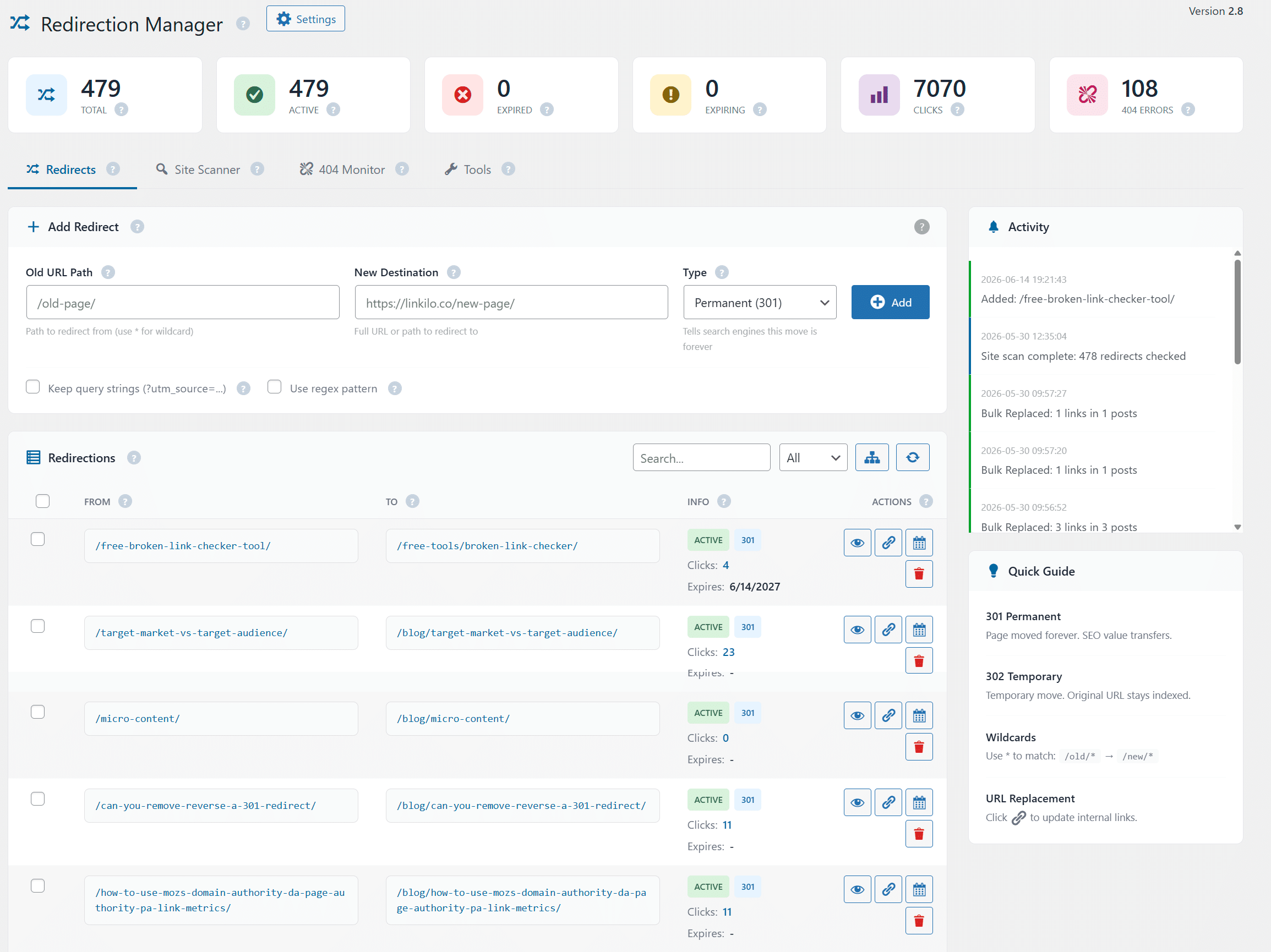
It also does the part most redirect setups miss. It watches for redirect chains, the case where one redirect points to a URL that redirects again, which slows every crawl and drains a little link equity at each hop. Linkilo flags the chain so you can point the first URL straight at the final destination. On a site that has been through a few redesigns, that cleanup alone speeds up how fast search and AI crawlers get through your pages.
Why redirect chains cost you
A chain
| Old URL | → | Middle URL | → | Final page |
Each hop slows the crawl and leaks link equity.
Flattened by Linkilo
| Old URL | → | Final page |
Linkilo points the first URL straight at the final page.
One honest limit. Linkilo runs on WordPress, so if your redirects live on another platform, you will still be setting those at the server.
The bottom line
For almost every redirect, reach for a 301. It is permanent, it passes link equity, and Google ranks it the same as a 308. Save the 308 for the narrow case where a URL has to keep its POST requests intact, like an app or an API endpoint. Get the type right, set it cleanly, and watch for chains, and your redirects will hold your rankings instead of leaking them.
301 and 308 redirects, quick answers
+Is a 308 redirect better than a 301 for SEO?
No. Google treats them the same, so there is no ranking advantage either way. A 301 is the simpler default for content and URL moves.
+Does Google follow 308 redirects?
Yes. Google follows 308s and passes link equity through them the same way it does with a 301.
+Is a 308 redirect permanent?
Yes. Like a 301, a 308 signals a permanent move. The difference is that a 308 also forces the browser to keep the original request method, so a POST stays a POST.
+What is the difference between 301, 302, 307, and 308?
The 301 and 308 codes are permanent, while 302 and 307 are temporary. Within each pair, the 307 and 308 versions keep the request method intact, and the 301 and 302 versions may let it change.
+Do redirects hurt SEO?
A single clean redirect passes almost all link equity and is safe. The harm comes from long redirect chains and broken redirects, which is why it helps to use a tool that flags them for you.
Linkilo does this for you
- Redirection Manager : Catch 404s as they happen and redirect them before anyone notices the traffic went missing.
- Crawl Log File Analyzer : See exactly which pages Google and the AI crawlers actually visit, inside WordPress, with no log files to download.
- Bulk Update URL Tool : Change one URL and Linkilo updates every link pointing at it, across your whole site, in seconds.

Jay - Linkilo
Jay's the brains behind cool tools like Linkilo, helping marketers rock their SEO game. He's all about data-driven strategies and using AI to boost results. He's been at this for a decade and loves figuring out what works (and what doesn't) to get more leads without paying a fortune. <a href="https://www.linkedin.com/in/jay-kang-80b103309/">Linkedin</a>