AI Bot Crawling Audit Guide – Find Which AI Systems Miss Your Best Content in 30 Minutes
See why 40% of websites miss AI traffic from ChatGPT, Claude, and Perplexity. Complete AI bot crawling audit in 30 minutes using manual log analysis or Linkilo's automated tools. Fix gaps, boost AI visibility.
 Jay - Linkilo

Your best content might be completely invisible to ChatGPT right now. Think about that for a second.
While you optimize for Google, millions of people search through AI systems instead. And if those systems can’t find your content? You miss out on serious traffic.
I ran this exact audit for a client last month. Found that 40% of their key pages weren’t being crawled by AI bots. After we fixed it, their AI-driven traffic jumped 1,400% in four weeks.
Takes about 30 minutes to run this audit. Want to see what you miss?
Why Most Websites Are Bleeding AI Traffic
ChatGPT processes over 1 billion queries every day and has nearly 800 million weekly active users as of July 2025. Google’s AI Overviews now appear in 13.14% of all searches as of March 2025, up from just 6.49% in January. Perplexity processes over 400 million search queries per month.
But most sites still only optimize for traditional search crawlers.
When AI bots can’t access your content, you’re invisible to these users. Unlike Google, which might still show your pages with limited crawling, AI systems won’t reference content they haven’t indexed.
Your competitors who figure this out first? They’re going to capture the traffic you lose.
The AI Bots That Control Your Visibility
Understand which bots matter most helps you prioritize your optimization efforts. Each bot serves different AI systems and user behaviors, so know their specific roles lets you focus on the crawlers that impact your target audience.
GPTBot powers ChatGPT responses and OpenAI’s growing ecosystem. Miss this bot and you miss millions of daily users who rely on ChatGPT for research.
ClaudeBot feeds Anthropic’s Claude AI. Businesses increasingly use Claude for decision-making, so miss this index means miss professional audiences.
PerplexityBot handles Perplexity’s real-time answers. Crucial if you publish news, trending topics, or time-sensitive content that users want immediately.
Google-Extended specifically trains Google’s AI products, separate from regular Googlebot. This determines whether you show up in Bard and Google’s AI Overviews.
Googlebot now serves double duty. Traditional search indexing and feeding Google’s AI systems. More critical than ever.
Your AI Crawling Audit Options and Which Method Works Best
You’ve got two ways to handle this audit, and the method you choose depends on how much time you want to invest and whether you prefer automated insights or hands-on control. Both approaches give you the same critical information about AI bot crawling gaps, but they differ significantly in time investment and ongoing maintenance.
Save Hours with Linkilo’s Automated Analysis Tool (5 minutes)
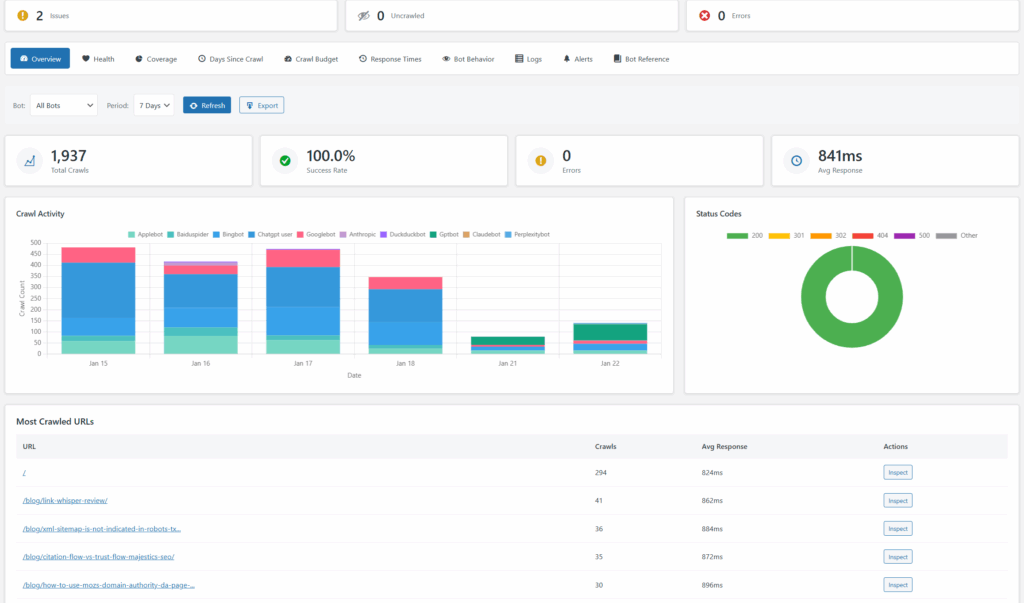
Skip the manual work entirely with Linkilo’s crawler analysis tool.
Try Linkilo for 30 days, or money back guaranteed.
What happens instantly.
Dashboard Overview shows real-time crawler activity from all major AI bots. Success rates, error tracking, the works.
Coverage Insights automatically calculate what percentage of your site each AI bot actually crawls. Visual coverage bars show exactly where your gaps are.
Days Since Last Crawl gives you automated risk assessment. Shows pages that haven’t been crawled in 100+ days by specific AI bots. These are your highest-priority fixes.

Status Code Analysis instantly identifies 404 errors and redirect issues preventing AI bots from accessing your content.
Why does this beat manual analysis? Instead of spending hours parsing log files and building spreadsheets, you get visual dashboards and actionable recommendations in minutes.
Complete Manual Log File Analysis Step-by-Step (30 minutes)
Prefer the hands-on approach? Want to understand what happens under the hood? Complete manual process.
Phase 1 – Download Server Logs and Select Priority Pages (5 minutes)
Access Your Server Logs
Log into your hosting control panel. Navigate to File Manager, then look for /logs, /access_logs, or /public_html/logs. Download files from the past 30 days.

Most hosting providers rotate logs weekly. Grab multiple files if they’re available.
Identify Your Priority Pages
List your top 20 pages that actually drive business results. Conversion pages, pillar content, product pages, high-traffic articles. Focus your audit here since gaps in these pages create the biggest impact.
Can’t Find Your Log Files? Try These Steps:
cPanel Users – Look under “Metrics” section for “Raw Access Logs” or “Webalizer.” Some hosts call it “Log Files” or “Access Logs.”

Plesk Users – Go to “Logs” in the left sidebar, then select “Access & Error Logs.”
Shared Hosting – Contact your hosting provider if logs aren’t visible. Many shared hosts disable log access by default. Ask them to enable “raw access logs” for your account.
WordPress.com, Wix, Squarespace – These platforms don’t provide server log access. You’ll need to use Linkilo’s automated system or switch to the manual Google Analytics approach below.
Alternative: Google Analytics Method – If you can’t access server logs, export your Google Analytics traffic data and filter for referrals from “chat.openai.com,” “claude.ai,” and “perplexity.ai” to see AI traffic patterns.
Most hosting providers rotate logs weekly. Grab multiple files if they’re available.

Phase 2 – Parse AI Bot Activity with ChatGPT Analysis (20 minutes)
Upload to ChatGPT-4o and use this specific prompt:
“Analyze this server log file for AI bot activity. Focus on GPTBot, ClaudeBot, PerplexityBot, Google-Extended, and Googlebot. Show me:
- Pages crawled fewer than 3 times by any AI bot
- Pages completely missed by specific bots
- Any 4xx or 5xx errors from AI bot requests
- Crawl frequency patterns for my top 20 URLs: [insert your priority URLs]
Present findings as actionable recommendations.”
Organize Results in Google Sheets
Create separate tabs for:
Tab 1: “Bot Summary”
- Column A: Bot Name
- Column B: Total Crawls
- Column C: Unique Pages Crawled
- Column D: Error Rate %
- Column E: Most Active Time
Tab 2: “Problem Pages”
- Column A: Page URL
- Column B: Page Title
- Column C: Missed by Bots (list which ones)
- Column D: Last Crawled Date
- Column E: Priority Level
- Column F: Business Impact
Tab 3: “Error Log”
- Column A: Date/Time
- Column B: Bot Name
- Column C: URL
- Column D: Error Code
- Column E: Fix Status
Export ChatGPT Results Step-by-Step:
- Copy ChatGPT’s response into a text document
- Use “Data” → “Split text to columns” in Google Sheets to separate URL, bot, and status data
- Apply conditional formatting to highlight error codes (red for 4xx/5xx, green for 200)
- Sort by “Priority Level” to focus on high-impact fixes first
If Log File is Too Large for ChatGPT:
Break large files into smaller chunks by date. Upload one week at a time and compile results in your master spreadsheet.
Phase 3 – Find Pages AI Bots Miss and Prioritize Quick Wins (5 minutes)
Spot the Low-Hanging Fruit
Look for pages that Googlebot crawls regularly but GPTBot or ClaudeBot ignore. These are immediate opportunities. The content’s already search-engine friendly but needs minor adjustments for AI bot appeal.
Create Your Action Plan Spreadsheet:
Tab 4: “Quick Wins”
- Column A: Page URL
- Column B: Current Google Ranking
- Column C: Monthly Traffic
- Column D: Conversion Rate %
- Column E: Missing AI Bots
- Column F: Fix Difficulty (Easy/Medium/Hard)
- Column G: Estimated Impact (High/Medium/Low)
Prioritization Formula: Sort by: High Impact + Easy Fix + High Traffic + High Conversion Rate
Find Your Blind Spots
Pages with zero AI bot visits usually have technical barriers. Blocked by robots.txt, thin content under 300 words, or poor internal linking. These issues are typically quick fixes with massive impact.
Document Common Issues:
Use conditional formatting to color-code:
- Red: Never crawled by any AI bot
- Orange: Crawled by only 1-2 AI bots
- Yellow: Inconsistent crawling patterns
- Green: Good coverage across all bots
Prioritize by Business Impact
Focus first on pages that drive conversions, leads, or revenue. A product page that converts at 15% but gets no AI bot crawling? That’s immediate lost business as users increasingly research through AI tools.
Weekly Tracking Setup:
Add a “Week” column to track progress:
- Week 1: Baseline audit
- Week 2: Fixes implemented
- Week 3: Progress check
- Week 4: Results measurement
This creates a systematic approach to monitor improvements over time.
Five Critical Fixes That Get AI Bots to Crawl Your Content
Once you’ve identified where AI bots miss your content, you need to fix the underlying issues. These five fixes address the most common problems that prevent AI bots from properly crawling and indexing your content. Start with Fix 1 and work your way down – each builds on the previous one.
Fix 1 – Add Content Depth So AI Bots Take Your Pages Seriously
The Problem
AI bots skip thin content. Pages under 300 words rarely get crawled more than once.
The Solution
Expand your priority pages to 800+ words with comprehensive topic coverage. Add context, examples, and related information that helps AI systems understand your content’s full value.
Quick Win
Take your top converting page and add 500 words of supporting content. FAQs, use cases, detailed explanations. Track AI bot visits over the next two weeks.
Fix 2 – Internal Links That Help AI Bots Discover Hidden Pages
The Problem
AI bots discover pages through links. Pages with fewer than 3 internal links get minimal AI attention.
The Manual Solution
Audit your top 10 pages and manually add relevant internal links to underperforming content. Use descriptive anchor text that tells AI bots what to expect. This process typically takes 2-3 hours for a comprehensive review.
The Linkilo Solution
Linkilo’s internal linking features automatically identify linking opportunities and suggest relevant connections between your content. Instead of manually hunting for linking opportunities, get automated suggestions that improve both user experience and AI bot discovery paths.
- Automatic Link Suggestions based on content relevance
- Anchor Text Optimization suggestions for better AI bot understanding
- Link Distribution Analysis shows which pages need more internal link authority
- Bulk Link Implementation adds multiple internal links efficiently
What takes 3 hours manually takes 30 minutes with Linkilo’s automated suggestions and bulk tools.

Fix 3 – Remove Technical Blocks That Stop AI Bots Cold
The Problem
Robots.txt blocks, slow loading speeds, or server errors prevent AI bots from accessing content.
The Solution
Review your robots.txt file for overly restrictive rules. Test page loading speeds since AI bots often abandon slow pages. Fix any 4xx or 5xx errors that appear in your crawl analysis.
Create specific robots.txt rules for different AI bots if needed. Some bots respect different crawling preferences.
Fix 4 – Structure Content So AI Bots Understand Your Pages
The Problem
Poor HTML structure confuses AI bots trying to understand content hierarchy and relevance.
The Solution
Use clear H1, H2, H3 tags to organize content logically. Add schema markup where relevant. Make sure your content flows logically from introduction to conclusion.
Quick Test
Review your lowest-crawled pages for heading structure. Add clear headings and subheadings that guide both users and AI bots through your content.
Fix 5 – Update Content Regularly to Keep AI Bots Coming Back
The Problem
AI bots favor fresh, updated content. Static pages get less frequent crawling over time.
The Solution
Regular content updates signal AI bots that your pages deserve frequent visits. Add publication dates, update timestamps, and refresh content periodically.
Strategy
Schedule monthly content reviews for your top 20 pages. Even minor updates can trigger increased AI bot attention.
Advanced Tactics That Keep AI Bots Engaged Long Term
After implementing the basic fixes, you can take your AI bot optimization to the next level. These advanced strategies help you get consistent, long-term success with AI crawling and address more nuanced aspects of how AI systems evaluate and prioritize content.
Content Types AI Bots Actively Seek Out and Index First
Comprehensive Topic Coverage
AI systems favor content that thoroughly addresses user questions. Create content that covers topics from multiple angles with supporting examples and context.
Semantic Richness
Include related terms, synonyms, and conceptual connections. This helps AI systems understand your content’s relationship to broader topics.
Structured Information
Use lists, tables, and clear formatting that makes information easy for AI systems to parse and understand.
Technical Setup Requirements for Consistent AI Bot Access
Mobile-First Design
Many AI bots simulate mobile crawling. Make sure your content displays perfectly on mobile devices.
Loading Speed Optimization
AI bots have limited patience. Pages that load in under 3 seconds get better crawling coverage.
Clean URL Structure
Use descriptive, hierarchical URLs that help AI bots understand content relationships.
Track AI Bot Progress with These Essential Metrics
Tracking your progress is essential for understanding whether your optimization efforts are working. The key is choosing metrics that actually matter and setting up monitoring systems that catch issues before they impact your visibility. Here’s how to measure what matters and avoid vanity metrics that don’t drive results.
Automated Monitoring That Alerts You to Problems Before They Hurt Traffic
Real-Time Dashboard tracks AI bot activity across all major crawlers with live updates. See immediately when crawling patterns change or new issues emerge.
Automated Alerts notify you when:
- AI bot crawling drops significantly on important pages
- New 404 errors prevent AI bot access
- Pages go 30+ days without AI bot visits
- Coverage percentage changes for specific AI bots
Visual Progress Tracking with coverage bars and trend charts shows your optimization progress over time without manual calculation.
Manual Tracking Methods When You Need Complete Data Control
Key Metrics to Track
Crawl Coverage Rate – Percentage of important pages being crawled by each AI bot. Target 95%+ coverage for priority content.
Crawl Frequency – How often AI bots revisit your pages. Weekly visits indicate healthy AI bot engagement.
Error Rate – Percentage of AI bot requests resulting in errors. Keep this below 5% for optimal performance.
AI Traffic Growth – Monitor increases in traffic from AI-powered tools and chatbots. Track this separately from traditional search traffic.
Tools for Manual Monitoring
Weekly Log Reviews – Download and analyze server logs weekly to catch crawling issues early. Requires 1-2 hours of manual work each week.
Google Search Console – Track Googlebot activity and identify crawling issues that might also affect other AI bots. Limited to Google’s data only.
Spreadsheet Tracking – Manually maintain logs of AI bot visits, error rates, and coverage percentages. Time-intensive but provides complete control over data analysis.
Avoid These Mistakes That Actually Hurt Your AI Bot Crawling
Even well-intentioned optimization efforts can backfire if you fall into these common traps. Understanding these mistakes helps you avoid wasting time on tactics that actually hurt your AI visibility. Let’s walk through the most frequent issues I see and how to avoid them.
Robots.txt Rules That Accidentally Block Important AI Bots
Many sites accidentally block AI bots with overly restrictive robots.txt rules. Review your file regularly and test with different user agents.
Quality Issues That Make AI Bots Skip Your Content Entirely
AI bots are sophisticated. They can identify thin, duplicate, or low-quality content. Focus on creating genuinely valuable content rather than trying to game the system.
Sporadic Monitoring That Misses Critical Changes in Bot Behavior
Sporadic auditing misses important changes in AI bot behavior. Establish weekly monitoring routines to catch issues before they impact your visibility.
Mobile Problems That Block AI Bots from Half Your Content
AI bots increasingly simulate mobile users. Poor mobile experience directly impacts AI crawling success.
Implementation Timeline – Choose Automated Tools or Manual Process
The AI revolution in search is happening now. You have two paths forward, and the one you choose depends on your priorities, technical comfort level, and available time. Both approaches work – the difference lies in implementation speed and ongoing maintenance requirements.
Path 1 – Fast Results with Linkilo’s Automated System (Recommended)
1 – Set up Linkilo’s crawler analysis at https://linkilo.co/features/log-file-analysis/. Get your complete AI bot audit in 5 minutes instead of 30. Identify your biggest gaps immediately.
2 – Use Linkilo’s internal linking suggestions to improve page discovery by AI bots. Implement automated link recommendations rather than manually hunting for opportunities.
3 – Monitor real-time improvements through Linkilo’s dashboard. Get automated alerts about changes in AI bot behavior instead of weekly manual log reviews.
4 – Scale successful strategies using Linkilo’s bulk optimization tools. Focus your time on strategy rather than repetitive manual tasks.
Path 2 – Complete Manual Control with Step-by-Step Process
1 – Complete your initial AI crawling audit using manual log analysis or ChatGPT. Download logs, parse data, create spreadsheets, identify gaps.
2 – Manually implement the 5-Fix Framework on your top 10 pages. Review each page individually, add internal links, optimize content depth.
3 – Set up weekly manual monitoring routines. Download and analyze logs, track changes in spreadsheets, identify new issues.
4 – Measure results through manual data compilation. Create charts, calculate coverage percentages, assess improvement rates.
Decision Guide – Which Method Fits Your Situation and Goals
Choose Linkilo if you want faster results, prefer visual dashboards, need automated monitoring, or value time savings over manual control.
Choose Manual if you prefer hands-on analysis, want to understand every detail of the process, or need custom tracking beyond standard tools.
Conclusion
AI bot crawling optimization isn’t just about staying current with technology. It’s about capturing traffic that your competitors miss.
The businesses that master AI crawling today will dominate tomorrow’s AI-powered search results.
You now have two proven approaches. Linkilo’s automated system that delivers results in minutes, or the comprehensive manual process that gives you complete control. Both methods work. The difference is time investment and ongoing maintenance requirements.
A 30-minute audit can uncover why 40% of your content is invisible to AI systems. Or 5 minutes with Linkilo. The fixes are straightforward. The results can be transformational.
Don’t wait for AI systems to find your content accidentally. Take control of your AI visibility today.
Linkilo does this for you
- Crawl Log File Analyzer : See exactly which pages Google and the AI crawlers actually visit, inside WordPress, with no log files to download.
- AI Internal Link Suggestions : Get link suggestions a human editor would approve, and add them in one click without leaving the editor.
- WordPress MCP for AI Assistants : Let Claude or ChatGPT read and update your WordPress site directly. No copy-paste, no plugins in between.
Jay - Linkilo
Jay's the brains behind cool tools like Linkilo, helping marketers rock their SEO game. He's all about data-driven strategies and using AI to boost results. He's been at this for a decade and loves figuring out what works (and what doesn't) to get more leads without paying a fortune. <a href="https://www.linkedin.com/in/jay-kang-80b103309/">Linkedin</a>