Your internal links are either working for you or quietly working against you. There is no middle ground. A site with 300 posts and sloppy internal linking is sending Google a confusing map, and Google will rank accordingly.
These are the 18 mistakes that hurt WordPress sites the most — what each one does to your rankings, and how to fix it from inside your WP admin.
What Internal Links Actually Do
An internal link is any hyperlink from one page on your domain to another page on the same domain. That sounds simple. What most people miss is what those links actually signal.
Every internal link is a vote. It tells Google which pages exist, which ones matter, and what they are about. Anchor text is the label on that vote. Point the wrong anchor at the wrong page and the vote works against you. Skip linking to a page entirely and Google treats it like it barely exists.
Get internal linking right and your pages support each other. Get it wrong and they compete with each other. Here are the 18 ways sites get it wrong.
18 internal linking mistakes ranked by severity and fix effort
| # | Mistake | Severity | Category | Fix |
|---|
The 18 Internal Linking Mistakes That Hurt Rankings
1. Not Enough Links to Your Most Important Pages
Your most valuable pages need the most internal links pointing at them. That is how link equity works. When you publish a new article and never link to your cornerstone content from it, you leave authority on the table every single time.
Map your top 10 most important pages and check how many contextual internal links each one receives. If a key page has fewer than five, start there. Linkilo’s AI Link Suggestions surface these gaps per post so you can add links during editing rather than doing a separate audit pass later.
2. Cramming Too Many Links Into One Paragraph
Three links in one sentence is not helpful. It is noise. Readers stop trusting the links when every other phrase is clickable. Google also distributes link equity across all links on a page, so more links per page means less value passed per link.
Cap it at two contextual links per paragraph. When you have more relevant connections, spread them across different sections of the piece. The goal is that each link stands out and earns the click.
3. Linking to Temporary or Expiring URLs
Seasonal campaign pages, limited-offer landing pages, and time-bound content eventually go dead. When you link to them from evergreen articles and never clean up, those links become 404s. That hurts user experience and wastes crawl budget on a dead end.
For genuinely temporary pages, use a 307 redirect so search engines know the target URL is not permanent. When the campaign ends, update or remove the links. A quick example: if your “Black Friday deals” page goes dead in December and you have 12 blog posts linking to it, each of those 12 posts now sends readers and crawlers to a 404. Linkilo’s Broken Link Checker runs scheduled scans and catches these before they pile up — you’ll see it in the image below.
4. Wrong Redirect Types and Chained Redirects
When a page moves permanently, use a 301. For a temporary change, use a 302 or 307. Most sites get this backwards or pile up redirect chains because nobody cleans old ones up. Redirect chains bleed link equity and slow crawling.
After any URL change, check for chains right away. Two redirects in a chain is already bad. Flatten them so old URLs point directly to the final destination with a clean 301. Use the free redirect path checker to instantly see how many hops any URL goes through before landing. Linkilo’s Redirection Manager handles this inside WordPress without touching your .htaccess file.
5. Broken Links Left Unfixed
A broken internal link is a dead end for both the user and the crawler. Every 404 from an internal link wastes a crawl request and signals to Google that your site is not well-maintained. On a site with hundreds of posts, broken links accumulate fast and silently.

Run a scan at least monthly — or use the free broken link checker for a quick one-off audit before you start. On an active site, weekly automated scans are better. Fix them by updating the link URL, redirecting the dead page, or removing the link if the destination no longer exists.
6. Sending Every Link Back to Your Homepage
Your homepage does not need more internal link equity — it already gets the most of any page on your site. The pages that need help are your category pages, pillar guides, and high-converting product or service pages buried three clicks deep.
Map out your most important deep pages and start linking to them from related content. A post about espresso machines should link to your espresso machine buyer’s guide, not your homepage. That is how you push authority to the pages that actually need it.
7. Too Many Links on a Single Page
Google’s John Mueller has confirmed that too many links on one page dilutes the value each link passes. When every paragraph links to three different places, no single link carries meaningful weight.
Keep total links per page (including header and footer) under 100. For most blog posts, 8 to 15 contextual internal links is a solid range depending on length. The free internal link ratio calculator gives you a site-wide health score so you can see which posts are over or under linked at a glance. Use Linkilo’s summary report to spot pages where link counts have gone out of range.

8. Pages That No Other Post Links To
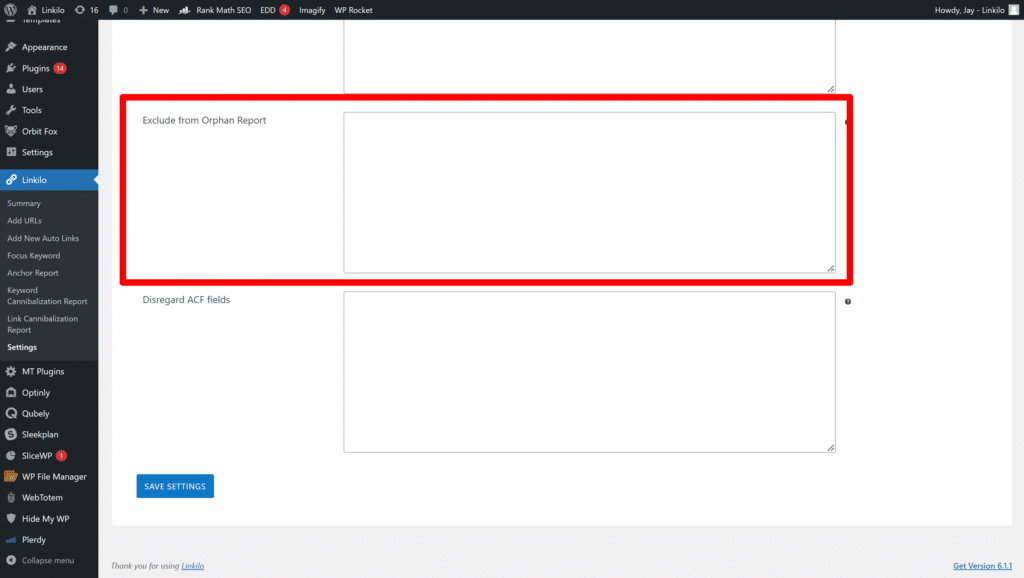
Orphan pages have zero internal links pointing to them. Google finds these only through your sitemap, and even then, it crawls them infrequently because nothing on your site vouches for them. They are effectively invisible to most visitors.

The exception: paid traffic landing pages where you intentionally want no organic discovery. Those stay orphaned on purpose. Every other page that should rank needs at least two or three contextual internal links. Linkilo’s Orphan Page Finder lists every post with zero inbound links so you can prioritize which ones to fix first.
9. Applying Nofollow to Internal Links
The nofollow attribute tells search engines to stop following a link. When you apply it to internal links, you block the flow of link equity through your own site, which is the opposite of what internal links are supposed to do.
Keep all internal links dofollow. The only exception is a specific technical reason to block crawling a section, like a member-only area. Check your internal links for accidental nofollow tags through Linkilo’s anchor report or a browser extension like SEO Minion.

10. Putting Internal Links Inside Headings
Headings tell Google what a section covers. When you put a link inside an H2 or H3, you mix two signals: what the section is about and where the link points. Google reads anchor text as a relevance signal for the destination page. A linked heading muddies both the section topic signal and the link target signal at the same time.
Leave headings clean. Put your internal links in the body text below the heading, where they fit naturally in a sentence and do not compete with the heading’s job.
11. Stuffing Keywords Into Anchor Text
Anchor text that reads “best espresso machine reviews buy now cheap espresso” is keyword stuffing. Google will flag it. Readers will not click it.
Write anchor text that reads naturally as part of a sentence and gives the reader a clear idea of where they are going. “Our espresso machine buyer’s guide” beats “best espresso machine.” Short, descriptive, and honest is what works.
12. Same Anchor Text Pointing to Different Pages
You write “best espresso machine” as anchor text in 30 different posts. Sometimes it links to your buyer’s guide. Sometimes your review round-up. Sometimes a category page. Google sees three pages all claiming the same anchor text signal and cannot decide which one should rank. So it picks one somewhat arbitrarily, often the wrong one, and all three pages lose ranking power they could have kept if you had been consistent.
This is link cannibalization — the internal linking version of keyword cannibalization. The difference: keyword cannibalization shows up in Google Search Console as two pages ranking for the same query. Linkilo’s Keyword Cannibalization Report syncs with your GSC data and surfaces every conflict like this, scored by impressions, competing pages, and position spread, so you know exactly which pages to consolidate.
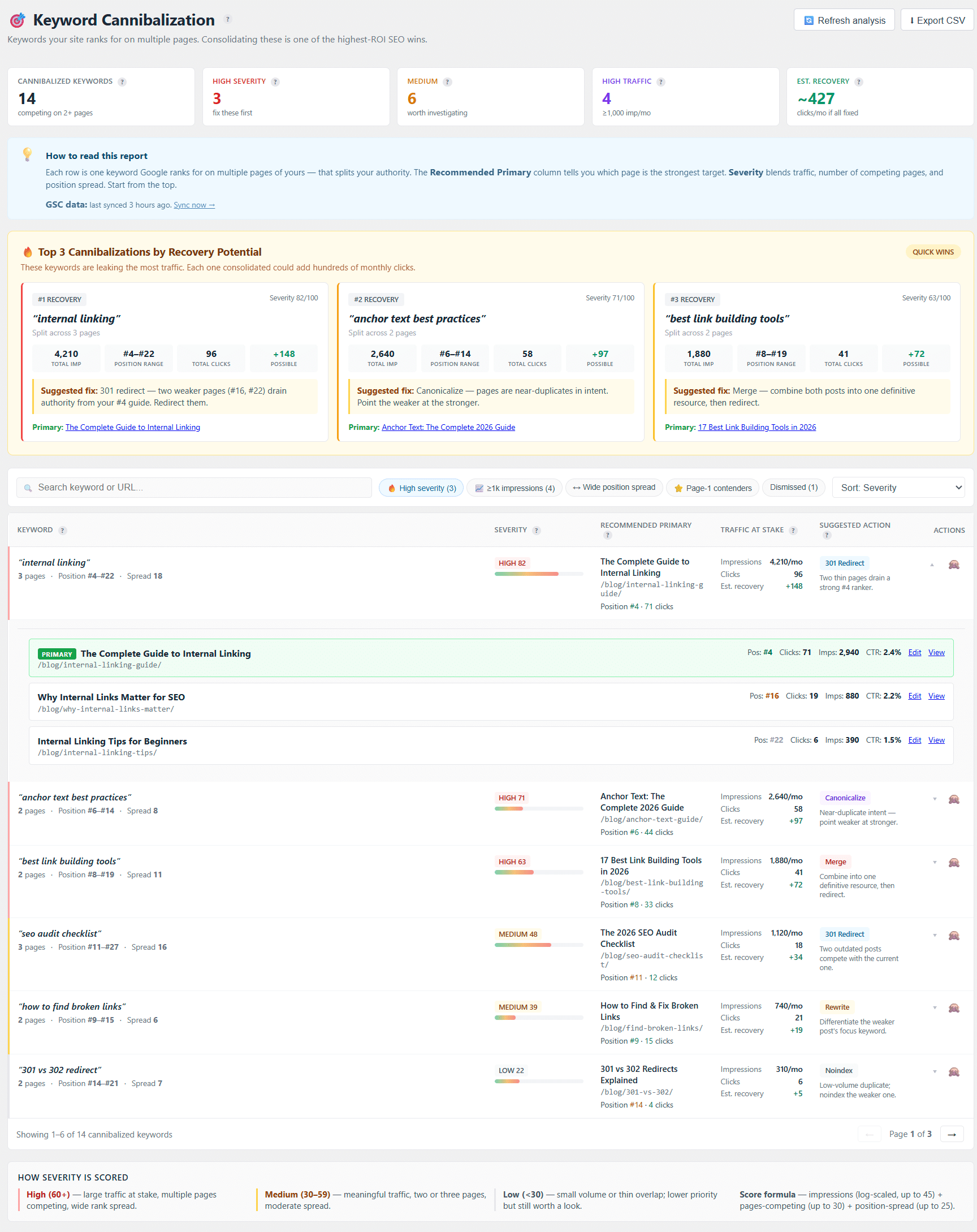
Link cannibalization lives entirely inside your own anchor text. Both can exist for the same topic simultaneously, and that combination is your highest-priority fix.
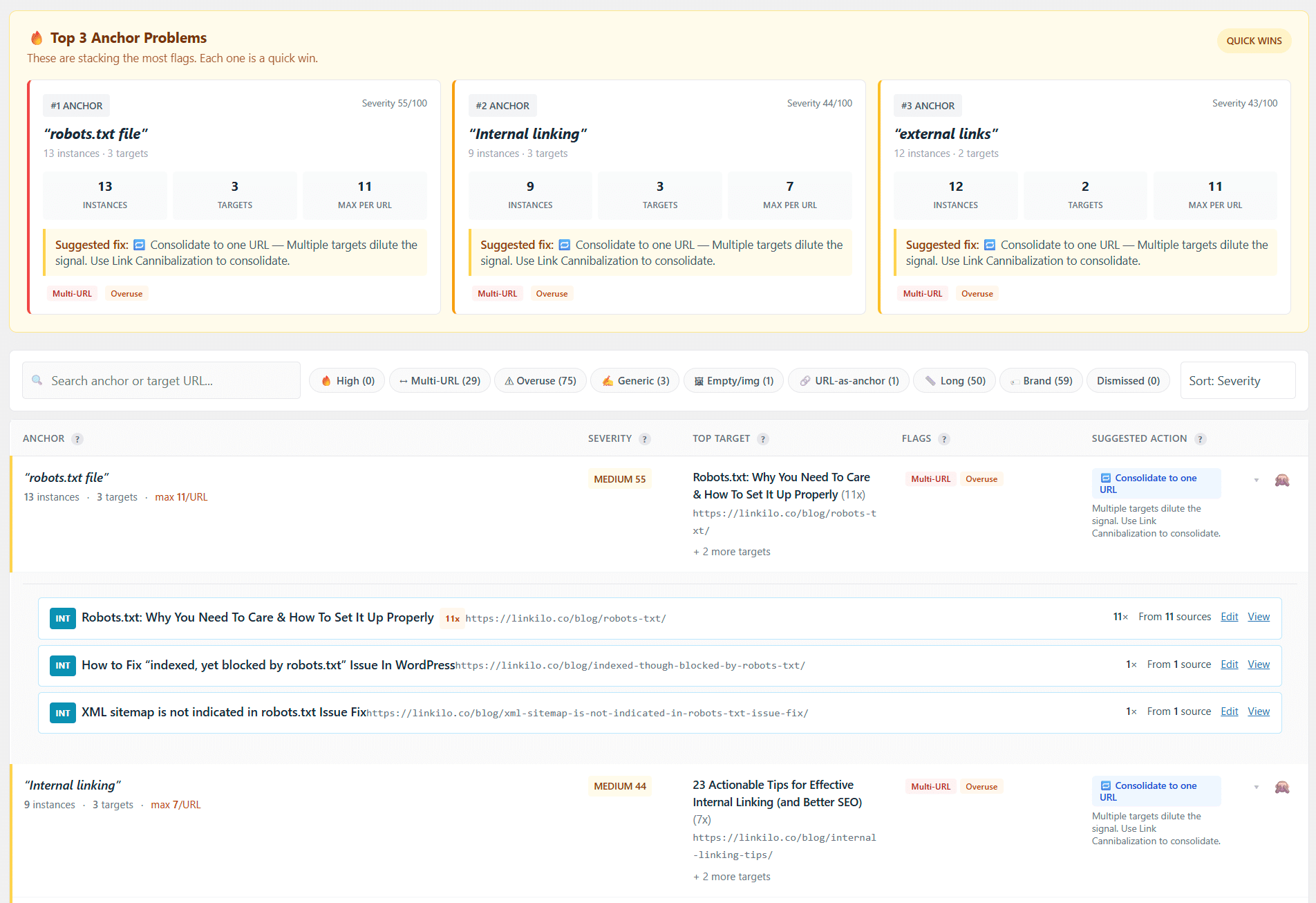
At 50 posts this is manageable. At 500 posts, nobody is tracking 400 anchor phrases manually. That is what Linkilo’s Link Cannibalization Report does. It finds every anchor phrase that points to two or more different pages, scores severity by how many splits exist and how keyword-rich the anchor is, and surfaces a Top 3 Anchor Dilutions box so the highest-value fixes come first. The report recommends which page should own each anchor — pulled from your Search Console performance data where available, internal link count otherwise. Hit Consolidate and Linkilo rewrites the duplicate links across every affected post at once.
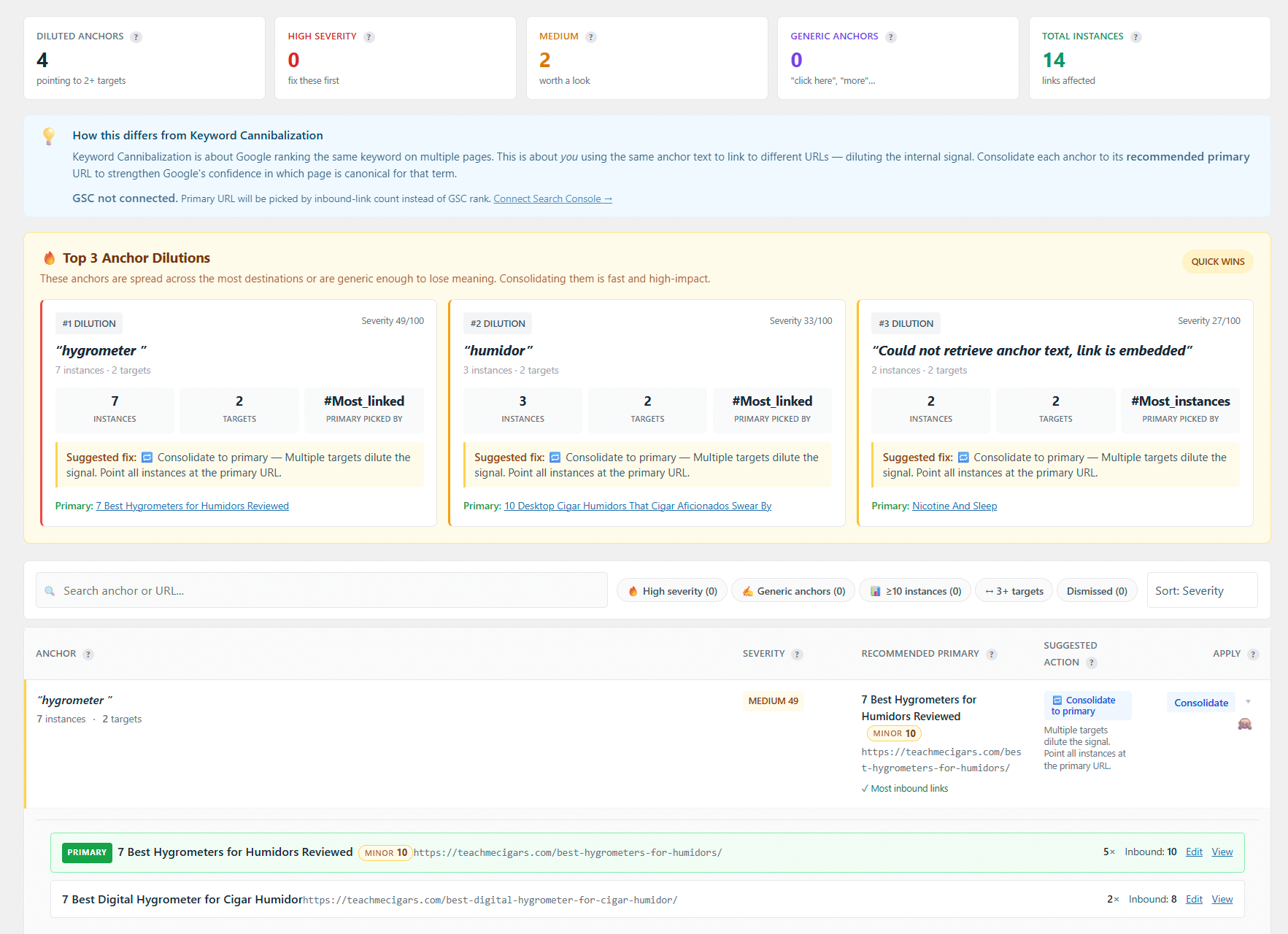
For bulk fixes, open URL Records or use the Update URL Tool: find the anchor, click Replace, pick the canonical destination, and Linkilo updates every matching link across all posts. The AI Link Suggestions engine avoids creating new dilutions as you publish — its composite score weights post similarity (0.75), keyword overlap (0.15), and topic cluster signal (0.10) to recommend links that reinforce one clear target per anchor phrase.
13. Generic Anchor Text Like “Click Here” or “Read More”
Generic anchor text tells Google nothing about the destination page. “Click here” and “read more” pass zero topical signal. They also tell the reader nothing, so fewer people click them.
Replace every “click here” with something descriptive. The anchor text should tell the reader what they will find when they get there. “How to set up your first topic cluster” beats “read this” every time. Linkilo’s Anchor Text Analysis flags generic anchors across your site so you can work through them systematically.
14. Over-Relying on Exact-Match Anchor Text
Exact-match anchor text — where the anchor phrase is identical to the target keyword — used to be a power move. After Google’s Penguin update, it became a risk signal. When every internal link to your buyer’s guide uses the exact same three-word phrase, Google reads that as over-optimization and can suppress the page rather than boost it.
Mix in partial-match, branded, and contextual anchors. Point five links to the same page but vary how you write the anchor each time. “Our espresso machine guide,” “a full review of home espresso machines,” and “which machine to buy” all point to the same destination without triggering over-optimization signals. The free anchor text diversity checker scores your anchor variety for any destination URL and flags over-concentration before it becomes a problem.
15. Repeating the Same Anchor to the Same Page Every Time
Some sites link to every page using its exact title as the anchor, every single time. “Best Espresso Machines” over and over. It looks mechanical to crawlers and is monotomous for readers.
Vary your phrasing intentionally. Same destination, different angle. That gives Google richer context about the page from multiple angles, which is better for ranking than one repeated phrase. Linkilo’s anchor diversity score in the Anchor Text Report shows how varied your anchors are for each destination page.

16. Links to Pages That Have Nothing to Do With the Topic
A post about home espresso machines has no business linking to your post about office furniture. Irrelevant internal links dilute the topical signal you are trying to build for both pages. Google uses internal link context to understand what a page is about. Off-topic links muddy that picture for everyone.
Before adding an internal link, ask one question: would a reader who is reading this specific sentence genuinely want to go to that destination page right now? If the honest answer is no, skip the link. Linkilo’s AI Link Suggestions use a composite relevance score to surface only contextually appropriate connections — no off-topic suggestions cluttering up the panel.

17. Related Content That Never Gets Linked
The flip side of mistake 16. You write a detailed post about espresso machine maintenance and never link to your post on buying guides, even though anyone reading about maintenance clearly also wants to know what to buy. That missed link is a navigation gap for users and a topical connection gap for Google.
When you finish writing a post, look at your list of closely related pages and find natural linking opportunities. Linkilo surfaces these directly in the editor sidebar, ranked by how closely related the content is to what you are writing. For a more structural fix, topic clusters group related posts under a pillar page so every spoke article automatically has clear linking relationships. The Related Posts feature adds automatic content suggestions at the end of every post, so readers always have a next step even if you missed a manual link.
18. Two Links to the Same Page in One Article
Google’s former Web Spam lead Matt Cutts confirmed that when multiple links on the same page point to the same destination, Google counts the anchor text from the first link only. So two links to the same page is one wasted link slot. If the second one has better anchor text, that better anchor is being ignored entirely.
Link to each page once per article. To reference the same destination a second time, mention it without a hyperlink or use a different phrase as plain text. The first link does the work — the second one just burns the slot.
The Monthly Audit That Catches Most of This
Most of these 18 mistakes are not one-time problems. They accumulate. A site publishing three posts a week creates new link cannibalization, new orphan pages, and new broken links every month without anyone noticing.
Interactive monthly internal link audit checklist with progress tracking
Check off each task as you complete it.
All three reports run inside your WP admin. No crawl export, no spreadsheets, no extra subscription. One honest limitation: the cannibalization report is capped at 1,000 keywords per scan, so very large sites should segment by category and run it in batches rather than site-wide.
Fix what the reports surface, then use AI Link Suggestions when writing new content to avoid introducing the same problems again.
Fix Your Internal Links Without a Spreadsheet
Linkilo finds broken links, orphan pages, anchor dilutions, and linking opportunities from inside your WordPress admin. No exports, no external tools.
Try Linkilo FreeLinkilo does this for you
- AI Internal Link Suggestions : Get link suggestions a human editor would approve, and add them in one click without leaving the editor.
- Anchor Text Reporting Tool : See every anchor pointing at every page, and catch the over-optimized ones before Google does.
- Redirection Manager : Catch 404s as they happen and redirect them before anyone notices the traffic went missing.

Jay - Linkilo
Jay's the brains behind cool tools like Linkilo, helping marketers rock their SEO game. He's all about data-driven strategies and using AI to boost results. He's been at this for a decade and loves figuring out what works (and what doesn't) to get more leads without paying a fortune. <a href="https://www.linkedin.com/in/jay-kang-80b103309/">Linkedin</a>