Typically, you do want search engines to be able to find your web pages. You’ll want your website and its contents to be as visible as possible. However, there are times when you’ll need to keep a page out of Google’s and other search engines’ reach.
You can use this to safeguard secret pages, limit access to paid material, or entice search engines to overlook pages you won’t need to maintain for an extended period, such as those created to advertise one-time events.
Why would you want to stop search engines from indexing your site?
In the following situations, people may desire to prevent search engines from indexing their websites:
Unfinished websites – Keeping your website hidden from the public during testing and development prevents users from encountering broken functionality or incomplete content.
Restricted websites – Websites that are exclusively accessible by invitation should not appear in search engine results pages (SERPs).
Test accounts – Website owners build a replica of their site for testing and evaluation. Search engines should not index these sites because they are not intended for the general public.
Staging environments – Development and staging sites need protection from indexing to avoid duplicate content issues and maintain clean search results for your live site.
Member-only content – Premium content areas, login-required sections, and subscription-based pages should remain hidden from public search results.
Method 1 – Use a robots.txt file to block entire site access
The simplest action would be to manually create and upload a simple robots.txt file instructing all search engines to avoid it and not index any of its content to the root directory of your website. The robots.txt file acts as a set of instructions that tell search engine crawlers which parts of your website they should and shouldn’t visit. This method works for most legitimate search engines, though it requires proper syntax and placement to be effective.
The syntax of the text file will be as follows:
User-agent: *
Disallow: /
Block specific pages or directories with robots.txt commands
You can also block specific pages or sections instead of your entire site:
User-agent: *
Disallow: /private/
Disallow: /admin/
Disallow: /test-page/
Advanced robots.txt configurations for different search engines
For more granular control, you can specify different rules for different search engines:
User-agent: Googlebot
Disallow: /private/

User-agent: Bingbot
Disallow: /admin/

User-agent: *
Crawl-delay: 10
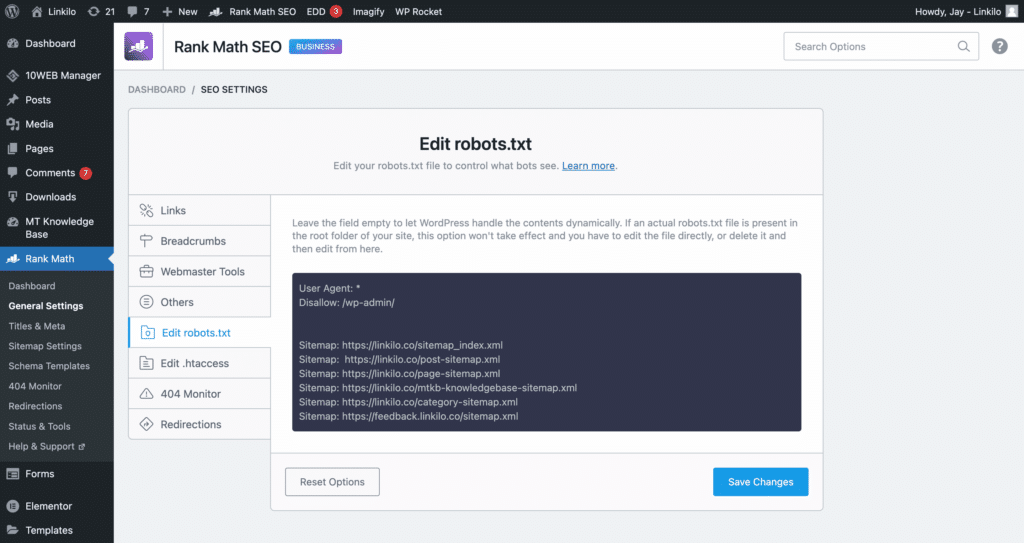
You can use RankMath robots.txt file editor to make your changes more efficiently within your WordPress dashboard.
Method 2 – WordPress built-in search engine visibility settings
WordPress includes a native feature that allows you to discourage search engines from indexing your entire site. This method is particularly useful for new websites under development or temporary sites that shouldn’t appear in search results. The built-in option automatically handles both robots.txt modifications and meta tag additions, making it a comprehensive solution for site-wide blocking.
You can also prevent search engines from crawling your website by using a built-in function on your WordPress admin:
Go to Settings and choose Reading to start.
Select the “Discourage search engines from indexing this site” checkbox next to Search Engine Visibility. Select Save changes.
By doing this, the following syntax is immediately added to your website’s robots.txt file:
User-agent: *
Disallow: /
Additionally, it adds the line:
<meta name='robots' content='noindex,follow' />
Complete step-by-step process for WordPress settings
Since WordPress already has a built-in feature for editing robots.txt, doing so is pretty simple. Here’s the complete process:
Go to Settings → Reading after logging in to the WordPress admin area.
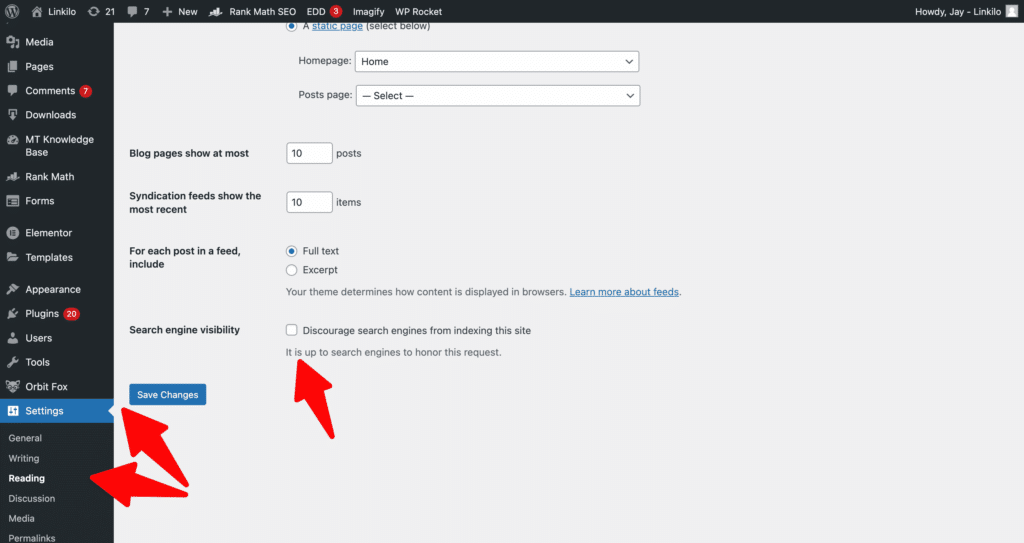
Locate the Search Engine Visibility option by scrolling down.
Select the checkbox next to the statement “Discourage search engines from indexing this site.”
Save Changes and you’re done! WordPress will automatically make changes to its robots.txt file for you.
This approach shields you from the majority of crawlers and robots used by search engines, but complete security requires additional measures.
Method 3 – Meta robots tags control individual page visibility
When you need more precise control over which specific pages or posts get indexed, meta robots tags provide the perfect solution. Unlike site-wide blocking methods, this approach allows you to selectively hide certain content while keeping other pages visible to search engines. This flexibility makes it ideal for hiding outdated content, work-in-progress pages, or sensitive information without affecting your entire website’s search visibility.
For page-specific control, you can add meta robots tags to individual pages or posts. This method provides more flexibility than site-wide blocking:
Add meta tags manually to page HTML
Add this code to your page’s HTML head section:
<meta name="robots" content="noindex, nofollow">
Yoast SEO plugin page-level noindex settings
Navigate to the page you want to block, scroll to the Yoast SEO section, click on the Advanced tab, and set “Allow search engines to show this page in search results” to “No.”
RankMath SEO plugin individual page blocking
Edit the page, find the RankMath meta box, go to the Advanced tab, and toggle “Robots Meta” to set noindex.
Method 4 – Password protection prevents crawler access completely
Password protection offers the most secure method for keeping content away from search engines and unauthorized users. Unlike robots.txt files or meta tags that rely on search engines respecting your requests, password protection creates a physical barrier that prevents access entirely. This approach works especially well for client work, premium content, or any material that requires absolute privacy from both search engines and the general public.
Files that are password-protected are inaccessible to web crawlers and search engines. A few ways to password-protect your WordPress website are listed below:
Hosting control panel directory protection setup
The procedure in cPanel follows these steps:
Go to Directory Privacy after signing in to your cPanel account.
Choose the root directory. In most cases, this will be public_html.
Select the option to password-protect this directory, then give the protected directory a name. Click Save.
Create a new user account to access the secured website.
WordPress plugins provide easy password protection
Numerous plugins are available to assist in password-protecting your website. The Password Protected plugin offers reliable functionality and regular updates. The plugin has been tested with the most recent WordPress version and provides straightforward configuration options.
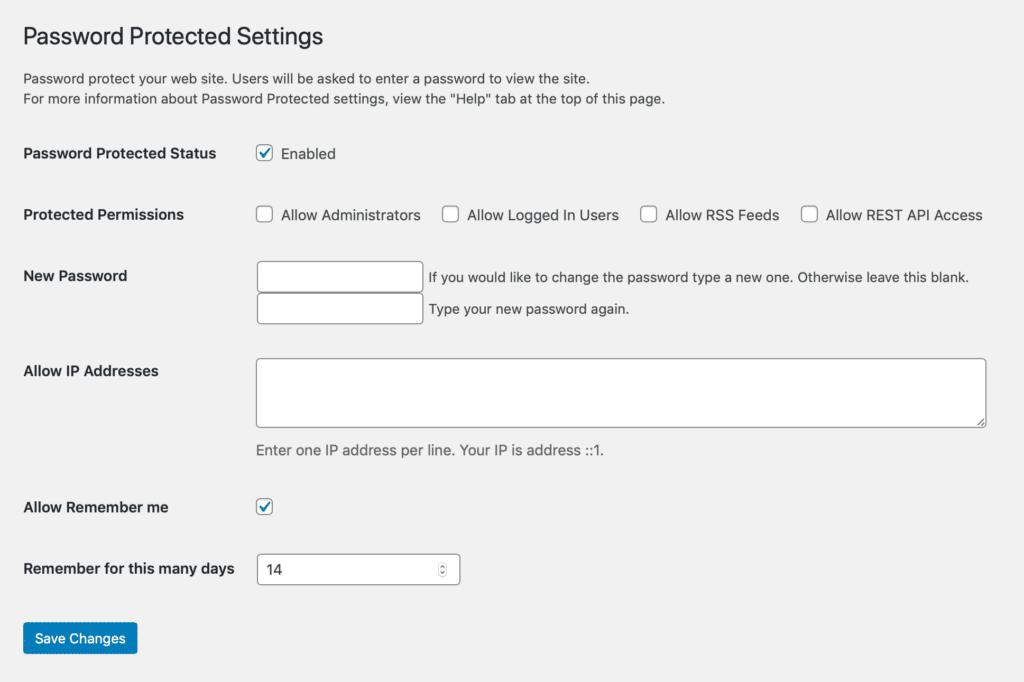
Go to Settings → Password Protected after installing and activating the plugin to adjust the settings to your specifications.
Additional password protection plugin options
WP Password Protect – Offers page-level password protection with customizable login forms.
Password Protect WordPress – Provides site-wide protection with user role management.
AccessPress Anonymous Post – Allows selective content protection based on user authentication.
Method 5 – Server-level .htaccess file restrictions block bots
For users comfortable with server-level configurations, .htaccess modifications provide powerful control over which bots and crawlers can access your site. This method works at the web server level, making it more difficult to bypass than standard robots.txt files. However, it requires technical knowledge and careful implementation to avoid accidentally blocking legitimate visitors or breaking your website’s functionality.
For server-level blocking, you can modify your .htaccess file to prevent specific user agents:
# Block specific search engine bots
RewriteEngine On
RewriteCond %{HTTP_USER_AGENT} Googlebot [NC,OR]
RewriteCond %{HTTP_USER_AGENT} Bingbot [NC]
RewriteRule .* - [F,L]
This method provides more technical control but requires careful implementation to avoid blocking legitimate traffic.
Method 6 – HTTP authentication adds maximum security layer
HTTP authentication represents the most robust method for preventing unauthorized access to your content. This server-level security measure requires users to enter credentials before they can even view your pages, making it impossible for search engines to crawl your content. This approach works best for highly sensitive content, development environments, or any situation where you need absolute control over who can access your website.
Basic HTTP authentication adds another layer of protection:
AuthType Basic
AuthName "Restricted Content"
AuthUserFile /path/to/.htpasswd
Require valid-user
This method completely blocks access to unauthorized users and prevents search engine crawling.
Remove already indexed pages from Google search results
Even with the best blocking methods in place, you may discover that Google has already crawled and indexed pages you wanted to keep private. Fortunately, Google provides tools to help you remove unwanted content from their search results. The removal process involves both requesting immediate removal through Google Search Console and implementing permanent blocking measures to prevent future indexing.
If Google has already crawled your website, you can remove it from search results through these steps:
Install Google Search Console for your website.
Go to your newly added website’s Google Search Console and choose Removals under Legacy tools and reports.
Enter the URL you want to have removed from Google by clicking the “Temporarily hide” button.
Select “Clear URL from Cache and Temporarily Remove from Search” in the new window, then click Submit Request.
Additional removal considerations you must understand
Removal timeline – Temporary removals last approximately six months. Apply permanent blocking methods to prevent re-indexing.
URL variations – Submit removal requests for all URL variations (www, non-www, HTTP, HTTPS).
Sitemap updates – Remove blocked pages from your XML sitemap to prevent confusion.
Your website will temporarily disappear from Google’s search results. Apply the aforementioned strategies to stop Google from indexing your website once more.
Test your blocking methods to ensure they work properly
Implementing blocking methods is only half the battle – you need to verify that your chosen approach actually works as intended. Testing helps you identify potential issues before search engines discover and index content you meant to hide. Regular testing also ensures that your blocking methods continue working correctly as your website evolves and search engine algorithms change.
Before relying on your blocking implementation, test its effectiveness:
Google Search Console testing tools verify page blocking
Use the URL Inspection tool to verify that pages show as “Blocked by robots.txt” or “Noindex tag detected.”
Third-party crawler testing simulates search engine behavior
Tools like Screaming Frog can simulate search engine behavior and identify potential indexing issues.
Manual verification confirms blocked pages stay hidden
Perform site-specific searches using “site:yourdomain.com” to confirm blocked pages don’t appear in results.
Pros and cons of hiding a page from search engines
Understanding the full impact of blocking pages from search engines helps you make informed decisions about which content to hide and which methods to use. While blocking can solve immediate privacy concerns and development needs, it also affects your website’s overall search visibility and traffic potential. Consider these advantages and disadvantages carefully before implementing any blocking strategy.
Hiding a page from search engines has advantages and disadvantages, just like any other strategy.
Pros
Analytics clarity – Analyze your website’s analytics to find out where visitors are coming from. Excluding search engine traffic from your analytics provides a comprehensive view of how your marketing strategies are performing.
Content prioritization – Promote a particular website page by preventing competition from similar content. Search engines will give priority to your pages if you have numerous pages that are SEO-optimized and have identical content. Therefore, you would want all available visitors to be directed to a page you’ve established expressly to market a product.
Temporary content management – Cover up outdated events and time-sensitive content. Pages made for events like webinars, conferences, or product debuts generally do not need long-term indexing. These pages could continue to appear in search engine results for years after your event has ended if you don’t hide them.
Development safety – Protect work-in-progress content from premature exposure and maintain professional appearance during site development.
Cons
Reduced discoverability – Searches won’t turn up any hidden pages, which clearly represents a significant limitation. If you hide your pages, search engines won’t index them, and users won’t be able to locate them through organic searches.
Compliance limitations – Your request for no-index will not be honored by everyone. Most search engines will abide by your request to hide particular pages, but malicious crawlers and bots won’t respect these directives. Examples include bots that disseminate malware or steal private data like email addresses, phone numbers, and other details.
Maintenance overhead – Multiple blocking methods require ongoing management and monitoring to ensure continued effectiveness.
Potential traffic loss – Blocking pages may inadvertently prevent valuable organic traffic from reaching important content.
Best practices and recommendations for page blocking success
Successful page blocking requires more than just implementing a single method – it demands a strategic approach that considers your long-term goals, technical capabilities, and content management needs. The key lies in matching the right blocking method to your specific situation while maintaining flexibility for future changes. These best practices will help you avoid common mistakes and ensure your blocking strategy supports rather than hinders your overall website objectives.
Choose the right method for your specific needs
Temporary blocking – Use robots.txt or meta robots tags for content that may need future indexing.
Permanent blocking – Implement password protection or HTTP authentication for sensitive content that should never be publicly accessible.
Selective blocking – Apply page-level meta tags for granular control over individual pieces of content.
Monitor and maintain your blocking implementation regularly
Regularly review your blocking implementation to ensure it aligns with your current content strategy. Update robots.txt files when site structure changes, monitor Google Search Console for crawl errors, and verify that blocked content remains inaccessible to unauthorized users.
SEO considerations impact your overall ranking strategy
Consider the long-term impact of blocking content on your overall SEO strategy. Blocked pages cannot contribute to your site’s authority or ranking potential, so ensure that blocking aligns with your marketing objectives.
Conclusion
Whatever your purpose, you can easily conceal your pages from search engines using the many methods we’ve covered. Whether you’re running a private blog, managing a staging environment, or still developing your WordPress website, you now have comprehensive options for controlling search engine access.
Understanding the various blocking methods allows you to choose the most appropriate solution for each situation. Robots.txt files work well for broad blocking, meta robots tags provide page-level control, and password protection offers the highest security for sensitive content.
Maintaining control of your WordPress website requires ongoing attention to these technical details. However, you’ll be on the correct route to producing an amazing digital experience if you have top-notch hosting, abundant resources, and the appropriate WordPress security solutions. Regular monitoring and updates ensure that your content blocking strategy continues to serve your business objectives effectively.
Frequently Asked Questions About Stopping Google From Indexing WordPress Pages
Get answers to the most common questions about preventing search engines from crawling and indexing your WordPress content
What’s the difference between robots.txt and meta noindex tags?
Robots.txt tells search engines not to crawl your pages at all, while meta noindex tags let them crawl but request they don’t include the page in search results. Robots.txt works site-wide or for specific directories, while meta tags give you page-level control. Meta tags are more reliable because they’re embedded in the page itself, but robots.txt is easier to implement for entire sections.
Can search engines still find my pages if I use the WordPress “discourage indexing” setting?
Yes, the WordPress “discourage indexing” setting only adds a polite request for search engines to avoid your site. It’s not a guarantee, and some search engines may ignore it entirely. For complete protection, you need password protection or server-level restrictions. This setting works well for temporary blocking during development but shouldn’t be relied upon for sensitive content.
How long does it take for Google to remove pages after I block them?
Google typically processes robots.txt changes within a few days to a week, but already indexed pages may remain in search results for weeks or months. Using Google Search Console’s removal tool provides faster results – temporary removals usually take effect within 24-48 hours. For immediate removal, combine blocking methods with a formal removal request through Search Console.
Should I block my staging site or development environment from search engines?
Absolutely. Staging sites should always be blocked to prevent duplicate content issues and protect unfinished work from public view. Use a combination of robots.txt blocking and password protection. Many hosting providers offer automatic staging site protection, but verify this is enabled. Indexed staging content can hurt your live site’s SEO performance and confuse users.
Will blocking pages hurt my overall SEO rankings?
Blocking low-quality, duplicate, or irrelevant pages can actually improve your SEO by helping search engines focus on your best content. However, blocking valuable content reduces your potential organic traffic and ranking opportunities. Only block pages that genuinely shouldn’t be public – like admin areas, thank you pages, or development content that doesn’t serve users.
Can I block specific search engines while allowing others?
Yes, robots.txt allows you to set different rules for different search engine bots. You can block Googlebot while allowing Bingbot, or set different crawl delays for different engines. However, this approach requires careful management and monitoring. Most legitimate use cases involve blocking all search engines or none at all, unless you have specific regional or competitive reasons for selective blocking.
What happens if I accidentally block important pages?
Remove the blocking immediately by updating your robots.txt file or removing noindex tags. Then use Google Search Console to request re-indexing of the affected URLs. Recovery time varies – new pages may be indexed within days, while previously indexed pages might take weeks to fully recover their previous rankings. Always test blocking rules on non-critical pages first.
Do I need to block WordPress admin and plugin directories?
WordPress automatically blocks most admin areas through its default robots.txt rules, but additional protection doesn’t hurt. Block /wp-admin/, /wp-content/plugins/, and /wp-includes/ directories. However, be careful not to block /wp-content/uploads/ if you want your images indexed. Focus your energy on blocking content pages rather than system directories that are already protected.
Can malicious bots ignore my robots.txt file?
Yes, robots.txt is purely advisory and malicious crawlers often ignore it completely. Bad bots may specifically target blocked content, assuming it’s more valuable. For truly sensitive content, use password protection, server-level blocks (.htaccess), or HTTP authentication. Robots.txt works well for legitimate search engines but provides no security against determined bad actors.
Should I remove blocked pages from my sitemap?
Yes, always remove blocked pages from your XML sitemap to avoid sending mixed signals to search engines. Including noindex pages in sitemaps can cause crawl errors and confusion. Most SEO plugins automatically exclude noindex pages from sitemaps, but verify this setting. Clean sitemaps help search engines focus on your important content and improve crawl efficiency.
How do I test if my blocking methods are working?
Use Google Search Console’s URL Inspection tool to check if pages show as “Blocked by robots.txt” or “Noindex tag detected.” Test with site:yourdomain.com searches to see what’s still indexed. Tools like Screaming Frog can crawl your site to identify blocking issues. Set up regular monitoring to catch accidental blocks before they impact important pages.
What’s the most secure method to hide sensitive WordPress content?
HTTP authentication combined with server-level restrictions provides the strongest protection. This requires credentials before anyone can view the content, making it impossible for search engines to crawl. Password protection plugins offer easier implementation but slightly less security. For maximum protection, use multiple layers: HTTP auth, robots.txt blocking, and noindex meta tags.
Linkilo does this for you
- Crawl Log File Analyzer : See exactly which pages Google and the AI crawlers actually visit, inside WordPress, with no log files to download.
- Internal Link Click Analytics : Find out which internal links people actually click, and stop guessing which ones earn their place.

Jay - Linkilo
Jay's the brains behind cool tools like Linkilo, helping marketers rock their SEO game. He's all about data-driven strategies and using AI to boost results. He's been at this for a decade and loves figuring out what works (and what doesn't) to get more leads without paying a fortune. <a href="https://www.linkedin.com/in/jay-kang-80b103309/">Linkedin</a>