Your organic click-through rate tells a story. It’s not just some number in Google Search Console that SEO folks obsess over. It shows you exactly how well your content connects with people when they’re searching.
Think about it. You could rank #1 for a keyword, but if nobody clicks? That ranking doesn’t mean much.
What Organic Click-Through Rate Really Means
CTR is simple math. Take your clicks, divide by impressions, multiply by 100.
CTR Calculator
Calculate your click-through rate and see how it compares
From Google Search Console
How many times your result was shown
Your average ranking position
Your CTR
0.00%
So if 1,000 people saw your result and 50 clicked, you’ve got a 5% CTR.
Google Search Console breaks this down for you. You can see CTR by query, page, country, device. The data’s all there.

But here’s what makes CTR different from other metrics – it shows you what happens between ranking and actually getting the visitor. That gap? That’s where you can make serious improvements to your traffic without changing your rankings at all.
The Significance of Organic CTR Curves in SEO
CTR curves are basically graphs showing how your click rates change over time or across different variables. Not exactly exciting stuff, right?
Wrong. These curves tell you things your rank tracking can’t.
Maybe your CTR drops every summer. Or spikes when algorithm updates roll out. You start to see patterns. And patterns help you predict what’s coming next.
You can plan better. Allocate resources smarter. Even spot when Google’s testing something new in your space.
CTR Drop-off by Search Position
See how dramatically CTR decreases as ranking position drops
The Big Drop
Position 1 gets 5x more clicks than position 5. Moving from position 4 to position 3 can double your traffic.
The Fold Effect
Position 3 is typically the last result above the fold on desktop. CTR drops sharply after position 3.
Mobile Reality
Mobile CTR is consistently lower because users see fewer results and scroll less frequently.
Cases When CTR Suffers
Your CTR can tank for reasons that have nothing to do with your content quality. Let me walk you through the main culprits.
Searchers find answers right in the SERP
Some queries don’t need clicks anymore. Google shows the answer right there. Weather, simple calculations, basic definitions. People get what they need without leaving the search page.
Rich results and PPC ads take up space
Featured snippets grab attention. Knowledge panels do too. Then you’ve got ads at the top. Your organic result gets pushed down, and fewer people see it.
Your search snippet doesn’t sell the click
Maybe your title’s boring. Your meta description doesn’t match what people actually want. Or Google rewrote your snippet and made it worse. It happens more than you’d think.
Understanding why your CTR drops helps you fix the right problem instead of guessing.
How to Use CTR Data Effectively
Let’s get into the practical stuff. Here are 15 ways you can use your CTR data to improve your SEO results.
1. Use CTR Data to Predict Traffic Trends
Your CTR data can predict the future. Not in a crystal ball way, but in a useful, practical way.
Look at your seasonal patterns. When does your CTR typically spike? When does it dip? You can plan your content calendar around these trends.
Your CTR data shows a consistent 15% increase every March for content related to your main topic. Use this pattern to schedule your most important content updates and new posts for February, so they’re ready when search interest peaks.
Your mobile CTR dropped from 4.2% to 2.8% over the past month while desktop stayed steady. Check your mobile page speed and snippet appearance – you might have a technical issue that’s hurting your mobile search presence.
Traffic forecasting gets more accurate when you include CTR trends alongside your ranking data.
2. Compare Organic vs. Paid Search Performance
Here’s a question worth asking – are you spending money on ads for keywords where your organic CTR is already strong?
If your organic result gets a 10% CTR but your ad only gets 3%, maybe it’s time to shift that ad budget somewhere else. Somewhere your organic presence is weaker.
Your top-performing article has a 12% organic CTR while your Google Ads for the same keyword only get 3.2% CTR but cost you $200 monthly. Consider reducing that ad spend and putting that budget toward creating more content around that successful topic.
Your organic CTR for your main service page climbed from 2.1% to 6.8% over six months. Check if your paid ads for those same terms are still necessary, or if you can shift that budget to target different keywords where your organic presence is weaker.
This comparison helps you balance your marketing spend better. Put money where it works hardest.
3. Break Down SERP Features and Their Impact
Google’s search results page keeps getting more crowded. Videos, images, featured snippets, local packs. All fighting for clicks.
Your job is figuring out how these features affect your CTR. Then adapting.
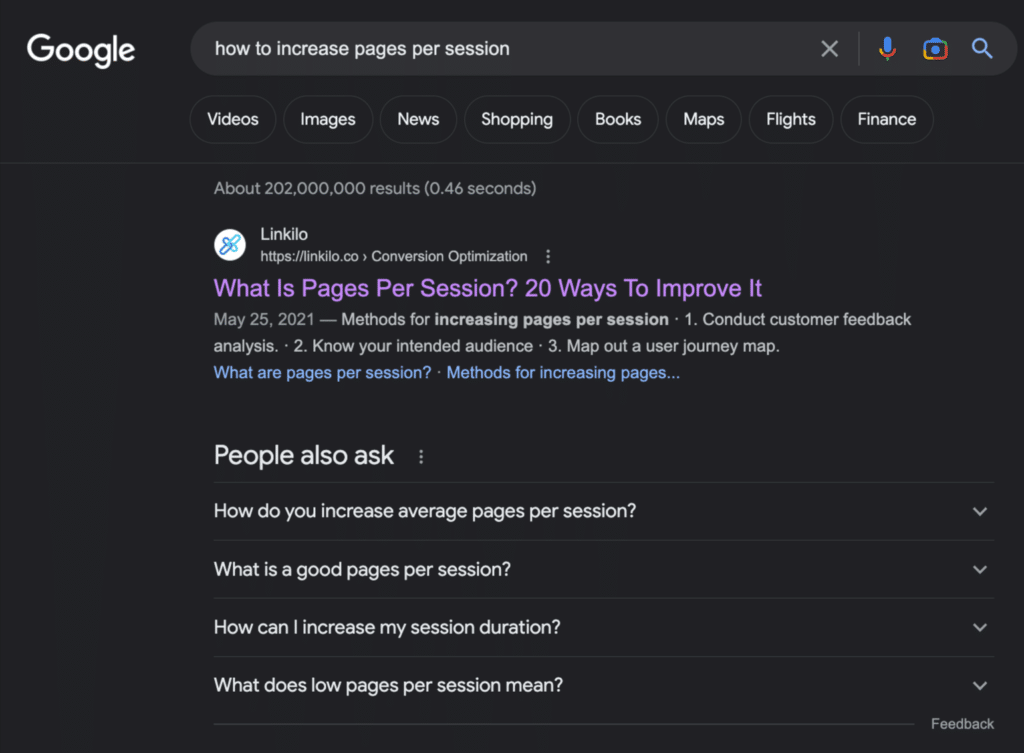
Your CTR for a popular article dropped from 8.1% to 3.2% after Google added a featured snippet above your result. Look at that snippet’s format and rewrite your introduction to match their structure – you might be able to claim that featured snippet spot.
You notice a YouTube video ranking above your comprehensive guide, and your CTR fell from 5.4% to 2.9%. Consider creating a video version of your content to compete for that video result, or add video elements to your existing page.
Don’t fight the SERP features. Work with them.
4. Optimize Titles for Search Engines

Your title tag is your first impression. Maybe your only impression.
A/B testing titles might sound complicated, but it’s not. Write two versions. See which one gets more clicks. Use that one.
Your title “Content Marketing Tips” gets 2.3% CTR, but “7 Content Marketing Mistakes That Kill Your Traffic” gets 6.8% CTR. The specific number and problem-focused angle pulls in more clicks than the generic version.
Test adding urgency words to your titles. Your basic title “Email Marketing Guide” might get 3.1% CTR, while “Email Marketing Guide (Updated This Week)” could jump to 4.7% CTR because it signals fresh, current information.
Numbers work. Problems work. Urgency works. But test everything to see what works for your audience.
5. Use Organic CTR Data to Set Industry Benchmarks
Organic CTR Benchmarks by Search Position
Industry averages to help you evaluate your performance
| Position | Desktop CTR | Mobile CTR | Key Factors |
|---|
Your Performance Check
Compare your current CTR to these benchmarks. If you’re 20% below average, you have immediate optimization opportunities.
Mobile vs Desktop
Mobile CTR is typically 15-30% lower than desktop due to smaller screens and different user behavior patterns.
How do you know if your 4% CTR is good or terrible? You need context.
Industry benchmarks give you that context. They also give you ammunition when you need budget approval.
Your website averages 4.2% CTR while your industry benchmark is 3.1%. This gives you concrete proof that your current SEO approach works when you need to justify maintaining or increasing your content budget.
Your CTR is stuck at 2.1% while competitors average 4.8%. This gap shows exactly where you’re losing potential traffic and gives you a clear target for improvement efforts.
Benchmarks turn your CTR from just a number into a competitive advantage or a clear problem to solve.
6. Analyze Mobile vs. Desktop Performance

People search differently on different devices. Your CTR data shows you exactly how differently.
Mobile users might prefer shorter titles. Desktop users might want more detail. The data tells the story.
Your mobile CTR is 2.1% while desktop hits 5.8%. Your mobile snippets might be getting cut off, or your mobile page preview isn’t showing correctly. Check how your results actually appear on mobile devices.
Desktop CTR is strong at 6.2%, but your conversion rate on desktop is only 1.3% while mobile converts at 3.7%. Your desktop page might be overwhelming visitors with too much information or poor navigation flow.
Device-specific optimization isn’t optional anymore. It’s basic SEO hygiene.
7. Match Content to User Intent
Here’s something interesting – you can have perfect technical SEO and still get terrible CTR if your content doesn’t match what people actually want.
User intent comes in four flavors. Informational, navigational, local, transactional. Each one needs a different approach.
Your how-to guide gets 8.3% CTR because people want to learn, but your product comparison page only gets 2.1% CTR. The how-to content matches what searchers want (information), while the comparison feels too sales-focused for their current search intent.
Your “near me” local content gets 1.9% CTR even though you rank well. Add your city name, local landmarks, or neighborhood references to your titles and descriptions to signal local relevance more clearly.
When your content matches search intent, CTR improves naturally. When it doesn’t, you’re fighting an uphill battle.
8. Run SEO Experiments and Track Results
Every change you make to your site is an experiment. Your CTR data shows you which experiments worked.
Changed your meta descriptions? Check CTR. Updated your headlines? Check CTR. Added schema markup? Check CTR.
You added FAQ schema to your main service page and CTR jumped from 3.4% to 5.9%. The FAQ snippets give searchers more reasons to click because they can see you answer their specific questions right in the search results.
After adding review schema to your product pages, CTR increased from 2.8% to 4.6%. The star ratings showing in search results build trust and make your listing stand out from competitors without ratings visible.
Document what works. Scale what works. Stop doing what doesn’t work.
9. Apply Structured Data Markup

Schema markup is like giving Google more information about your content. More information often means better-looking search results.
Better-looking search results usually mean higher CTR.
After implementing ‘Organization’ schema markup, your brand logo now appears next to your search results. Your CTR for branded searches increased from 47% to 63% because the visual recognition makes your listing more trustworthy and noticeable.
You added ‘Article’ schema to your blog posts, and now publication dates and author names show in search results. Your content CTR improved from 4.1% to 6.3% because users can see your articles are recent and authoritative.
Use Google’s structured data testing tool to make sure you’re doing it right. Then watch your CTR data to see if it actually helps.
10. Prioritize Pages That Need Optimization
You can’t optimize everything at once. Your CTR data shows you where to start.
Break down your metrics by device, page type, topic. Look for the biggest gaps between performance and potential.
Your new landing page has a 1.7% CTR while your older, similar pages average 4.2% CTR. The title might be too generic, or the meta description doesn’t clearly explain what visitors will get from clicking.
Your about page surprisingly gets 7.8% CTR, much higher than expected. Look at what information you included there – maybe you’re addressing common concerns or questions that should be highlighted on other pages too.
Fix the biggest problems first. You’ll see the biggest improvements fastest.
11. Track Seasonal CTR Changes
Your CTR probably changes throughout the year. Most sites do.
Understanding these changes helps you plan better. Content calendar, budget allocation, team resources.
Your content about planning and preparation topics gets 6.2% CTR every February, then drops to 2.1% by July. Plan to publish your best planning content in January so it’s ready when people start their annual planning and search behavior peaks.
You notice your tutorial content CTR drops 40% during summer months when people are less focused on learning new skills. Prepare lighter, entertainment-focused content for summer, or batch-create educational content during high-engagement seasons.
Seasonal planning based on actual data beats guessing every time.
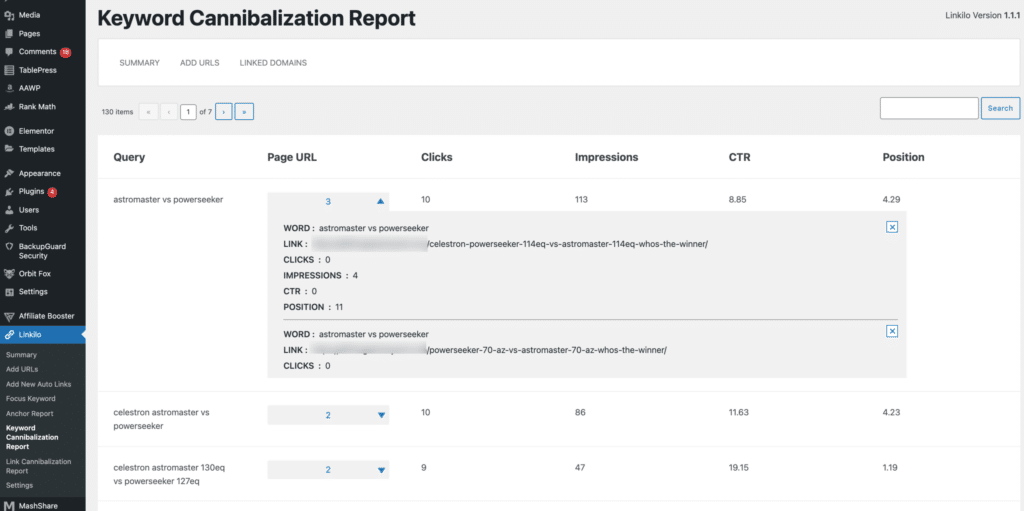
12. Fix Keyword Cannibalization Issues
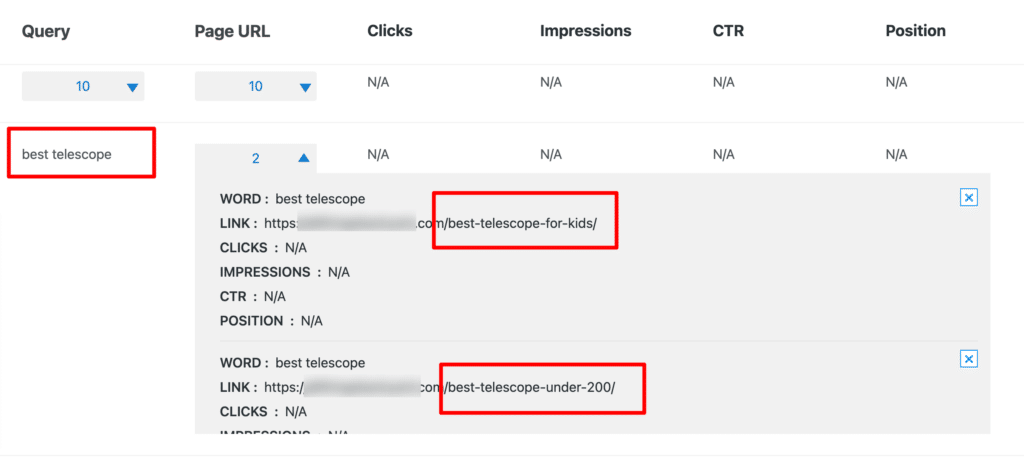
Sometimes your own pages compete against each other. This splits your CTR potential.
Two pages targeting the same keyword means two weaker results instead of one strong one.
You have two articles targeting “productivity tips” – one for remote workers and one for entrepreneurs. Both compete for the same general searches and split your CTR potential. Rewrite one to target “productivity tips for remote teams” to capture a specific audience without competing with yourself.
Your main service page and your FAQ page both rank for your core business term, dividing your CTR between positions 3 and 7. Use a canonical tag to consolidate the ranking power to your main service page, or merge the FAQ content into that primary page.
Check your Google Search Console for queries where multiple pages rank. Those are your cannibalization opportunities.
13. Test Different Content Types
Not all content performs equally. Your CTR data shows you what formats work best for your audience.
Lists versus long-form guides. Videos versus text. Infographics versus plain articles.
Your list-based articles average 6.8% CTR while your long-form guides get 3.2% CTR. People prefer scannable content for your topics, so focus on creating more numbered lists, bullet points, and step-by-step formats.
Your pages with embedded videos get 5.4% CTR compared to 2.9% for text-only content. Adding even simple screen recordings or talking-head videos to your written content could boost engagement and click-through rates.
Double down on what works. Your audience is telling you what they prefer.
14. Use Descriptive URLs
URLs don’t directly affect rankings much anymore. But they do affect whether people click.
A URL like “yoursite.com/p=1234” tells people nothing. A URL like “yoursite.com/email-marketing-tips” tells them exactly what to expect.
Descriptive URLs build trust. They also give you another place to include relevant keywords that might catch a searcher’s eye.
Keep them short but descriptive. Use hyphens, not underscores. Make them readable.
15. Link Pages Properly to Get Sitelinks
Good internal linking does more than help with rankings. It can also get you sitelinks in search results.
Sitelinks are those additional links that appear under your main result sometimes. They take up more space and give people more reasons to click.
Create clear site structure. Use descriptive anchor text. Make sure your important pages are well-connected to your homepage and main navigation.
When Google understands your site structure, you’re more likely to get sitelinks. When you get sitelinks, you usually get better CTR.
Questions Worth Asking
Here are some questions to ask yourself as you dig into your CTR data:
- Which of your pages have surprisingly low CTR despite good rankings?
- What patterns do you see in your seasonal CTR changes?
- Are you competing against yourself for any important keywords?
- Do your mobile and desktop CTRs tell different stories?
- Which content types consistently outperform others?
Final Thoughts
Your CTR data isn’t just numbers in a dashboard. It’s insight into what happens between someone seeing your result and deciding whether to visit your site.
That decision happens in seconds. Your title, description, URL, and any rich features all influence it.
The good news? You can control most of these factors. You can test different approaches. You can track what works.
Start with the biggest opportunities. The pages with good rankings but poor CTR. The seasonal patterns you can plan around. The cannibalization issues you can fix.
Small improvements in CTR can lead to big improvements in traffic. And traffic that converts better, because it’s coming from people who were genuinely interested enough to click.
Frequently Asked Questions About CTR Data
Get answers to the most common questions about using click-through rate data to maximize your SEO results
What’s considered a good organic click-through rate?
A good organic CTR varies by position and industry, but generally position 1 should get 25-35% CTR, position 2 around 15-25%, and position 3 about 10-15%. However, these numbers depend heavily on search intent, SERP features, and your industry. Focus more on improving your CTR relative to your current performance rather than hitting specific benchmarks.
How often should I check my CTR data in Google Search Console?
Check your CTR data weekly for high-traffic pages and monthly for your overall performance. This frequency helps you spot trends early without getting overwhelmed by daily fluctuations. If you make changes to titles or meta descriptions, check CTR data after 2-3 weeks to see the impact, as it takes time for changes to reflect in search results.
Why did my CTR suddenly drop even though my rankings stayed the same?
CTR drops with stable rankings usually mean SERP features changed. Google might have added featured snippets, ads, or other elements above your result. Check what your actual search results look like for your main keywords. Sometimes Google also rewrites your title tags or meta descriptions, which can impact CTR significantly.
Should I optimize for CTR or rankings first?
Focus on rankings first to get into the top 5 positions, then optimize CTR. A 10% CTR in position 8 gives you less traffic than a 5% CTR in position 3. Once you’re ranking well, CTR optimization can significantly boost your traffic without changing rankings. Plus, higher CTR may indirectly help your rankings over time.
Can I improve CTR without changing my content?
Yes, you can improve CTR by optimizing title tags, meta descriptions, URLs, and adding schema markup without touching your main content. These changes affect how your page appears in search results. However, make sure your optimized snippets accurately represent your content, or you’ll get clicks but high bounce rates.
How do I know if my title tag is too long for search results?
Google typically displays about 50-60 characters of title tags, but it’s based on pixel width, not character count. Use tools like Linkilo’s SERP preview or manually search for your keywords to see how your titles appear. If your titles get cut off at important words, they’re probably too long and hurting your CTR.
Do branded searches affect my overall CTR data?
Yes, branded searches typically have much higher CTR (often 50-80%) because people are specifically looking for your company. This can make your overall CTR look better than it actually is for non-branded terms. Filter your data in Google Search Console to analyze branded and non-branded queries separately for more accurate insights.
Why is my mobile CTR different from desktop CTR?
Mobile and desktop show different SERP layouts, title lengths, and user behavior patterns. Mobile users often see fewer results above the fold and have different search intent. Your titles might get cut off differently on mobile, or your site might load poorly on mobile devices. Always check how your results appear on both devices.
What’s the best way to A/B test different title tags?
Change one title at a time and wait 3-4 weeks to see results, as Google needs time to update search results and gather enough data. Focus on pages with decent impressions (at least 1,000 per month) so you can see meaningful differences. Document your changes and track CTR before and after to build a database of what works for your audience.
How does seasonality affect CTR data interpretation?
Seasonal changes can significantly impact CTR as search behavior shifts throughout the year. Compare your current CTR to the same period last year rather than last month. Holiday seasons, back-to-school periods, and industry-specific cycles all affect how people search and what they click on. Plan your content updates around these patterns.
Should I worry about CTR for low-volume keywords?
Focus your CTR optimization efforts on keywords with at least 100 impressions per month. Low-volume keywords don’t provide enough data to make reliable decisions, and small changes won’t significantly impact your overall traffic. However, if these low-volume terms are highly valuable to your business, they’re still worth optimizing.
Can schema markup really improve my click-through rates?
Yes, schema markup can improve CTR by 10-30% when it results in rich snippets like star ratings, prices, or FAQ sections. However, not all schema markup gets displayed, and Google decides which rich snippets to show. Focus on schema types most relevant to your content: reviews, FAQs, articles, and local business markup tend to have the highest display rates.
Linkilo does this for you
- Internal Link Click Analytics : Find out which internal links people actually click, and stop guessing which ones earn their place.
- AI Internal Link Suggestions : Get link suggestions a human editor would approve, and add them in one click without leaving the editor.
- Anchor Text Reporting Tool : See every anchor pointing at every page, and catch the over-optimized ones before Google does.

Jay - Linkilo
Jay's the brains behind cool tools like Linkilo, helping marketers rock their SEO game. He's all about data-driven strategies and using AI to boost results. He's been at this for a decade and loves figuring out what works (and what doesn't) to get more leads without paying a fortune. <a href="https://www.linkedin.com/in/jay-kang-80b103309/">Linkedin</a>