Wondered what rel=”noopener” in WordPress means? WordPress automatically adds the rel=”noopener” tag to links that open in new tabs. In this post, we’ll explore what rel=”noopener” is, why it’s important for your website’s security, and how to use it effectively.
What Is rel=”noopener” and Why Is It Important?
rel=”noopener” is a critical HTML attribute that enhances your WordPress website’s security by preventing cross-site scripting attacks. When you add a link that opens in a new tab, WordPress automatically includes the rel=”noopener” tag to protect your site from potential vulnerabilities.
Without rel=”noopener”, an external site opened in a new tab could use JavaScript to control and manipulate your original page, potentially stealing data or spreading malicious scripts. By including this attribute, WordPress ensures that new tabs opened from your links can’t access or alter your original page, safeguarding your site and visitors.
How rel=”noopener” Works
In HTML, rel=”noopener” is an attribute added to an (anchor) element. When included in a link, it instructs the browser to open the link in a new window or tab without granting the new page any access to the original window. Here’s an example:
<a href="https://example.com" target="_blank" rel="noopener">Click here</a>Clicking this link will open https://example.com in a new tab, but that tab won’t be able to interact with or manipulate the page that contained the link.
WordPress also adds rel=”noreferrer” to links set to open in new tabs, providing an extra layer of security by preventing the new tab from receiving referrer information.
re is a real-live example:
Linkilo is the best internal linking WordPress plugin.
You can see the word “Linkilo” opens in the same window with no added attributes.
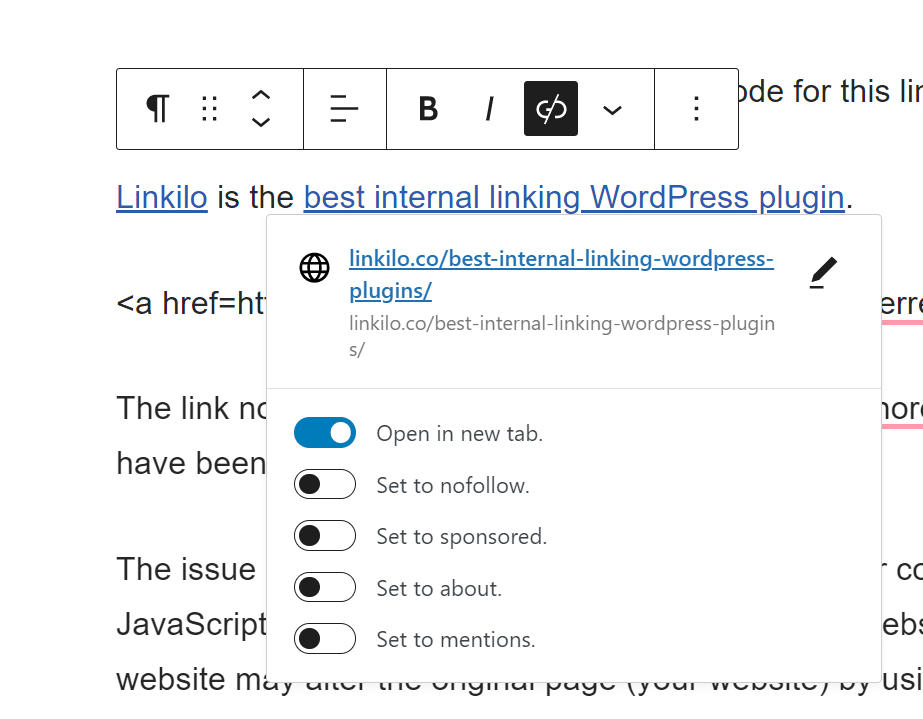
With “best internal linking WordPress plugin” I’ve added the option of “Open in new tab” and the rel=’noopener’
<p><a href="https://linkilo.co/">Linkilo</a> is the <a href="https://linkilo.co/blog/best-internal-linking-wordpress-plugins/" target="_blank" data-type="post" data-id="1973" rel="noreferrer noopener">best internal linking WordPress plugin</a>.</p>The link now has added the rel=” noopener” and rel=” noreferrer” HTML attributes. These qualities have been introduced to fix a security flaw.
The Difference Between rel=”noopener” and rel=”nofollow”
Although they may sound similar, rel=”noopener” and rel=”nofollow” serve distinct purposes:
- rel=”noopener” focuses on security and prevents cross-site access.
- rel=”nofollow” is an SEO-related attribute that tells search engines not to pass link equity to the linked page.
Search engines consider the nofollow attribute when crawling links but do not take the noopener attribute into account for SEO purposes.
The Impact of rel=”noopener” on Your WordPress Website
When you use rel=”noopener” does not negatively affect your WordPress site’s performance or SEO. Despite misconceptions, this attribute enhances your website’s security without any drawbacks, protecting against potential vulnerabilities while allowing you to create links that open in new windows or tabs.
How to Properly Use and Test rel=”noopener”
To effectively use rel=”noopener” and maximize its security benefits:
- Always include target=”_blank” when creating links that should open in new tabs.
- Add rel=”noopener” to the link. For even better protection, use rel=”noopener noreferrer”.
- If you’re using WordPress’s block editor (Gutenberg), rel=”noopener” will be added automatically for links set to open in new tabs.
- Test if rel=”noopener” is working by opening your page in two separate browsers and clicking the link. The original page should remain unaffected.
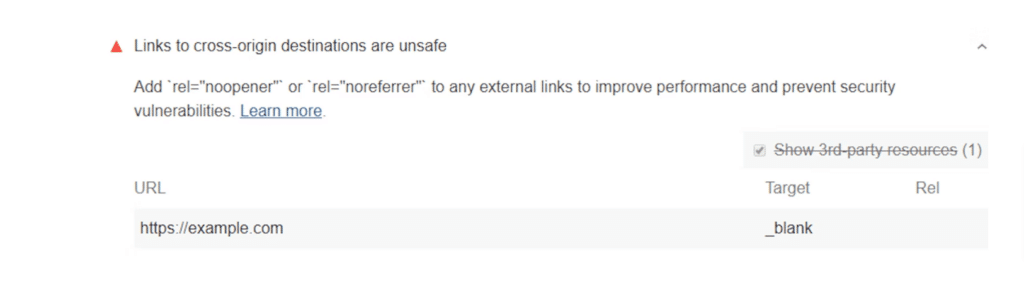
Tools like Google’s Lighthouse can also scan your site and verify that all external links have rel=”noopener” implemented.
How to Combine rel=”noopener” with Other Link Attributes
While rel=”noopener” prevents malicious websites from hijacking your site, other link attributes can help control link behavior:
- The target attribute opens links in new windows or tabs.
- The rel=”noopener noreferrer” combination opens links without sending referrer information.
When deciding which attribute to use, consider the security implications. For external links, using rel=”noopener” ensures your site’s safety.
Accessibility and Browser Compatibility
Using rel=”noopener” does not interfere with accessibility or hinder the user experience. The attribute only affects the relationship between the original page and the linked page, not the content itself. However, when opening links in new tabs, inform users by including text like “(opens in new tab)” or providing an indicative icon.
rel=”noopener” is widely supported by modern browsers, including Chrome, Firefox, Safari, Edge, and Opera, ensuring compatibility across different platforms.
How to Disable rel=”noopener” (Not Recommended)
Removing rel=”noopener” is not recommended due to its security benefits. However, if you must disable it, you’ll need to switch from the WordPress Gutenberg block editor to the classic editor. The block editor automatically re-adds rel=”noopener” to protect your site.
To disable rel=”noopener”, add the following code snippet to your theme’s functions.php file:
Add_filter('tiny_mce_before_init', 'wpb_disable_noopener');
Function wpb_disable_noopener($mceInit) {
$mceInit['allow_unsafe_link_target'] = true;
Return $mceInit;
}
After doing this, WordPress won’t apply rel=”noopener” to new links. You’ll also need to manually remove the attribute from any existing links.
rel=noopener
Having a comprehensive understanding of rel=noopener is essential if you want to keep your website secure. But how can you test to make sure you’re using rel=noopener correctly? Fortunately, there are several ways to test this.
One of the ways to test if you’re using rel=noopener correctly is to inspect the HTML code of your page. Make sure that all external links have the rel=noopener attribute.
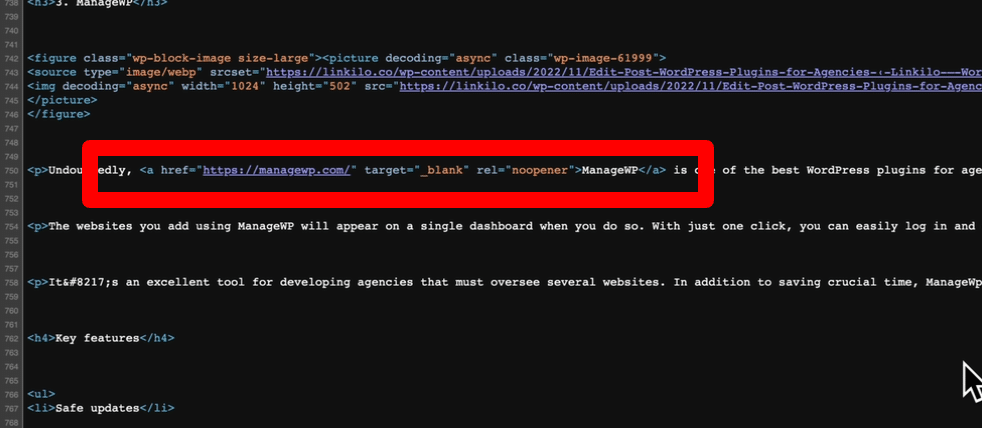
Another way to test your use of rel=noopener is to open your page in two separate browsers. In one browser, open the page with the external link. Then, in the other browser, open the page with the external link. You should see two separate windows. This means that the rel=noopener attribute is working correctly.
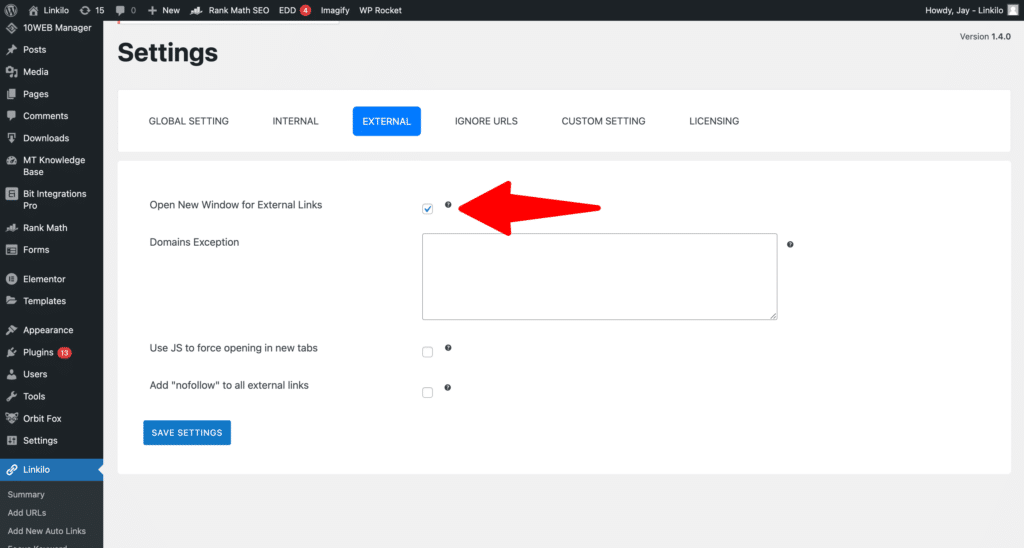
If you are using Linkilo, by selecting “Open New Window for External Links”, all external links will contain rel=”noopener”
Finally, you can use a tool such as Google’s Lighthouse to check if all of your external links have rel=noopener. Lighthouse will scan your page and generate a report that will tell you if any of your external links need the rel=noopener attribute.
Testing if you’re using rel=noopener correctly is an important step in making sure your website is secure. By using the methods described above, you can ensure that your website is protected from malicious websites.
Best Practices for WordPress Developers
- Never Disable Automatic noopener
While it’s possible to disable WordPress’s automatic addition of noopener, don’t do it:
   // Don't use this - it creates unnecessary security risks
add_filter('tiny_mce_before_init', 'disable_noopener');- Custom Link Handling
If you’re programmatically creating links:
   function create_secure_external_link($url, $text) {
       return sprintf(
           '<a href="%s" target="_blank" rel="noopener noreferrer">%s</a>',
           esc_url($url),
           esc_html($text)
       );
}- Theme Integration
Add this to your theme’s security checks:
   function verify_link_security() {
       if (is_singular()) {
           global $post;
           // Scan content for insecure external links
           audit_external_links($post->post_content);
       }
   }
   add_action('wp', 'verify_link_security');
Conclusion
Implementing rel=”noopener” in your WordPress links is a simple yet effective way to enhance your website’s security. By preventing linked pages from accessing your original window, you protect your site and visitors from potential attacks and data theft.
Remember to include rel=”noopener” whenever you create links that open in new tabs, and periodically test your site to ensure the attribute is present and working correctly.
If you’re tired of manually adding internal links to your WordPress website, consider using a tool like Linkilo. It simplifies internal linking, improves your site’s SEO, and can automatically set rel=”noopener” for you.
Prioritize your WordPress site’s security by consistently implementing rel=”noopener”. Stay vigilant and provide your visitors with a safe browsing experience they can trust.
Linkilo does this for you
- AI Internal Link Suggestions : Get link suggestions a human editor would approve, and add them in one click without leaving the editor.
- Internal Link Click Analytics : Find out which internal links people actually click, and stop guessing which ones earn their place.

Jay - Linkilo
Jay's the brains behind cool tools like Linkilo, helping marketers rock their SEO game. He's all about data-driven strategies and using AI to boost results. He's been at this for a decade and loves figuring out what works (and what doesn't) to get more leads without paying a fortune. <a href="https://www.linkedin.com/in/jay-kang-80b103309/">Linkedin</a>