Think of your website as a modern, well-curated library. If the librarian—akin to a search engine bot—can’t easily locate a book, that book stays on the shelf, unread.
Similarly, your website’s crawlability directly impacts how effectively search engine bots can index your content. And this indexing significantly influences your visibility in Google search and other search engine results.
What is Website Crawlability?
Crawlability isn’t just a fancy term; it’s the backbone of your website’s visibility in search results. In this context, we’re looking at how smoothly a search engine bot can navigate or “crawl” through your website to index its pages. A well-crawled site improves your ranking in search engine results pages (SERPs), enhancing your site’s SEO overall.
15 Crawlability Problems That Are Hurting Your Site’s SEO Performance
To rank in search results and elevate your SEO performance, addressing common website crawlability issues is critical. Crawlability refers to how easily search engines can explore and index the pages on your website. If your website’s crawlability is compromised, it won’t appear in Google searches, causing a significant drop in visibility.
Here are 15 common crawlability issues that are hurting your SEO performance, increasing crawl budget spend, affecting how frequently Google crawls your site and and how to fix them:
1. Blocked by Robots.txt
The Challenge: Being blocked by robots.txt file is a crawlability issue that prevents web crawler from accessing specific pages on your website.
Solution: Use Google Search Console to identify and unblock important URLs.
Example: If your “Products” page is blocked, your robots.txt file might read “Disallow: /products”. Changing it to “Allow: /products” directive will solve the issue and allow search engines to access these web pages.
Example Code:
textCopy codeUser-agent: *
Allow: /
2. Excessive Use of Nofollow Links
The Challenge: Nofollow links are crucial for telling search engine crawlers what to ignore. However, their overuse can lead to crawlability problems, causing essential pages to be skipped during indexing.
The Solution: Perform a site audit using SEO tools to find all nofollow links. Reevaluate each link’s necessity and adjust as required.

3. Poor Website Structure
The Challenge: A disorganized website structure can lead to crawlability and indexability issues, affecting the overall performance of your website.
Solution: Reorganize your website for a more logical, hierarchical structure.
Example: If your “FAQ” page is buried under several sub-menus, bring it up one level for easier access.
Example:
- Homepage
- Electronics
- Televisions
- Smartphones
- Home Decor
- Lamps
- Furniture
- Electronics
4. Insufficient Internal Links
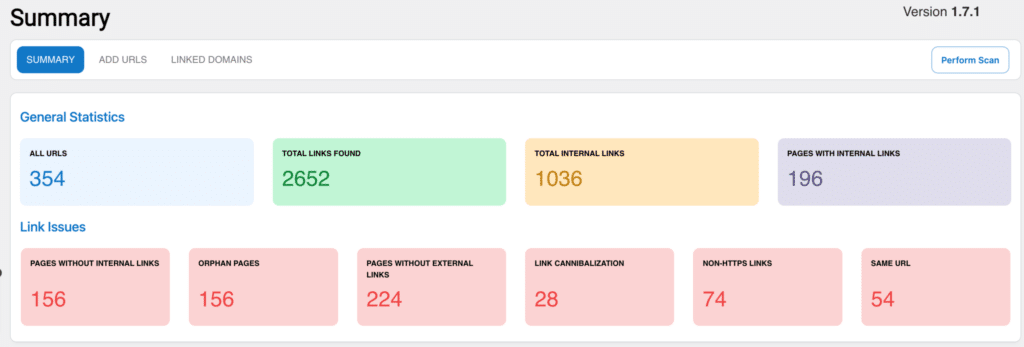
The Challenge: Lack of adequate internal linking can create ‘orphan pages‘—pages that aren’t linked to from any other page on your website, making them uncrawlable by search engine bots.
The Solution: Formulate a comprehensive internal linking strategy that connects all important pages, ensuring each is accessible from the homepage.
5. Errors in Sitemap
The Challenge: An outdated or incorrect sitemap can mislead search engine bots during their crawl, impacting how your site gets indexed.
The Solution: Generate a precise, updated sitemap and submit it via Google Search Console to ensure accurate crawling and indexing of your site.
6. Overuse of Noindex Tags
The Challenge: The ‘noindex’ meta tag can exclude specific pages from search engine indices. Improper usage can inadvertently make vital pages invisible to search engines.
The Solution: Conduct a site audit to identify all ‘noindex’ tags and assess their necessity on crucial pages.
Example: If your product pages have accidentally been set to ‘noindex,’ update the meta tag from <meta name="robots" content="noindex"> to <meta name="robots" content="index">.
7. Slow Page Load Speed
The Challenge: Slow-loading pages can make it difficult for search engines to crawl your website efficiently, which can affect SEO.
Solution: Optimize your website to improve load times, positively affecting the overall SEO performance of your website.
Example: If your “Home” page takes over 10 seconds to load, consider compressing images or using lazy loading techniques.
8. Broken Links
The Challenge: Broken links disrupt the crawl process for search engine bots and may result in incomplete indexing of your website.
Linkilo-s Broken Link Checker finds them automatically — scanning your entire WordPress site on a schedule you set and showing each broken link with source page, anchor text, and error type in one table.
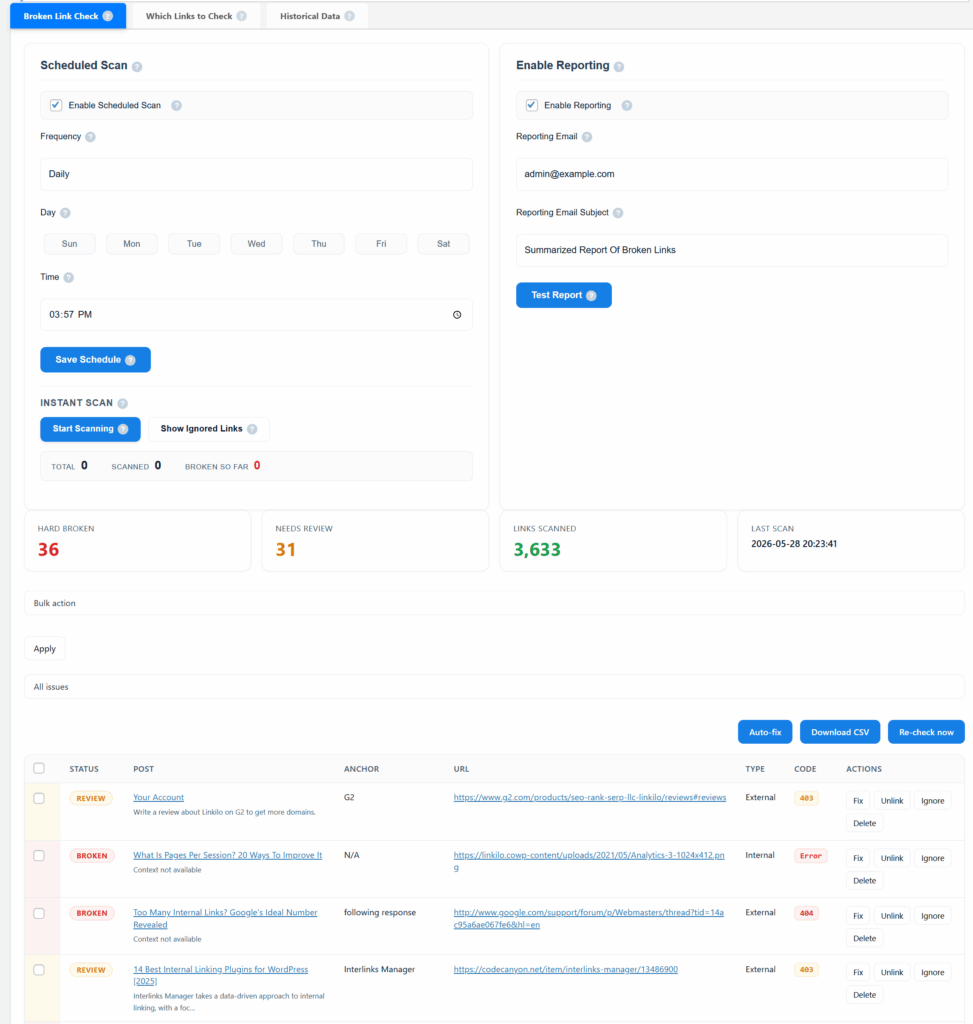
The Solution: Utilize site audit tools
The Solution: Utilize site audit tools to identify and fix broken links, thereby making your site more crawlable.
Example: If your ‘Contact Us’ page URL has changed, make sure all internal links point to the new URL to prevent 404 errors.
9. Server Errors
The Challenge: Errors like 5xx can halt the crawl process temporarily or permanently, damaging your website’s SEO.
The Solution: Monitor your server health regularly and fix issues as they arise.
Example: If you encounter frequent 503 Service Unavailable errors, consult your hosting provider to resolve the issue promptly.
10. Redirect Loops
The Challenge: Redirect loops can trap search engine bots, making it difficult to crawl and index your website effectively.
The Solution: Conduct a redirect audit to identify and eliminate any loops.
Example: If Page A redirects to Page B, which in turn redirects back to Page A, you have a loop that needs to be broken.
11. Access Barriers
The Challenge: Geo-blocking or user authentication can prevent search engine bots from fully crawling your site, causing crawlability issues.
The Solution: Make sure that vital pages on your site are accessible and avoid any unnecessary access restrictions.
Example: If your eCommerce store is geo-blocked, consider providing an alternate, crawlable version for search engine bots.
12. 404 Errors

The Challenge: 404 errors can cause crawlability problems by wasting crawl budget.
Linkilo-s Crawl Log Analyzer shows how much this waste adds up to. The Crawl Waste tab categorizes all wasted bot requests into hard waste (404s and 5xx errors), probable waste (parameter URLs, faceted nav), and configuration waste — so you can see what proportion of Googlebot-s crawl budget your 404s are consuming versus other problem types.
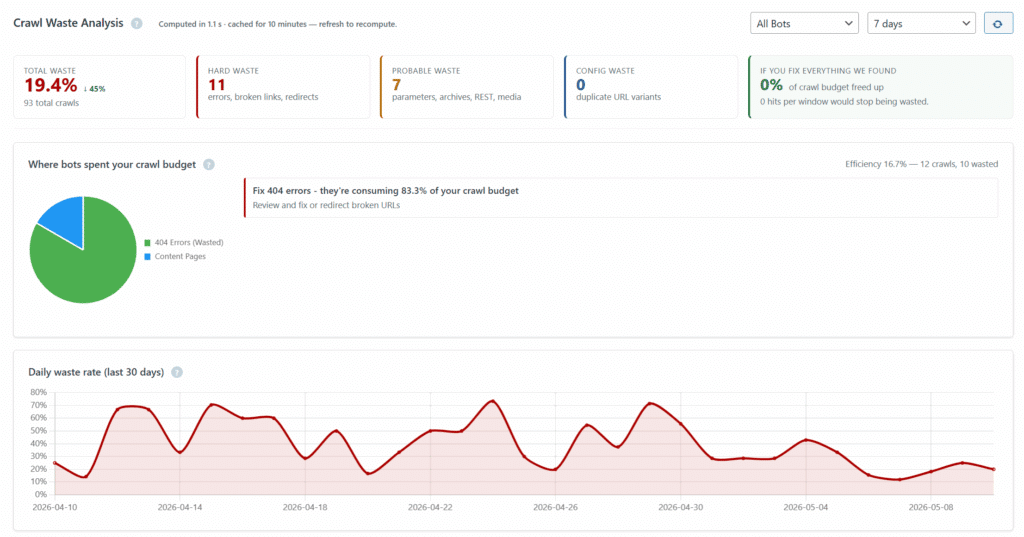
Solution: Identify 404 errors through a site audit
Solution: Identify 404 errors through a site audit and implement 301 redirects to relevant pages.
Example: If your old “About Us” page was deleted, set up a 301 redirect to the new version of the page.
13. Faulty Redirects
The Challenge: Incorrectly implemented redirects can cause search engines to miss important pages, affecting your site’s visibility in search engine results pages.
Solution: Audit your redirects to ensure they’re pointing to the correct locations.
Example: If a 302 temporary redirect is set up when a 301 permanent redirect is needed, change it to a 301 redirect.
14. Duplicate Content
The Challenge: Duplicate content issues can make it difficult for search engines to understand which pages should rank in search results.
Solution: Use canonical tags to indicate the original source of the content.
Example: If you have multiple product pages with similar content, specify one as the canonical version.
15. Ineffective Use of Meta Tags
The Challenge: Incorrect or missing meta tags can prevent search engines from indexing your pages correctly, affecting your search engine rankings.
Solution: Ensure each page has a unique and descriptive meta title and meta description.
Example: If your blog posts lack meta descriptions, add succinct summaries to help search engines understand the content.
Conclusion to Fixing Common Crawlability Issues
One of the most practical ways to monitor crawlability on an ongoing basis is Linkilo’s Crawl Log Analyzer. The Days Since Last Crawl view shows exactly how long it has been since any bot visited each URL on your site — so problems like slow pages, broken links, or orphan pages show up as crawl gaps before they have time to damage rankings.
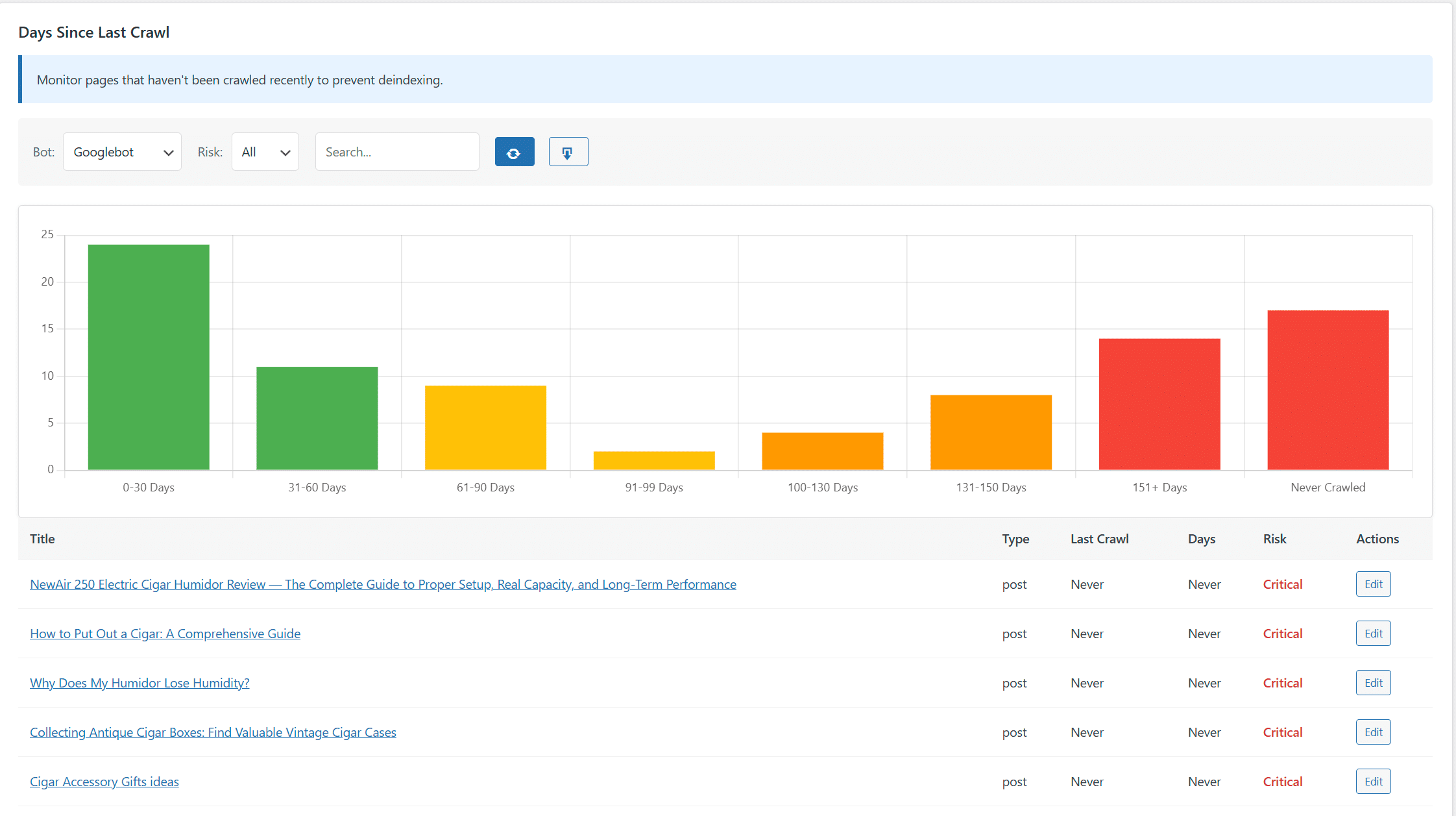
Fixing crawlability issues is crucial for improving your website’s performance in search engine results. Regular site audits and the correct use of SEO tools like Google Search Console can be pivotal in addressing these issues.
By taking these steps, you can optimize your website and make it easier for search engines to crawl, thereby improving your visibility and rankings in the long term.
For ongoing monitoring, Linkilo-s Crawl Log Analyzer gives you a live dashboard showing bot activity, health score, and crawl coverage across your entire WordPress site — so crawlability problems surface before they have time to affect your rankings.
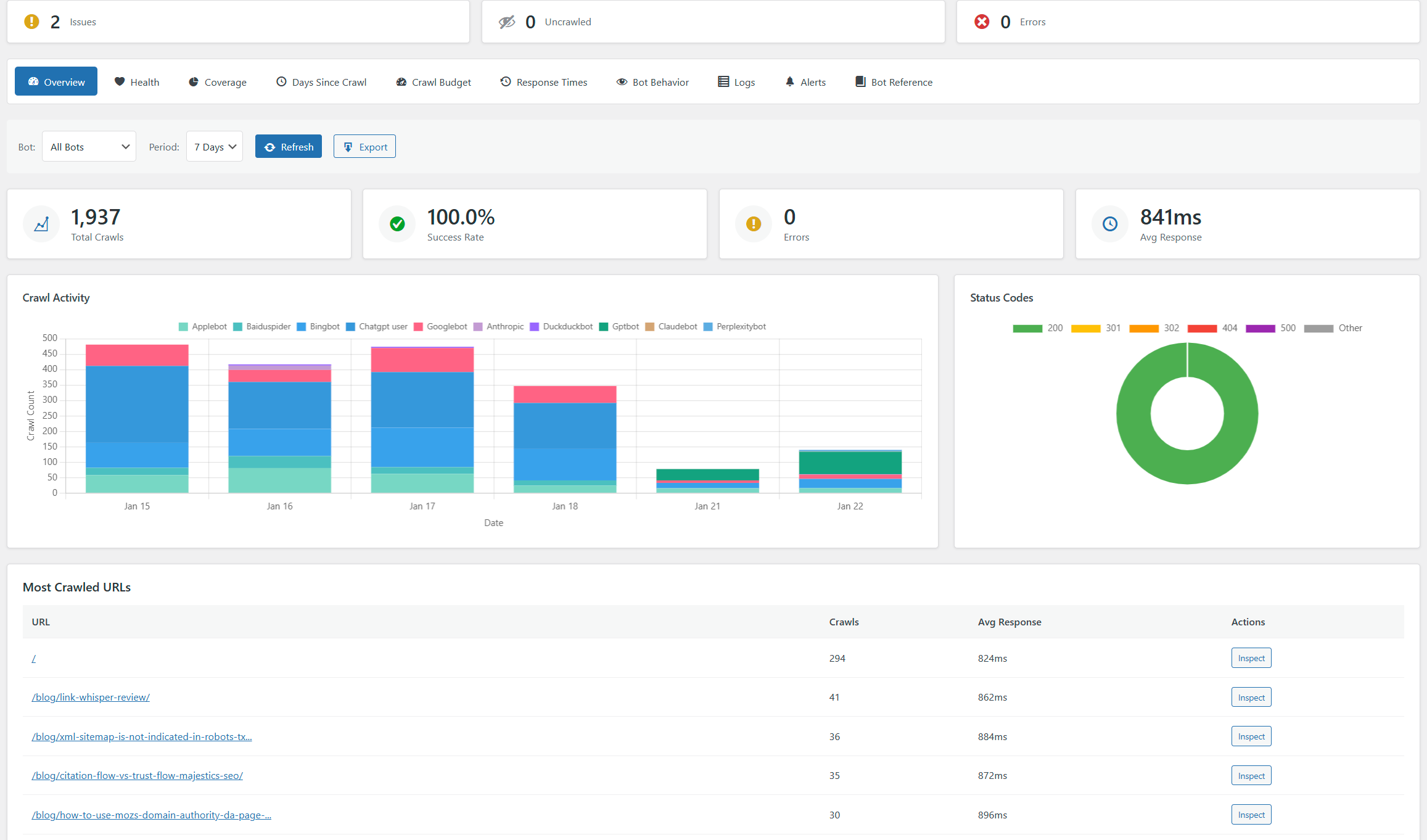
Linkilo does this for you
- Redirection Manager : Catch 404s as they happen and redirect them before anyone notices the traffic went missing.
- Crawl Log File Analyzer : See exactly which pages Google and the AI crawlers actually visit, inside WordPress, with no log files to download.
- AI Internal Link Suggestions : Get link suggestions a human editor would approve, and add them in one click without leaving the editor.

Jay - Linkilo
Jay's the brains behind cool tools like Linkilo, helping marketers rock their SEO game. He's all about data-driven strategies and using AI to boost results. He's been at this for a decade and loves figuring out what works (and what doesn't) to get more leads without paying a fortune. <a href="https://www.linkedin.com/in/jay-kang-80b103309/">Linkedin</a>