LinkBoss and LinkStorm are both cloud platforms for internal linking, both run outside your site, and both can place links automatically. On paper they compete directly.
In practice they are organized around different questions. LinkBoss asks how quickly you can wire a large archive together. LinkStorm asks which links are worth building and what the data says about them.
There is also a structural difference in how each one puts a link on your page, and it has consequences that outlast either subscription.
LinkBoss vs LinkStorm at a glance
| LinkBoss | LinkStorm | |
|---|---|---|
| Built mainly to | Build links in bulk | Analyze and place with data |
| How links are placed | Written into your posts as HTML | Injected with JavaScript via a snippet |
| If you cancel | Links stay in your content | Injected links stop appearing |
| Platforms | WordPress and Shopify fully, others semi-automatic | Any platform |
| Silo building | One-click presets with a visual map | No |
| Search Console data | No | Yes, per suggestion |
| Click depth reporting | No | Yes |
| Anchor reporting | Reuse tracking | Distribution report |
| Priced by | Credits and number of sites | URLs and credits, unlimited sites |
| Entry price | $11 a month or $99 a year | $30 a month |
| Money-back guarantee | 14 days | Free tier to test |
The difference in what they are built to do
One builds, one measures
Both place links. They are organized around different questions.
LinkBoss is a construction tool
The centre of the product is bulk building and silo structures. You point it at a set of posts and it wires them together, up to 1,000 links across 200 pages in one run, with presets that shape a pillar and its supporting content into a defined pattern.
LinkStorm is an analysis tool that also places
The centre is the data around each opportunity. Every suggestion carries a relevance score, the click depth of the target, and Search Console figures for the pages involved, so you are choosing based on performance rather than relatedness alone.
That split explains most of the feature gaps.
LinkBoss has silo presets, Reverse, Serial, Priority, and Circle, that wire a pillar page and up to 15 supporting posts into a defined structure with a visual map you can rearrange. Nothing in LinkStorm does this.
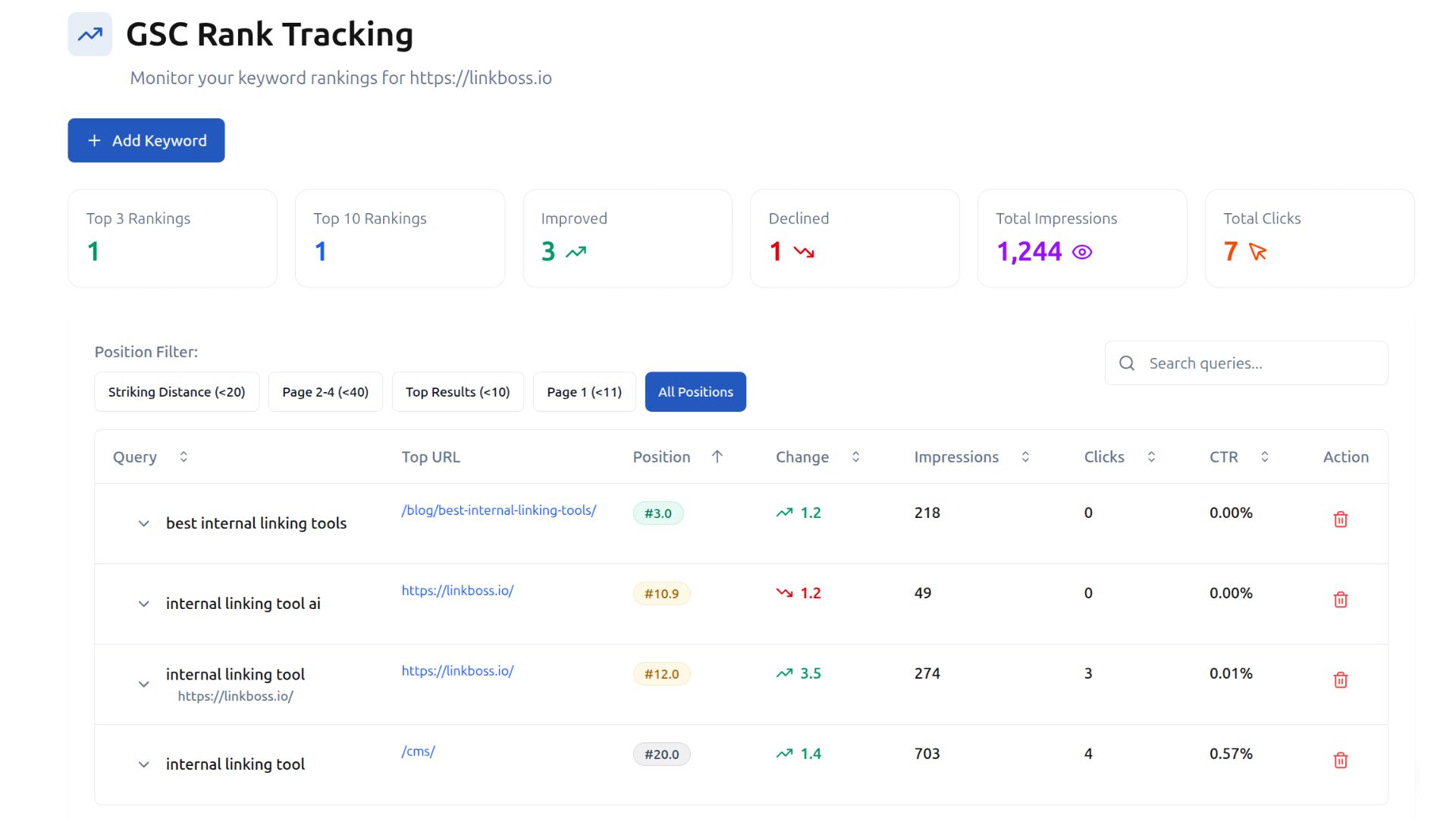
LinkStorm connects to Search Console and reports click depth, so you can prioritize pages that are buried or underperforming rather than simply related. Nothing in LinkBoss does this.
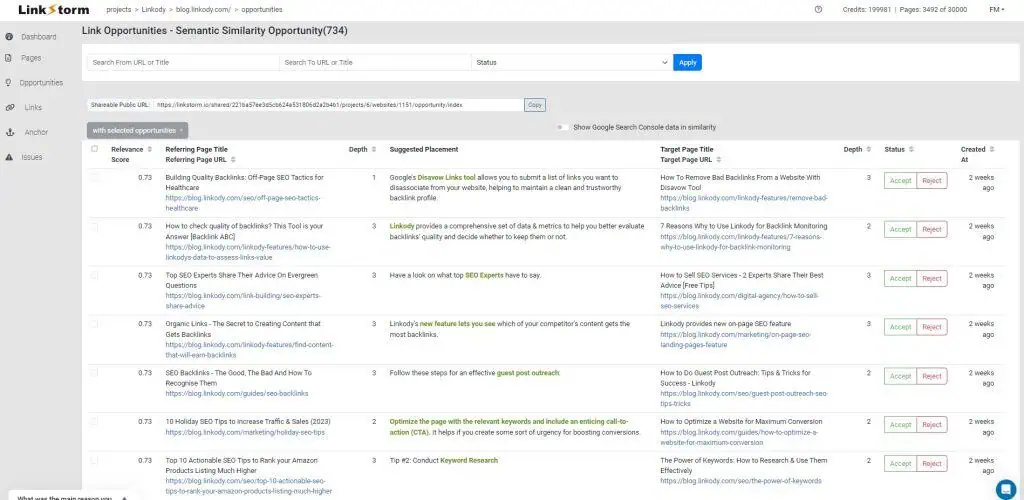
Both can run hands-off if you let them. LinkBoss processes bulk runs at up to 1,000 links, and LinkStorm has an auto-link mode plus bulk actions at a similar scale.
Where the links live, and what happens if you leave
This is the difference that should decide the choice for most people, and it is rarely discussed.
LinkBoss sends finished links back to your site as clean HTML written into your posts. The links become part of your content. Cancel the subscription and they stay exactly where they are.
LinkStorm keeps the links on its side and inserts them into the page as it loads, through a JavaScript snippet or its WordPress plugin. Its documentation states plainly that it uses JavaScript to insert links into your content, and it answers the SEO objection by noting that Google renders JavaScript when indexing.
That answer is correct as far as indexing goes.
The consequence is what happens later. Remove the snippet or stop paying, and every injected link stops appearing at once. A year of internal linking unwinds the day the subscription lapses.
So one platform leaves you owning the work and the other rents it to you. Neither is dishonest about this, but only one of them is a decision you can reverse cheaply.
Platform coverage
LinkStorm works with any CMS or stack because it analyzes your site from the outside, and it renders JavaScript while crawling, so it reads pages built with front-end frameworks that many crawlers miss.
LinkBoss fully automates on WordPress and Shopify. For other platforms like Webflow or Ghost it drops to a semi-automatic workflow where you copy the generated links across by hand, which works but is not the same product experience.
If your sites are all WordPress, this difference does not affect you. If they are not, LinkStorm covers ground LinkBoss cannot.
What each one costs
The two models are not directly comparable, and each becomes expensive in a different direction.
LinkBoss sells credits and caps sites per tier. Launch is $11 a month or $99 a year for 200 credits and one site, Scale is $37 a month or $333 a year for 1,000 credits and three sites, Agency is $99 a month or $891 a year for 2,500 credits and ten sites, and Dominator reaches $549 a month or $4,941 a year for 15,000 credits across fifty sites.
LinkStorm sells URLs and includes unlimited sites on every plan. Small is $30 a month for 1,000 URLs, Medium is $60 for 5,000, Large is $120 for 20,000, and XL is $200 for 50,000.
For one WordPress site, LinkBoss is far cheaper. $99 a year against $360.
The picture inverts once you run a portfolio. Ten sites on LinkBoss Agency is $891 a year, while LinkStorm covers any number of sites and charges only on total URLs, so the same ten sites might sit inside a $60 a month plan at $720 a year with room to spare.
Credits expire on LinkBoss, monthly ones resetting with no carryover and annual ones lapsing after a year. LinkStorm’s limit is your URL count rather than a consumable, which is easier to reason about month to month.
Both let you test before committing. LinkBoss runs a 7-day free trial that does not ask for a card, and LinkStorm has a free entry point on its plans.
Which should you choose
Which one fits
Choose LinkBoss for building on WordPress
You have an archive to wire up, you want silo structures around pillar pages, and you want the links to stay yours afterwards. The credits model suits a big push followed by quiet months, and bulk batches can be rolled back in one click if a run goes wrong.
Choose LinkStorm for portfolios and data
You run sites on several platforms, or you want Search Console figures and click depth behind every decision. Unlimited sites on every plan makes it the cheaper option once you are managing more than a handful.
The short version is that platform and permanence usually decide it before price does.
On WordPress, wanting the links to survive a cancellation, LinkBoss. Across mixed platforms, wanting performance data behind each decision, LinkStorm.
If both apply, the pattern worth considering is using LinkStorm for analysis and letting it tell you which pages need help, then building those links somewhere they will persist.
If you are on WordPress only, and a disclosure
We build Linkilo, so weigh this section accordingly. The comparison above holds without it.
Neither platform above is wrong, but both are cloud tools reaching into your site from outside. On WordPress you can have something living inside the site instead, which changes what is possible.
If your sites are all WordPress
A plugin can do things a cloud platform cannot reach.
| LinkBoss | LinkStorm | Linkilo | |
|---|---|---|---|
| Links stay if you cancel | Yes | No | Yes |
| Cannibalization report | No | No | Yes |
| Broken link checker with fixes | No | Reports only | Yes |
| Redirect manager | No | No | Yes |
| Crawl log for search and AI bots | No | No | Yes |
| AI on your own API key | No, credits | No, credits | Yes |
| Cost for one site | $99/yr | $360/yr | $59/yr |
Linkilo writes real links into your posts, like LinkBoss does, so nothing depends on a subscription staying active.
What it adds is the maintenance layer neither platform covers. The anchor report shows how often each phrase is used and where each one points.
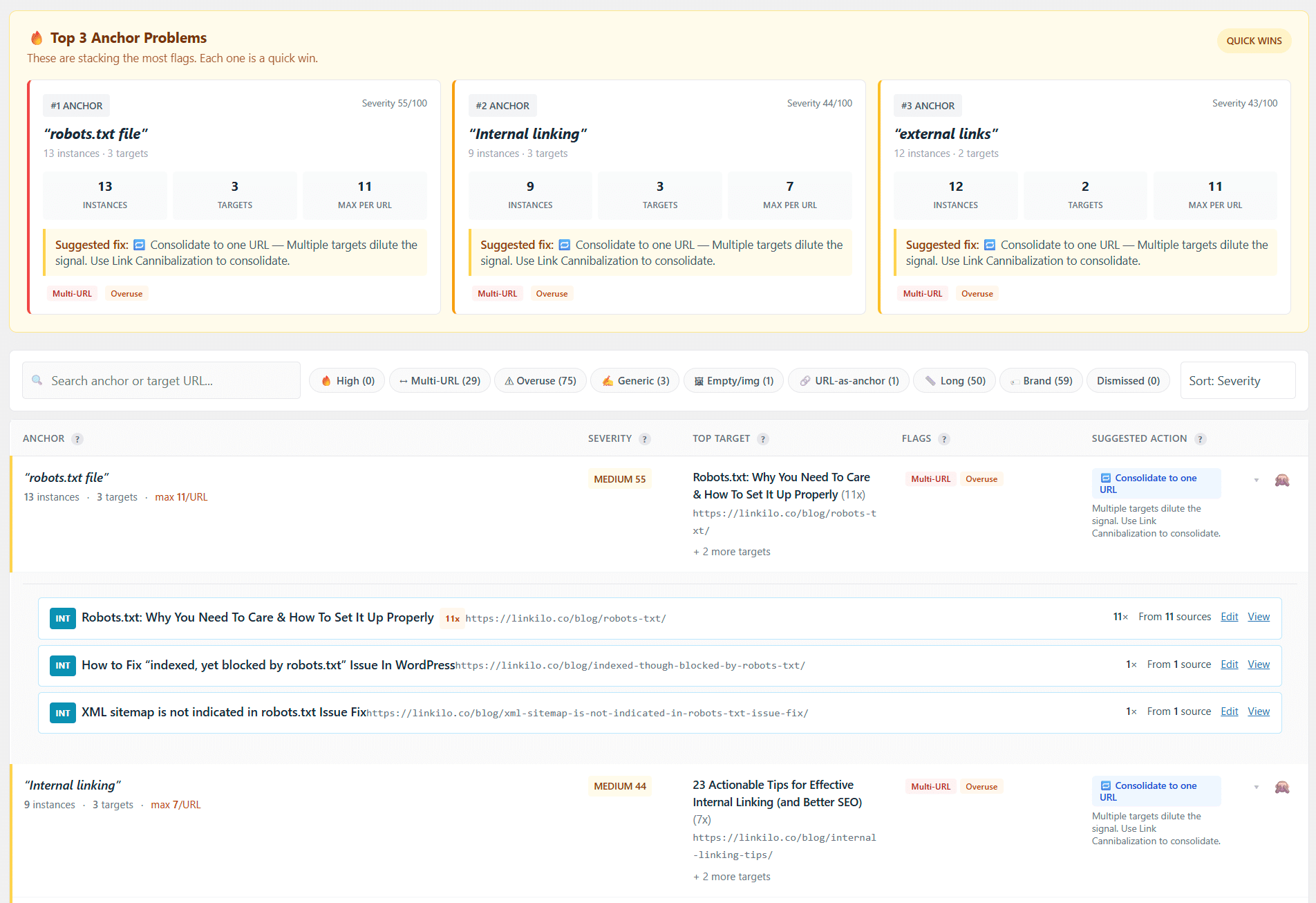
The cannibalization report finds pages competing for the same term using Search Console data. The broken link checker scans on a schedule and fixes each one in a click. The redirect manager flattens chains back to a single hop. And the crawl log reads your server logs to show whether Googlebot, GPTBot, and ClaudeBot are reaching your pages at all.
The AI runs on your own OpenAI key rather than a credit system, usually a dollar or two per 500 posts, and it is $59 a year for a single site.
The limits are real and worth naming. Linkilo is WordPress only, so a mixed portfolio rules it out and LinkStorm stays the answer. And it does not do one-click silo construction, so if that is the job in front of you, LinkBoss does it better.
Common questions
At how many sites does LinkStorm become the cheaper option?+
Around the point where you outgrow a LinkBoss tier. LinkBoss caps sites per plan, so three sites means Scale at $333 a year and ten means Agency at $891. LinkStorm includes unlimited sites on every plan and charges on total URLs instead, so those same ten sites can sit inside a $60 a month plan at $720 a year if their combined page count fits. Count your total URLs rather than your sites.
Can I move from one to the other without losing work?+
In one direction, yes. Links LinkBoss built are written into your posts, so they survive a move to anything else. Going the other way is harder, because LinkStorm serves its links through a snippet rather than your content, so leaving means rebuilding them elsewhere rather than carrying them across. Worth factoring in if you expect to change tools.
Can LinkStorm build silos?+
No. It surfaces and places individual link opportunities with data behind them. LinkBoss has dedicated silo presets that wire a pillar page and its supporting posts into a defined structure in one action.
Does LinkBoss work outside WordPress?+
Fully on WordPress and Shopify only. Other platforms such as Webflow or Ghost use a semi-automatic workflow where you copy the generated links across manually. LinkStorm treats every platform the same way.
Can I use both?+
Yes, and it is a defensible setup. Some people use LinkStorm to find and prioritize opportunities with Search Console data, then build the links in a tool that writes them permanently into the content. You are paying two subscriptions, so it only makes sense at a certain scale.
Linkilo does this for you
- Topic Clusters : Group your content into pillars and clusters automatically, then link them the way Google expects.
- Internal Link Click Analytics : Find out which internal links people actually click, and stop guessing which ones earn their place.
- Crawl Log File Analyzer : See exactly which pages Google and the AI crawlers actually visit, inside WordPress, with no log files to download.

Jay - Linkilo
Jay's the brains behind cool tools like Linkilo, helping marketers rock their SEO game. He's all about data-driven strategies and using AI to boost results. He's been at this for a decade and loves figuring out what works (and what doesn't) to get more leads without paying a fortune. <a href="https://www.linkedin.com/in/jay-kang-80b103309/">Linkedin</a>