Why Search Engines and AI Bots Stop Crawling Your Pages
Pages stop getting crawled all the time -- and you usually don't know until it's too late. Here's why search engines and AI bots drop pages, and how the Days Since Last Crawl feature in Linkilo's Crawl Log Analyzer helps you catch it before it hurts your rankings.
 Jay - Linkilo
If a page on your site hasn’t been crawled in 90 days, you have a problem you can’t see.
Search engines and AI bots don’t crawl every page every day. They work through priorities, and some pages get pushed down the list or dropped entirely. When that happens, your updates don’t get picked up, your freshness signals decay, and the page quietly falls out of favor — all without a single error message in your dashboard.
The Crawl Log Analyzer in Linkilo tracks exactly this. The Days Since Last Crawl view shows you how long it’s been since each URL was visited by any crawler — Google, Bing, GPTBot, ClaudeBot, or whatever else is hitting your site. If something has gone quiet, you’ll see it immediately.
Why Crawlers Stop Visiting Pages
Crawlers don’t stop visiting pages randomly. There are real reasons a URL gets deprioritized, and most of them are fixable once you know they’re happening.
Why crawlers stop visiting
The content hasn’t changed in a long time
Google and other search engines crawl more frequently when they expect something new. A post that hasn’t been touched in two years trains the crawler to visit less often. The signal is: nothing changes here, so check back later. If you’ve quietly updated that post without publishing a new date or adding substantial new content, the crawler may not notice for months.
The page loads too slowly
Crawl budget gets allocated across your whole site. Slow pages consume more of that budget per visit, so crawlers start skipping them to cover more ground elsewhere. A page that takes five seconds to respond at scale gets fewer return visits. Google’s crawlers in particular are sensitive to server response time, and a spike in Core Web Vitals issues on a specific URL can show up as a crawl gap shortly after.
The page dropped in perceived quality
If a page used to rank well and has slipped, crawl frequency often follows. Lower rankings typically mean fewer clicks, weaker engagement signals, and less authority flowing from internal links — and crawlers factor all of this into how often they revisit. A page that’s sliding down the rankings usually also starts getting crawled less, which compounds the problem.
Something broke
Redirect chains, temporary errors that never got cleaned up, server timeouts, or bot-blocking rules that someone added and forgot — any of these can cause a crawler to stop visiting a URL. The crawler tries, gets a bad response, backs off, and eventually stops trying as often. From the outside it just looks like the page isn’t being crawled. The root cause is often something mundane like a misconfigured cache rule or an overzealous security plugin.
The crawl budget got squeezed elsewhere
Sites that publish frequently, run large ecommerce catalogs, or generate parameterized URLs can stretch crawl budget thin. When crawlers have a lot of ground to cover, older or lower-priority pages get pushed down the queue. Adding a lot of new content can actually cause existing pages to be crawled less often in the short term.
AI Bots Have Their Own Crawl Patterns
Google isn’t the only thing crawling your site anymore. GPTBot, ClaudeBot, PerplexityBot, and other AI training and retrieval crawlers now represent a significant share of bot traffic — and they behave differently than search engine crawlers.
AI training crawlers tend to hit pages in large bursts, then go quiet for extended periods. Retrieval crawlers used for real-time AI answers operate more continuously but focus heavily on pages that have been cited or linked recently. Cloudflare Radar data shows that training traffic makes up the bulk of AI crawler requests by volume, while retrieval traffic is smaller but more consistent.
Major AI crawlers and what they do
What this means practically: a page that hasn’t been crawled by an AI bot in several months is unlikely to appear in AI-generated answers. If you want your content cited by ChatGPT, Perplexity, or similar tools, those bots need to be visiting your pages. Days Since Last Crawl shows you which ones they’ve been ignoring.
What Days Since Last Crawl Shows You
The Days Since Last Crawl view in Linkilo’s Crawl Log Analyzer pulls from your actual server logs and shows you a per-URL count of how many days have passed since each page was last visited by any crawler. It doesn’t rely on estimates or third-party sampling — it reads from the log data directly. One thing to note: the feature requires access to your server’s raw log files. Managed WordPress hosts that don’t expose logs won’t work — you need a host that gives you direct log file access.
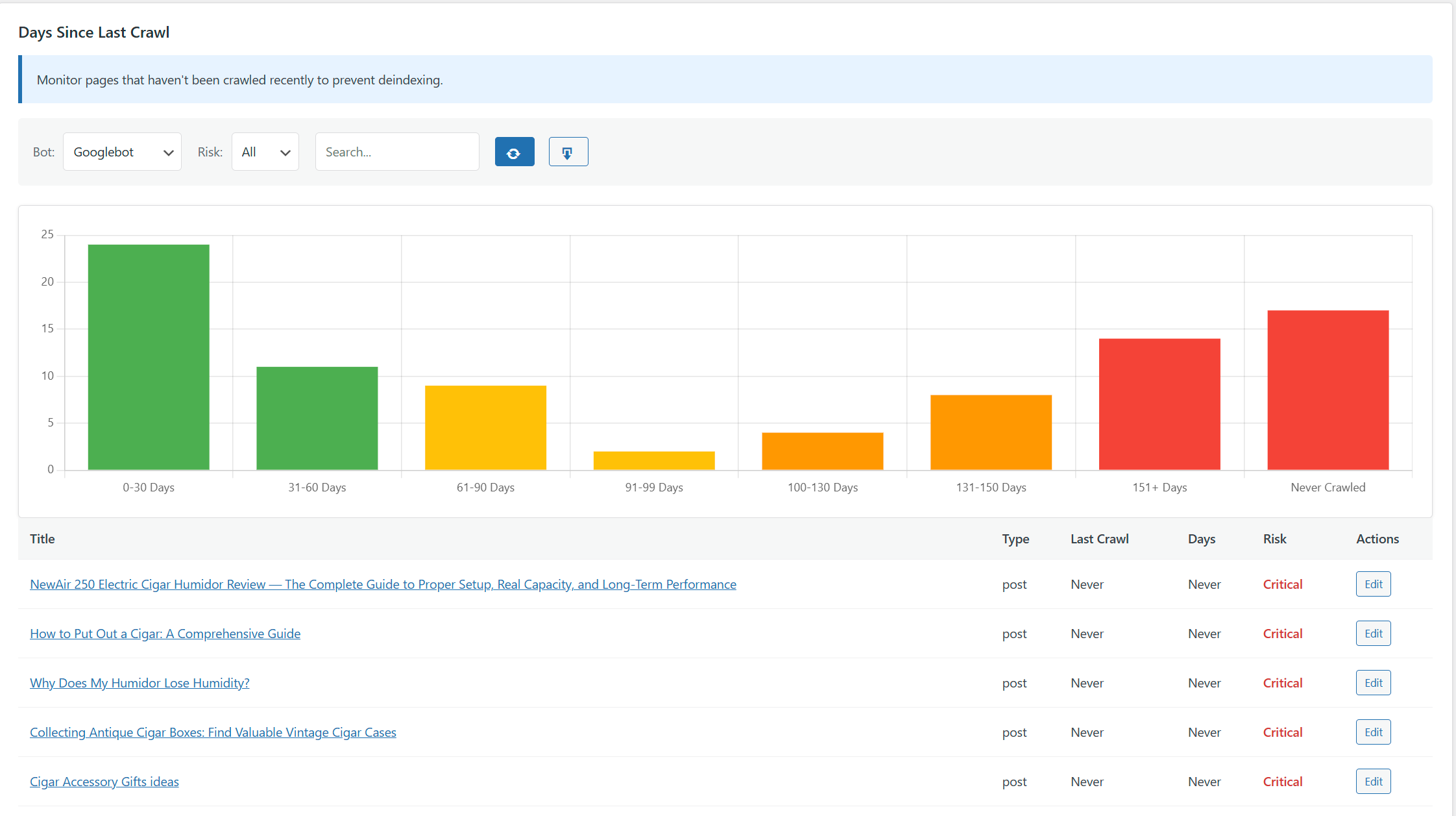
Pages that haven’t been crawled in a long time surface at the top. You can see which specific bots have visited and which haven’t, so you’re not guessing whether Google has seen your latest update or whether GPTBot has ever touched a page at all.
This matters because the alternative is no visibility. Without log-based data, you have no way to know that a specific post stopped getting crawled three months ago. Search Console shows some crawl data, but it’s sampled, delayed, and doesn’t break down by individual bot. The raw log is the only complete record.
What to Do When a Page Hasn’t Been Crawled
Finding a page with a high days-since-crawl count is the start of a short diagnostic process. The right fix depends on why crawlers stopped visiting.
Diagnostic flow: page not crawled recently
Page shows high Days Since Last Crawl
30+ days for an important page, or 90+ days for any published page
Check for technical problems first
Does the URL return a clean 200? Any redirect chains, server timeouts, or bot-blocking rules?
Problem found
Technically clean
Is the content stale?
Has the page been updated in the last 6–12 months? Have competing pages outgrown it?
Yes, stale
Content is current
Is the page underlinked internally?
Few other pages link to this URL? Crawlers follow internal links — isolated pages get visited less.
Few links in
Well-linked
Is this specific page slow?
Slow server response on specific URLs causes crawlers to skip them. Run PageSpeed Insights on the URL directly.
Page is slow
Speed is fine
Submit via Google Search Console
After making any change, use URL Inspection to request indexing. Won’t override crawl budget long-term, but accelerates pickup after a fix.
Check for technical problems first
Before assuming the content is the issue, rule out anything broken. Check whether the URL returns a clean 200 status code, whether there are redirect chains that have gotten too long, and whether any recent changes to your security or caching configuration might be blocking crawlers. A page that looks fine in a browser can still be returning errors or timing out when a bot hits it at scale.
Update the content
If the page is technically healthy, a content refresh is the most reliable way to signal that something new is here. This doesn’t need to be a full rewrite. Adding new statistics, updating examples, expanding a section that’s gone thin, or adding a FAQ based on what people are actually searching for are all enough to trigger recrawl. The goal is giving crawlers a reason to come back and a reason to re-index what they find.
Add internal links pointing to the page
Crawlers follow internal links. A page that has very few internal links pointing to it gets discovered and revisited less often. If the neglected page isn’t well-connected to the rest of your site, adding links from high-traffic or recently-updated posts can bring it back onto the crawl path. Linkilo’s AI Link Suggestions can surface relevant linking opportunities across your existing content without manual sifting.
Check page speed
If the page loads slowly, fix that before expecting more crawl frequency. Slow server response times on specific URLs often show up as crawl gaps. Run the URL through PageSpeed Insights and look for anything specific to that page — large images, render-blocking scripts, or third-party embeds that add load time. A page that responds quickly gets more revisits.
Submit through Search Console
For pages where you’ve made significant changes and want Google to pick them up quickly, the URL Inspection tool in Google Search Console lets you request indexing directly. This doesn’t override crawl budget constraints in the long run, but it’s useful for pushing a specific update through faster after you’ve fixed whatever caused the crawl gap.
Using Days Since Last Crawl as a Routine Check
The most useful thing you can do with this feature isn’t a one-time audit. It’s building a habit of checking it regularly — monthly for most sites, weekly if you publish frequently or your site changes a lot.
A threshold that works for most sites: any page that hasn’t been crawled in over 30 days deserves a look. Over 60 days is a red flag. Over 90 days means something is likely wrong, either with the content, the page’s technical health, or its position in the internal link structure.
Pages you’ve recently updated should be crawled within a few days if they’re well-linked and technically healthy. If you pushed a major update and two weeks later the Days Since Last Crawl count hasn’t reset, that’s a signal worth investigating before assuming the update will eventually get picked up.
The same logic applies to AI crawlers. If you want your content to show up in AI answers, GPTBot and ClaudeBot need to be visiting your pages. If Days Since Last Crawl shows those bots haven’t been around in months, you’re not in the training data or the retrieval pool — and fixing that starts with knowing it’s happening.
Key Takeaways
- Crawlers stop visiting pages for real reasons — stale content, slow load times, technical errors, thin internal links, or a squeezed crawl budget
- AI crawlers like GPTBot and ClaudeBot have different patterns than Google and need to be visiting your pages for your content to appear in AI answers
- Days Since Last Crawl in Linkilo’s Crawl Log Analyzer shows you exactly which pages have gone quiet and for how long, using your actual server log data
- Pages dark for 30+ days deserve a check; 90+ days usually means something is wrong
- Fixes include updating content, adding internal links, cleaning up technical issues, or improving page speed
- Regular monitoring is more valuable than one-time audits — crawl health can change as you publish new content or make site changes
Frequently Asked Questions
Common questions about crawl frequency, AI bots, and fixing pages that stopped getting visited
Linkilo does this for you
- Crawl Log File Analyzer : See exactly which pages Google and the AI crawlers actually visit, inside WordPress, with no log files to download.
- AI Internal Link Suggestions : Get link suggestions a human editor would approve, and add them in one click without leaving the editor.
- WordPress MCP for AI Assistants : Let Claude or ChatGPT read and update your WordPress site directly. No copy-paste, no plugins in between.
Jay - Linkilo
Jay's the brains behind cool tools like Linkilo, helping marketers rock their SEO game. He's all about data-driven strategies and using AI to boost results. He's been at this for a decade and loves figuring out what works (and what doesn't) to get more leads without paying a fortune. <a href="https://www.linkedin.com/in/jay-kang-80b103309/">Linkedin</a>