Linkilo and Link Whisper are the two internal linking plugins WordPress site owners compare most often.
The short version is this. Link Whisper is the simpler, single-purpose tool. Linkilo does the same internal linking work, and it also replaces your redirect, broken-link, and crawl-log tools.
If you only want link suggestions inside the editor, Link Whisper is the leaner pick. If you want your whole linking and crawl stack in one install, Linkilo is the stronger buy.
Here is where they overlap, where they differ, and which one fits your site, with current pricing for both.
Linkilo vs Link Whisper at a glance
| Feature | Linkilo | Link Whisper |
|---|---|---|
| AI link suggestions with manual review | Yes | Yes |
| Verified anchor text and confidence scores | Yes | Partial |
| AI runs on your own API key | Yes | No, credits only |
| Anchor text distribution analysis | Yes | No |
| Keyword and link cannibalization detection | Yes | No |
| Orphan page detection | Yes | Yes |
| Broken link checker with one-click fix | Yes | Yes |
| Redirect manager (301, 302, regex) | Yes | No |
| Real-time bot crawl-log tracking | Yes | No |
| Site visualization | Yes | Yes |
| Platforms | WordPress | WordPress and Shopify |
| Starting price | $59/year | $97/year |
What Linkilo and Link Whisper both do well
Both plugins scan your content and suggest relevant internal links that you approve before anything goes live, so you keep editorial control.
Both find orphan pages that have no internal links pointing to them, and both sit inside the WordPress editor rather than a separate dashboard.
For the core job of adding internal links as you publish, either tool does the work. If that is all you need, the decision comes down to price and simplicity.
What both tools already do well
Link suggestions you approve
Both propose internal links you approve first.
Orphan page detection
Both flag pages with no internal links pointing in.
Built into WordPress
Both live in the editor, not a separate dashboard.
How each tool suggests links
This is the part worth slowing down on, because it is where the two tools stop being comparable.
Both start the same way now. Every post is turned into an embedding, a numeric fingerprint of what the page means, and candidates are matched by how close those fingerprints sit. Link Whisper moved to this approach in version 2.7.0, and it was a real improvement on the keyword matching it used before.
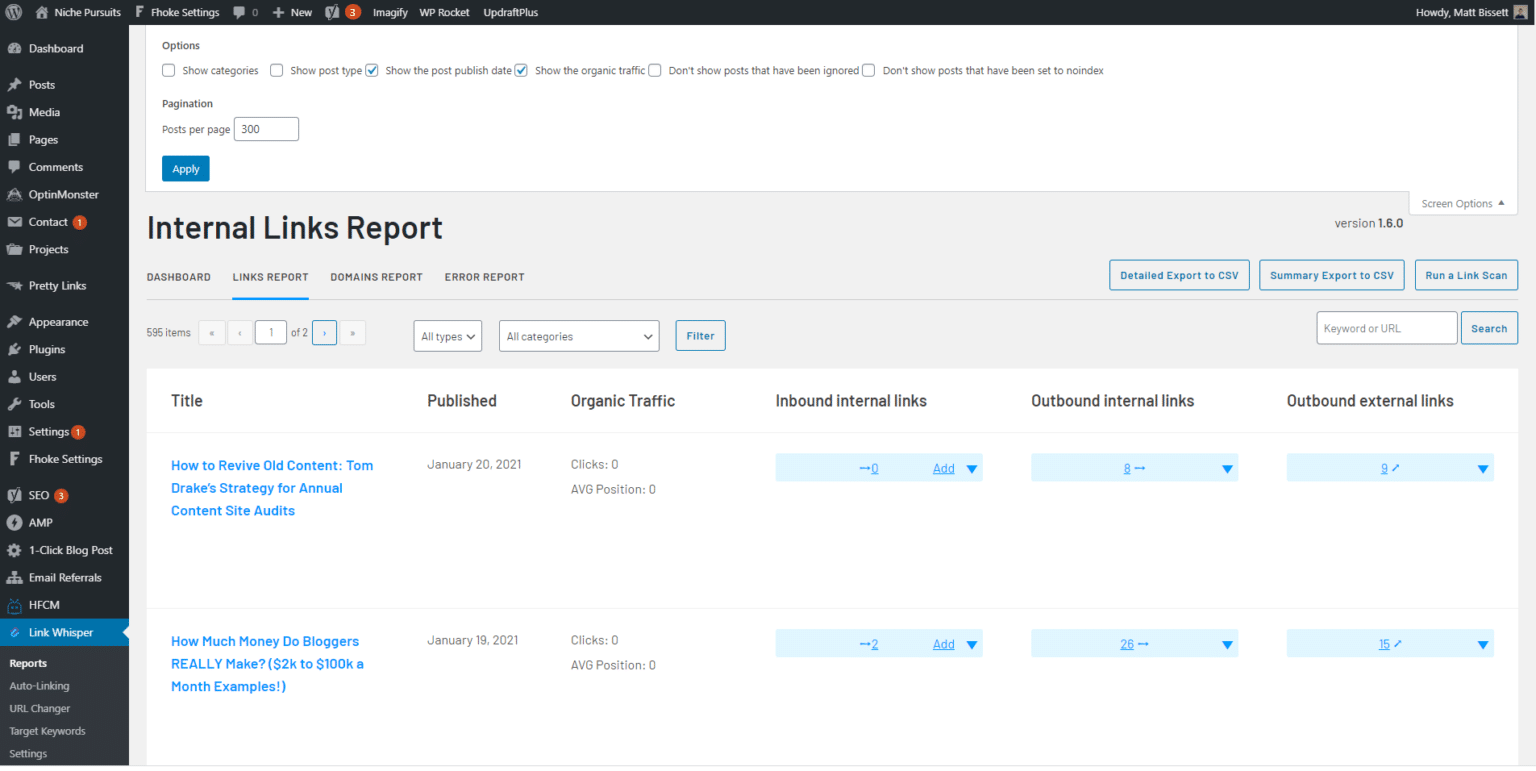
For a similarity-only engine, that score is roughly where the work finishes. In Linkilo it is the first of six passes, and the five that follow exist because post-level similarity on its own produces links that are technically related and practically wrong.
Where post-level similarity breaks down
Two posts being related does not mean any given sentence should carry the link.
A humidor storage guide might mention Boveda packs in one sentence and a Cigar Oasis unit in the next. Post-level scoring rates both sentences the same against a Cigar Oasis review, so the link can land on the sentence that was never about that product.
Linkilo scores each candidate sentence separately against the target page, then boosts, penalizes, or drops the suggestion on that basis. Post-level scoring on its own has no way to make that call.
What runs before a suggestion reaches you
Six passes in Linkilo. Stage one is where a similarity-only engine stops.
STAGE 1
Post-level embedding similarity
Every post becomes an embedding, and candidates are matched by closeness of meaning rather than shared keywords. Both tools do this. In Linkilo it is only the coarse filter that decides what is worth examining.
STAGE 2
Sentence-level semantic gate
Each candidate sentence is embedded and scored against the target on its own, so the link lands in the sentence that is actually about the destination.
STAGE 3
Anchor linguistics
An anchor is rejected if it opens on a clause fragment, ends mid-phrase, is filler like best or guide, or carries no distinctive noun from the target title.
STAGE 4
Wrong-target detection
If your sentence covers the Magna 3.0 and the closest match reviews the Magna 2.0, that conflict is caught and the suggestion is re-ranked toward the right page.
STAGE 5
Site-wide anchor health check
Each anchor is cross-checked against your anchor text report. Generic, overused, or already pointed at a different URL means the suggestion gets downranked.
STAGE 6
A second AI verifies the first
A language model reads the sentence and the target subject and answers one question. Is this sentence really about that page. Failures are dropped with the reason attached.
The last pass is the one that catches what math alone cannot. Similarity scores have no way to know that a sentence opening with “unlike traditional humidifiers that only add moisture” is an argument against humidifiers, not a recommendation of one. A second model reads that sentence, checks it against the target, and drops it if the answer is no.
You approve every link before it exists
Nothing goes live on its own. Each suggestion arrives with a confidence score and the exact anchor text to use, and it sits in the editor until you accept or skip it.
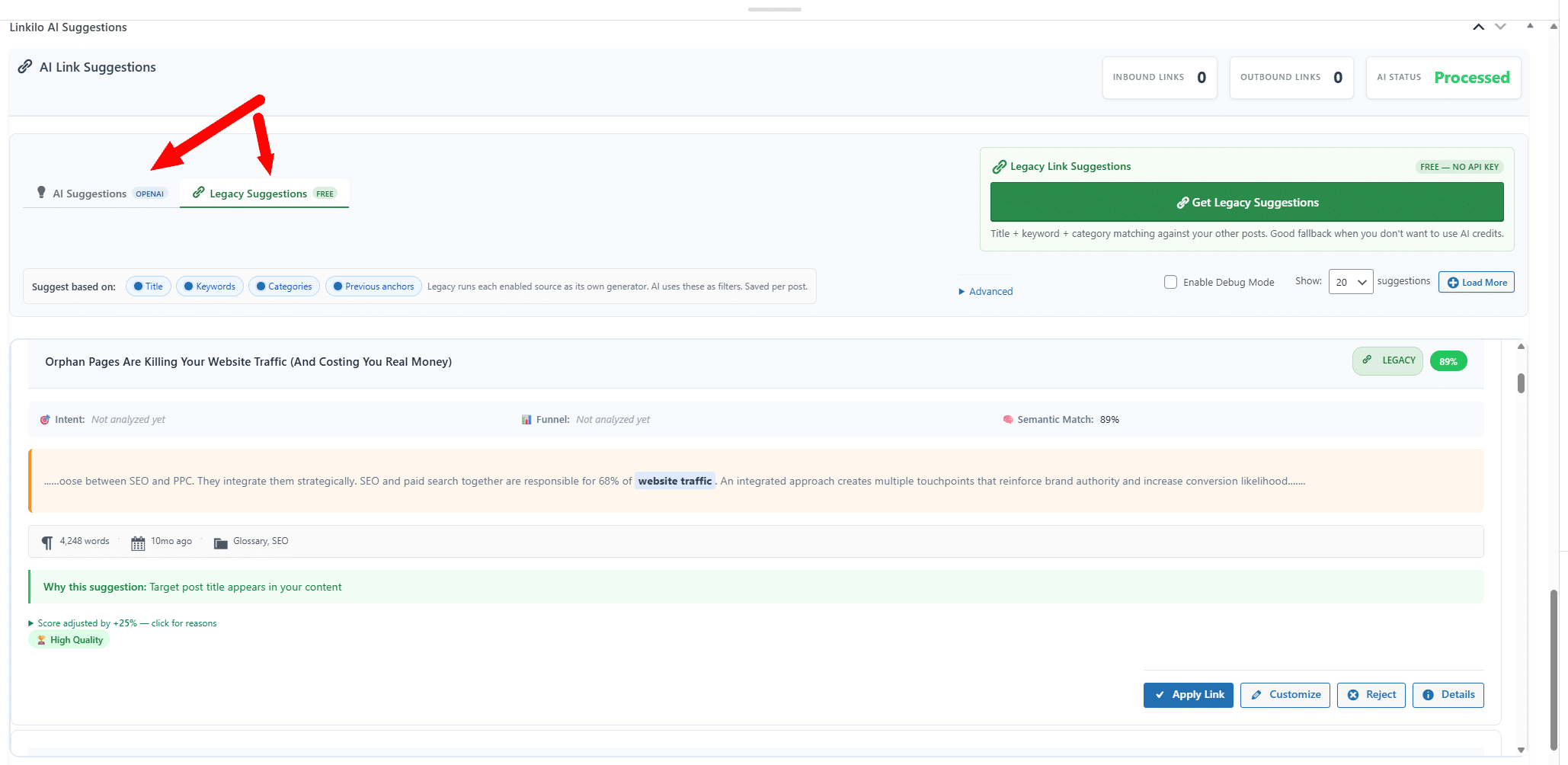
That is the point of the review step. You are not waving through a machine’s best guess. You are looking at a candidate that has already been filtered six times and still has to convince you.
Over time it also tunes to you. Every suggestion carries a confidence band, Linkilo records which bands you accept and reject, and it moves its own thresholds toward your judgment. If your high-confidence suggestions are only landing half the time, the bar for high rises.
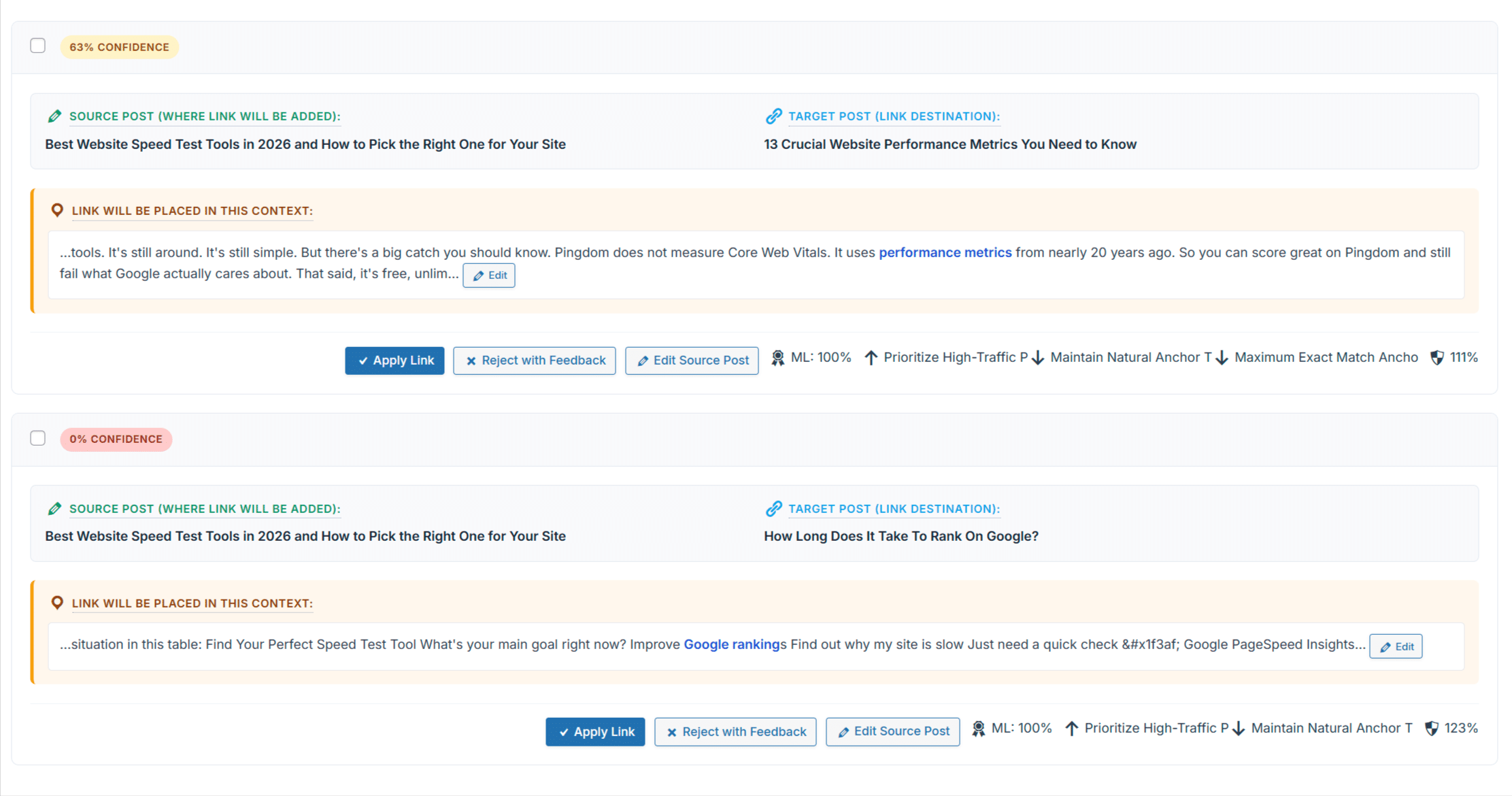
The AI runs on your own OpenAI key, so a full pass costs cents and the number is visible to you rather than metered as credits. If you want the background on why anchor text and placement move rankings, our guide to link equity covers it.
Why the words you link matter as much as the page you link to
Anchor text is the visible wording you turn into a link. In the sentence you are reading, the words carrying the link are the anchor.
Those words are a signal. Search engines read them as a description of the page on the other end, which means every link you place is also a small statement about what that page is for.
So two things can go wrong, and neither one looks like an error on the page.
The first is using the same wording to link to different pages. Point the phrase best coffee grinder at one review this month and a different review next month, and you have told search engines that two pages compete for the same term. They split the signal instead of stacking it. That is keyword cannibalization, and it is quietly common on sites that have been publishing for years.
The second is repetition. Use one exact phrase forty times across a site and the pattern stops looking like writing and starts looking manufactured.
Both problems scale badly. A tool that picks anchors and inserts them without asking can repeat the same mistake across hundreds of posts before anyone notices, and undoing it means going back through every one of those posts.
Linkilo checks each proposed anchor against the record of what your site already uses. If a phrase is generic, is already heavily used, or already points at a different URL, the suggestion is pushed down before it ever reaches you.
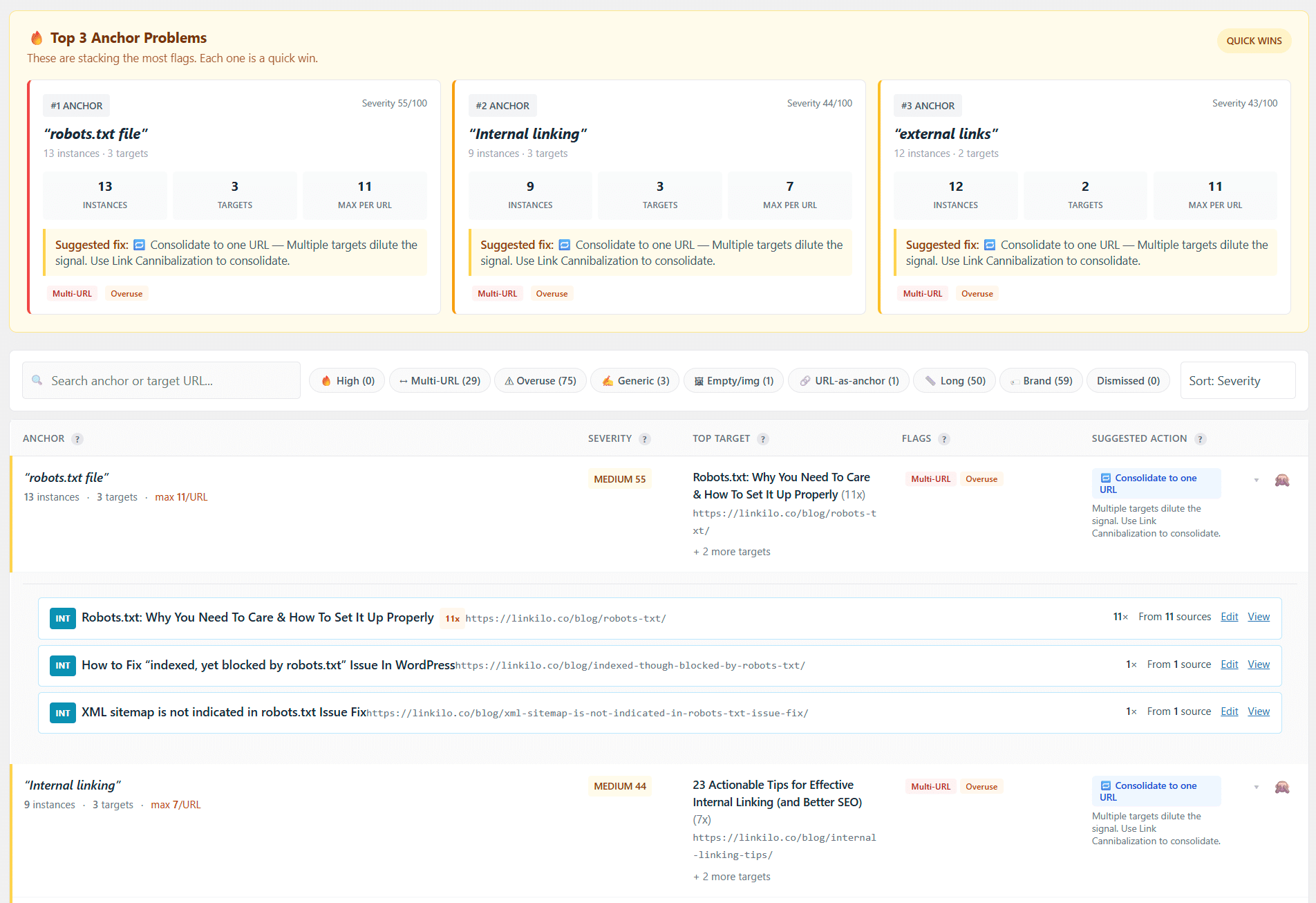
Then it still asks you. Every AI suggestion waits for your approval, and that is a deliberate choice rather than a missing feature.
A model can tell you two pages are related. It cannot know that you are about to retire one of them, that a client asked you to stop pushing a product, or that the post you are linking to is the weaker of two you wrote on the same topic. You know that. The tool does not.
Approval takes a second per link, and it is the difference between a system that helps you build a site and one that edits your site while you are not looking.
Where Linkilo pulls ahead
Link Whisper stops at internal links. Linkilo does that same job and keeps going, into work you are probably doing right now in another plugin or a spreadsheet.
A link is not finished the moment you place it. Links rot. Posts get deleted, slugs change, external sites go down, and a page you linked two years ago quietly becomes a dead end.
So the real job is bigger than picking good targets. Every link on your site needs to point somewhere real, get there in one hop, and still make sense to the reader who clicks it. That is link health, and it is most of what Linkilo does beyond suggestions.
Broken links and the one-click fix
A broken link is one that points to a URL that no longer resolves. The post was deleted, the slug changed, or the site you linked to disappeared, and the reader lands on a 404 instead of the page you promised.
Two things go wrong at once. Readers hit a dead end and leave, and the ranking power you passed through that link stops reaching anything, because there is nothing on the other side to receive it.
On a small blog you catch these by accident. On a site with a few hundred posts they accumulate faster than any manual check, which is why most sites are carrying dead links they have never seen.
Linkilo’s broken link checker scans on a schedule and puts every one in a single list, with the page it lives on, the anchor text used, and the URL that failed.
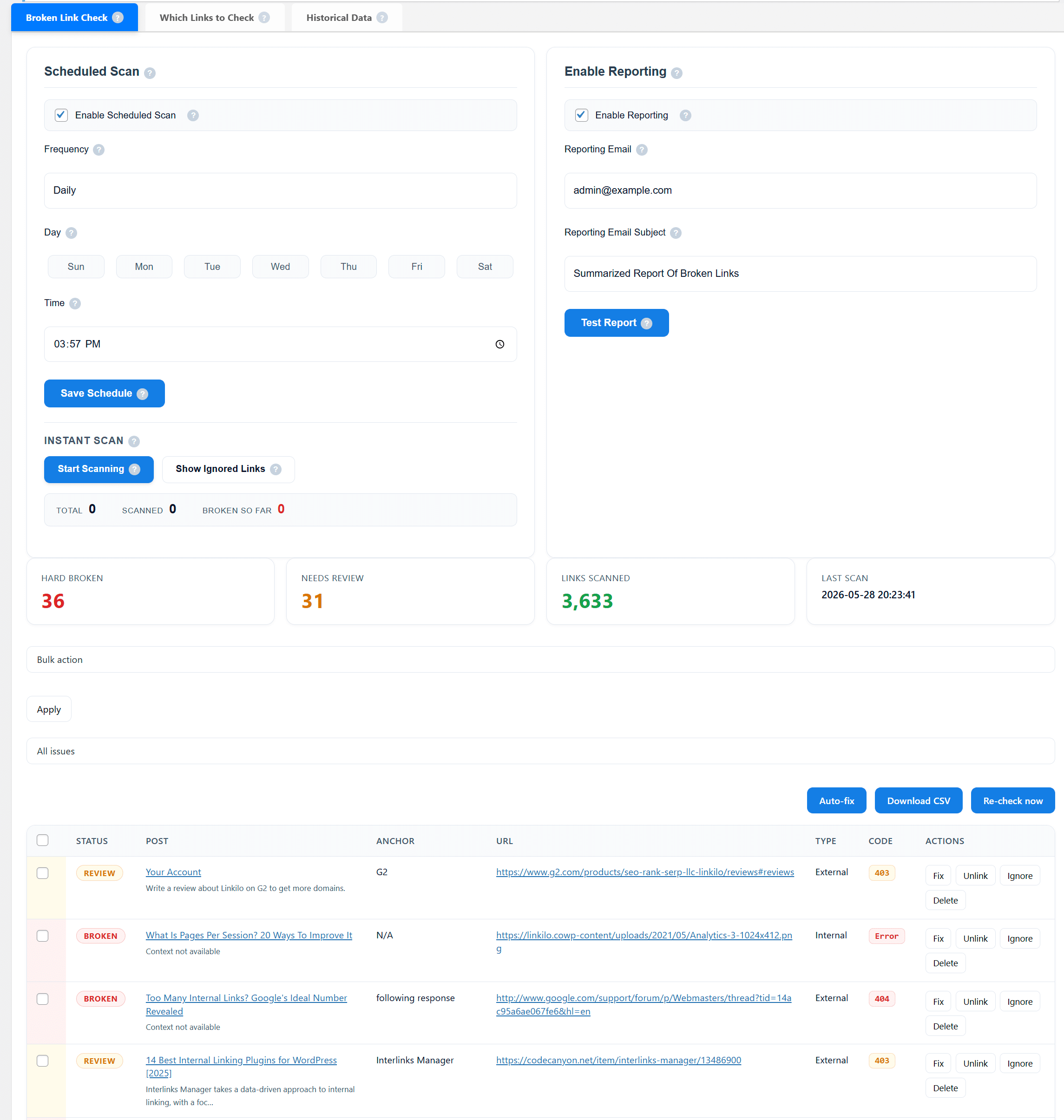
Then you fix it from that screen. Update the URL or remove the link in one click, without opening the post, finding the paragraph, and editing by hand.
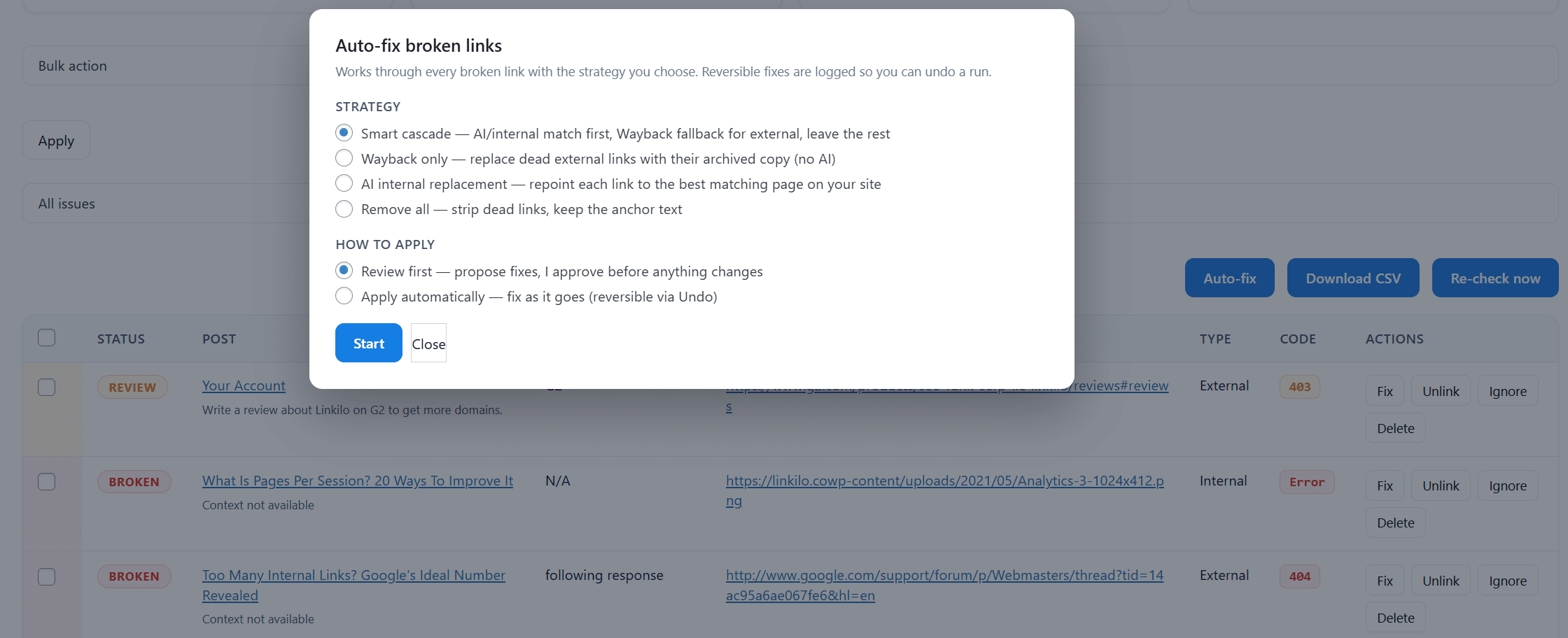
An afternoon of cleanup becomes a two-minute review, and it repeats on its own rather than waiting for you to remember.
Redirect chains and why one hop matters
When you change a URL, a 301 redirect sends the old address to the new one so old links and bookmarks still work. Change a URL without one and every link pointing at it breaks.
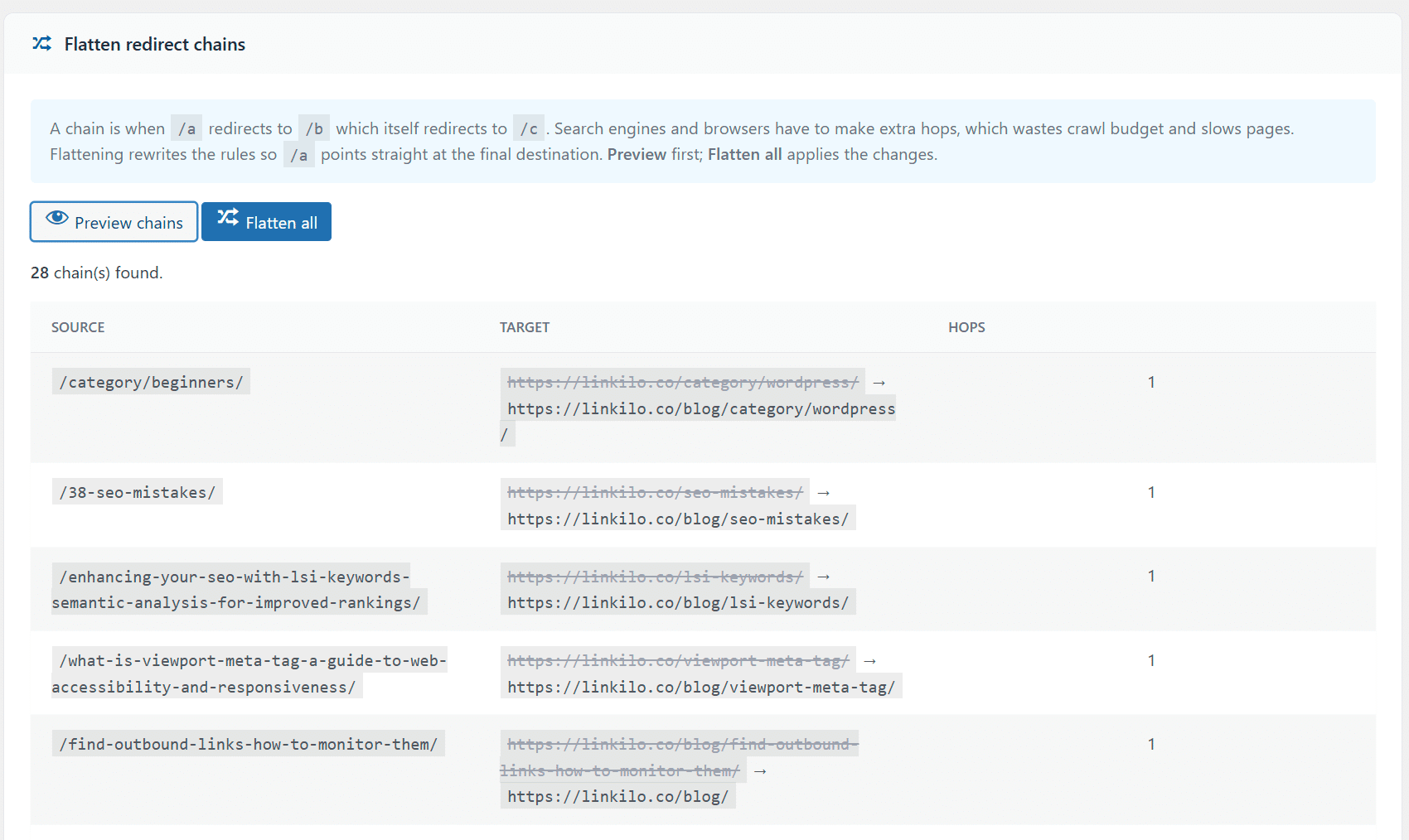
A chain is what happens after you do this a few times. Page A redirects to B, B was later moved to C, so a single click now travels three addresses to reach one page.
Every hop costs something. The reader waits longer, crawlers spend more of your budget to fetch one page, and long chains risk being abandoned before the crawler reaches the end.
Chains are also invisible in normal use, because the page still loads. Nothing looks broken, so nobody looks.
Linkilo finds them and flattens each chain back to a single direct hop.
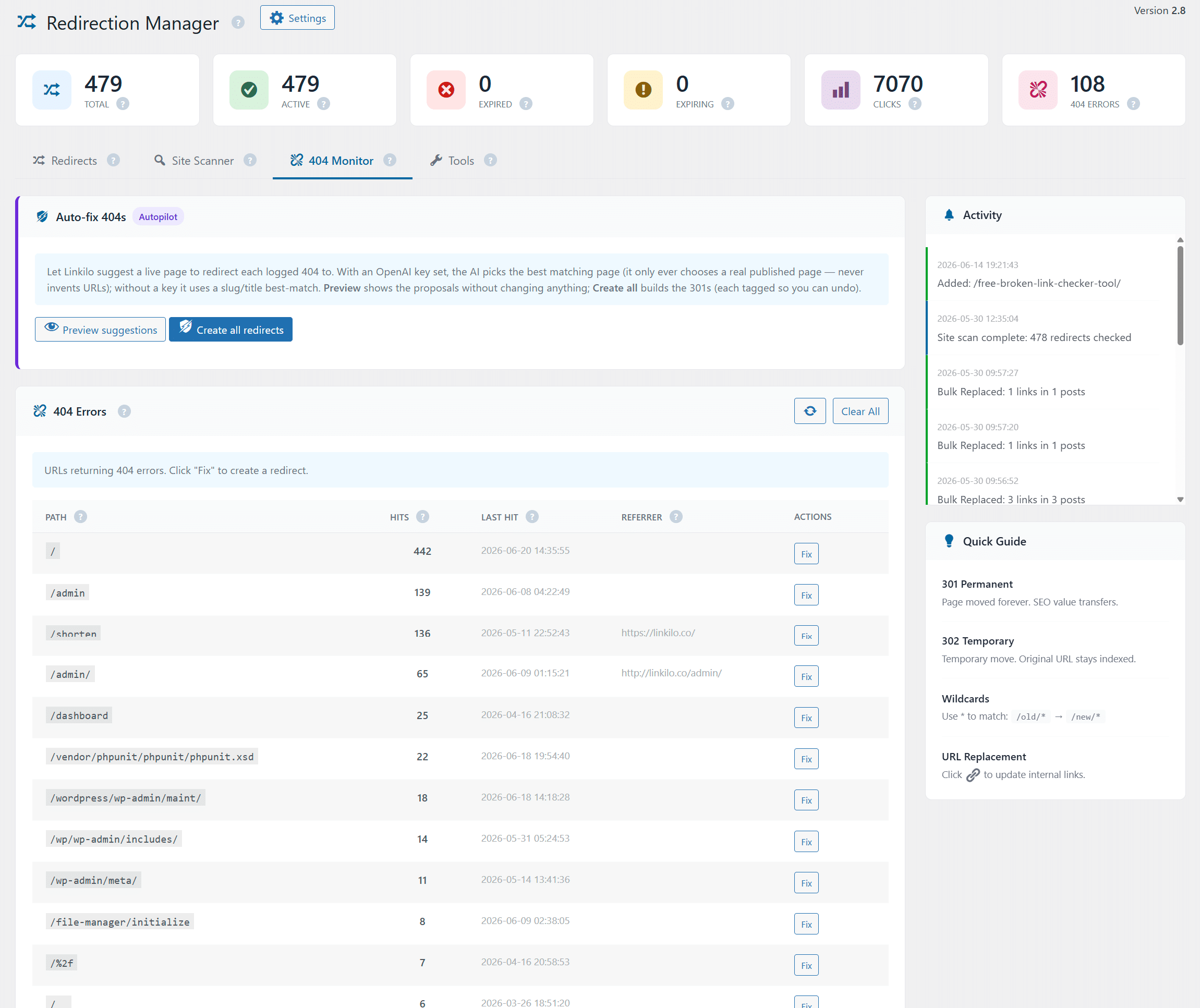
The 404 monitor closes the other half. It records the URLs people and bots are actually requesting and failing to reach, so you redirect the ones with real traffic instead of guessing.
Link preview so you know where you are sending people
The other half of link health is context. A link can resolve perfectly and still be the wrong link.
Link preview shows the destination title and content while you are placing the link, inside the editor. You see what is actually on that page before you commit, rather than trusting a slug you wrote eighteen months ago.
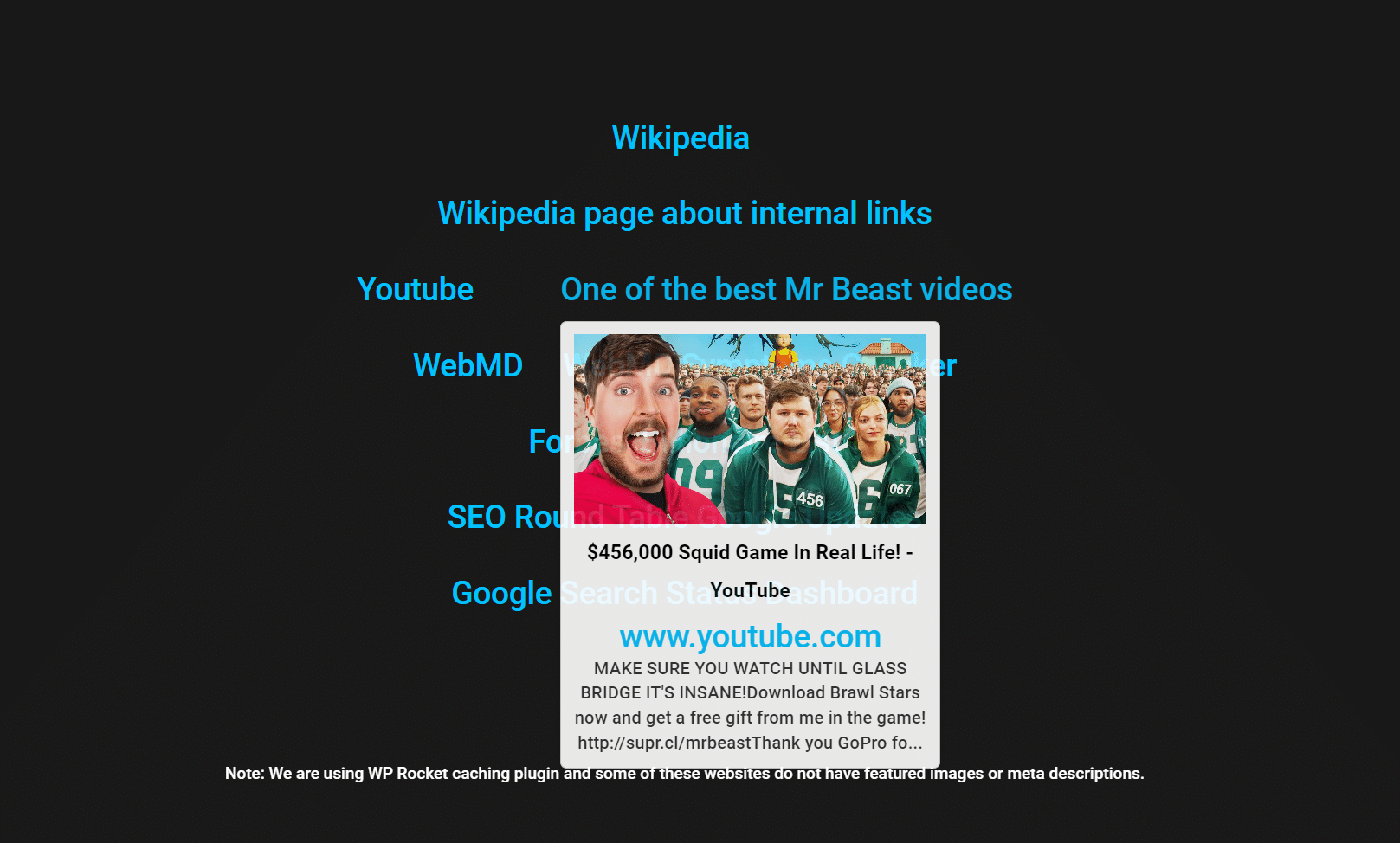
It catches the quiet mistakes. The thin page you meant to update, the older post you have since replaced, the review that now covers a different model.
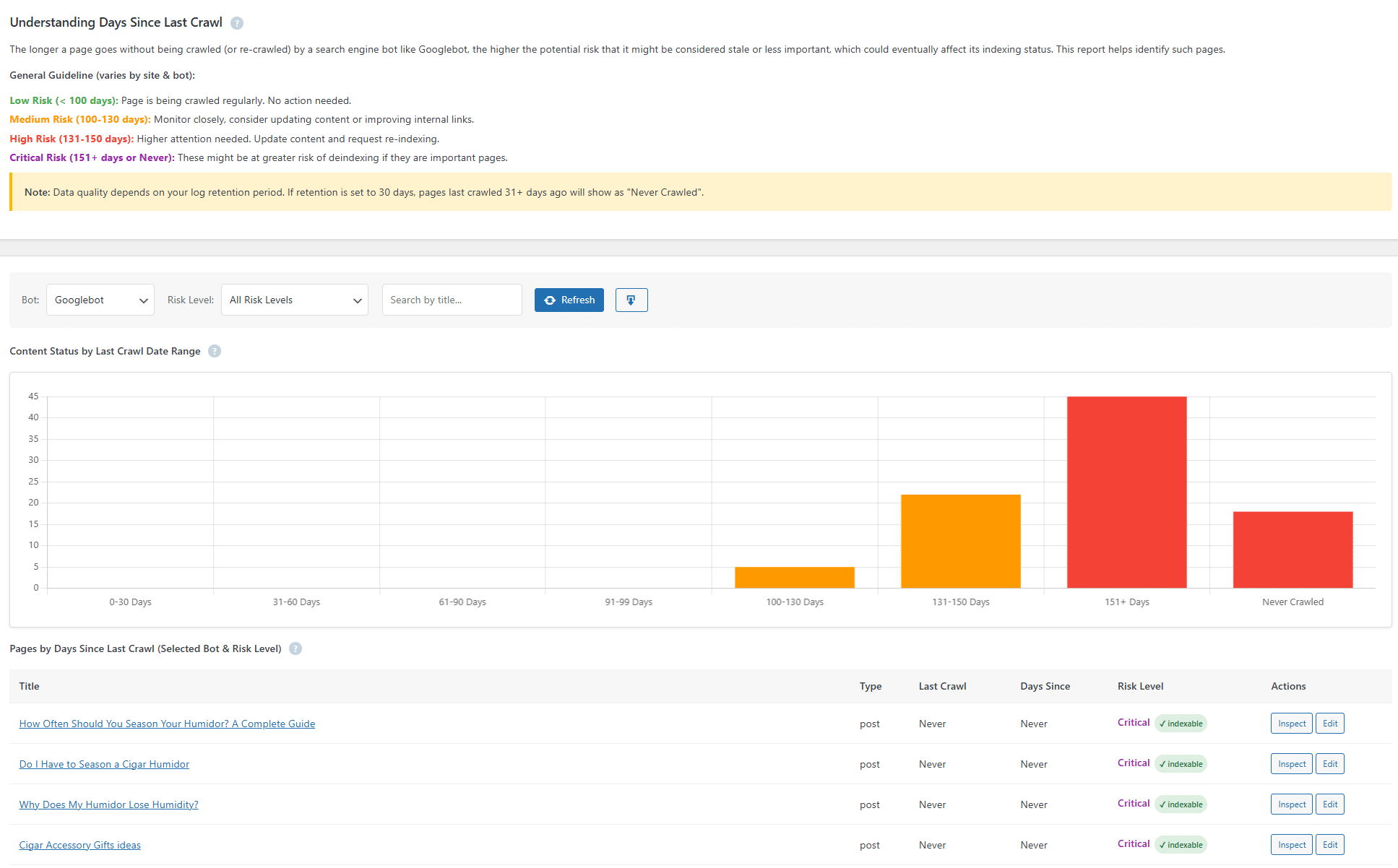
Then comes the part almost no linking tool touches. Linkilo reads your server logs and shows how search and AI crawlers move through your site.
You see every Googlebot, Bingbot, GPTBot, and ClaudeBot visit, real bots split from anything spoofing them, and where crawl budget is spent on pages that do not matter.
A page Google or ChatGPT never crawls cannot rank or be cited, and this is how you catch it early.
It also watches the smaller signals. The anchor text report shows how often you use each phrase so you spot over-optimization before a search engine does.
And the cannibalization report finds pages fighting each other for the same term. Link Whisper surfaces neither.
None of this is in Link Whisper. Buy those jobs separately and you pay for a redirect plugin, a broken-link plugin, and a log-file analyzer on top of your linking tool, usually $200 to $600 a year.
Linkilo folds them into one install for less than most single-purpose plugins cost alone.
What it costs to match Linkilo with separate tools
Yearly cost, four single-purpose tools next to one install
Four separate tools
$200 to $600 / year
Linkilo
$59 / year, one install
One honest limit. Linkilo is WordPress only. If you publish on Shopify or elsewhere, this is not your tool.
Where Link Whisper is the simpler choice
Link Whisper does one thing, which means a shorter learning curve if all you want is link suggestions.
It also works on Shopify as well as WordPress, so store owners have an option that Linkilo does not give them, though the Shopify app is rated lower than the WordPress version.
If you do not need redirects, broken-link fixing, or crawl data, Link Whisper’s tighter focus is a fair trade. You can read the full breakdown in our Link Whisper review.
Pricing in 2026
Linkilo starts at $59 a year for a single site, with a 30-day money-back guarantee. Its AI runs on your own OpenAI key, usually a dollar or two to process 500 posts.
Link Whisper runs $97 to $497 a year depending on how many sites you cover. Its pricing page lists a per-month figure, but every plan is billed once a year for the full amount.
So the money question is not only the sticker price. It is whether one flat plan that also covers your broken-link and crawl-log tools beats paying for those separately on top of a linking plugin.
Moving from Link Whisper to Linkilo
The switch is lower-risk than it sounds, because the internal links you already built stay in your content.
They are normal links in your posts, not something Link Whisper holds onto, so they do not disappear when you deactivate it.
Install Linkilo, run its first scan, and it maps every internal link already on your site. Then it starts suggesting new ones and flagging orphan pages and cannibalization.
From there you turn on the redirect manager and crawl log when you are ready. You are adding capability on top of the links you have, not rebuilding them.
For the full side-by-side on features and plans, see the Linkilo vs Link Whisper page.
Which should you choose
Choose Link Whisper if you run one or a few small sites, want the simplest link-suggestion workflow, or need Shopify support.
Choose Linkilo if you want to fold internal linking, redirects, broken links, and crawl-log analysis into a single plugin, you care about how AI bots crawl your site, or you want flat annual pricing with your AI on your own key.
Both are solid at internal linking, so the real question is whether you want one focused tool or one tool that replaces four.
If you are also considering a cloud tool that works outside WordPress, the Link Whisper vs LinkStorm comparison covers that matchup directly.
And if budget is the constraint, the Link Whisper vs Internal Link Juicer comparison looks at the free and one-time-payment option.
Which one fits your site
Choose Link Whisper if
Choose Linkilo if
Linkilo vs Link Whisper FAQ
+Is Linkilo better than Link Whisper?
It depends on what you want the plugin to do. For plain internal link suggestions, both work well and Link Whisper is simpler. If you want one tool that also handles redirects, broken links, cannibalization, and bot crawl data, Linkilo is the stronger buy because Link Whisper does not cover those.
+Does Link Whisper have anchor text analysis?
Only in a limited form. Link Whisper surfaces suggestions but does not give you a full anchor text distribution report. Linkilo’s anchor text tool shows how often each variation is used so you can spot over-optimization.
+Can Linkilo replace the Redirection and Broken Link Checker plugins?
Yes. Linkilo includes a redirect manager and a broken-link checker with one-click fixes, so you can remove both standalone plugins. Link Whisper does not replace either one.
+Does Link Whisper work on Shopify?
Yes, Link Whisper has a Shopify app, though it is rated lower than the WordPress version and has reported theme issues. Linkilo is WordPress only, so Shopify users should weigh that.
+Which one is cheaper?
Linkilo starts at $59 a year for a single site. Link Whisper runs $97 to $497 a year depending on how many sites you cover. Linkilo is the lower entry price, and because its AI runs on your own OpenAI key there are no separate token charges to add on top.
Linkilo does this for you
- AI Internal Link Suggestions : Get link suggestions a human editor would approve, and add them in one click without leaving the editor.
- Redirection Manager : Catch 404s as they happen and redirect them before anyone notices the traffic went missing.
- Anchor Text Reporting Tool : See every anchor pointing at every page, and catch the over-optimized ones before Google does.

Jay - Linkilo
Jay's the brains behind cool tools like Linkilo, helping marketers rock their SEO game. He's all about data-driven strategies and using AI to boost results. He's been at this for a decade and loves figuring out what works (and what doesn't) to get more leads without paying a fortune. <a href="https://www.linkedin.com/in/jay-kang-80b103309/">Linkedin</a>