Link Whisper and LinkStorm both find internal linking opportunities and place the links for you. They go about it so differently that the right answer usually comes down to one question, which is what platform you are on.
Link Whisper is a WordPress plugin. LinkStorm is a web app that works with any site. That difference drives almost everything else, including where your links are stored and what happens to them if you stop paying.
Here is how they compare, with current pricing for both.
Link Whisper vs LinkStorm at a glance
| Link Whisper | LinkStorm | |
|---|---|---|
| Where it runs | WordPress plugin, plus a Shopify app | Web app, any platform |
| How links are placed | Written into your post content | Injected with JavaScript via a snippet |
| If you cancel | Links stay in your content | Injected links stop appearing |
| Suggestion method | Embedding-based semantic matching | Two proprietary AI methods, semantic clustering and topic modeling |
| Full automation | Auto-linking rules | Auto-link mode, plus bulk actions up to 1,000 |
| Anchor distribution report | No | Yes |
| Search Console data | No | Yes, per suggestion |
| AI cost model | Bundled credits per plan | Credits per plan |
| Price | $97 to $497 a year | $30 to $200 a month |
| Priced by | Number of sites | URLs and credits, unlimited sites |
The difference that matters most
Both tools let you accept a suggestion and have the link appear on your page. What happens underneath is not the same thing at all.
Where the link actually lives
The same accepted suggestion, stored two different ways.
Link Whisper writes into your content
The link becomes part of the post itself, the same as if you had typed it. It is in your database, in your export, and in your backup. Deactivate the plugin and the link is still there.
LinkStorm injects with JavaScript
The link is stored in LinkStorm and added to the page in the browser through a snippet you install. Your post content is untouched. Remove the snippet or stop paying and those links stop appearing.
Link Whisper writes a real link into your post. Your content changes, and the link belongs to you from that point on.
LinkStorm keeps the link on its side and inserts it into the page as it loads, through a JavaScript snippet or its WordPress plugin. LinkStorm’s own documentation is direct about this, saying the tool uses JavaScript to insert links into your content, and it addresses the obvious SEO worry by pointing out that Google renders JavaScript when it indexes pages.
That is a fair answer as far as indexing goes. Google does render JavaScript.
The consequence worth understanding is what happens when the tool goes away. Cancel LinkStorm, or remove the snippet, and every injected link stops appearing. The internal linking you built over a year unwinds at once. Cancel Link Whisper and the links stay, because they were written into your posts.
This is not a reason to avoid LinkStorm. It is a reason to know which one you are buying. Injected links are rented. Written links are owned.
How each one finds links
Link Whisper compares pages using embeddings, a numeric representation of what a page means, which it moved to in version 2.7.0. Its 2026 updates added sentence-level relatedness checks, so it looks at whether the specific sentence relates to the target rather than only the page.
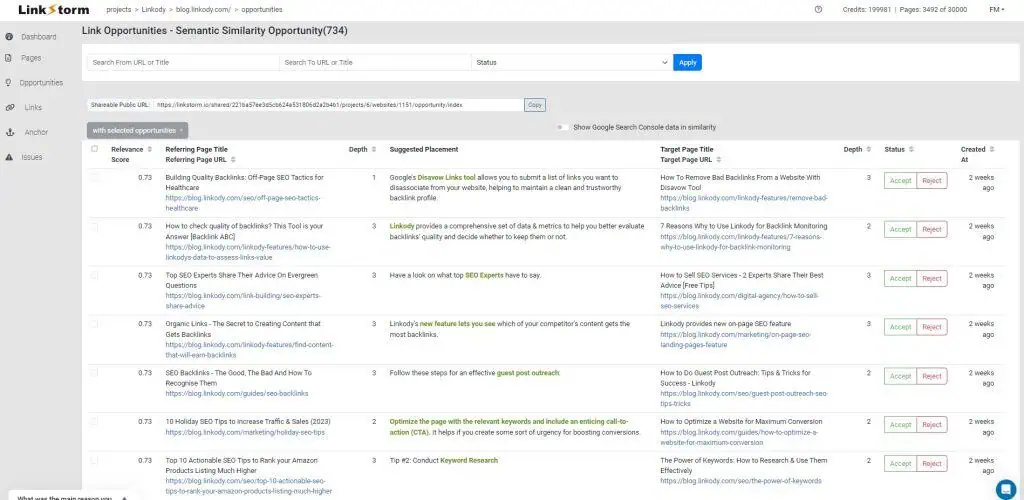
LinkStorm uses two proprietary AI methods, described as semantic clustering and topic modeling, and shows a relevance score for each suggestion alongside the suggested anchor and the surrounding sentence.
Both are past simple keyword matching, so suggestion quality is closer than the marketing on either side implies.
Where LinkStorm pulls ahead is the context around the suggestion. It shows click depth, so you can prioritize pages buried far from the homepage, and it connects to Search Console so you can see clicks, impressions, and position for the pages involved. You are deciding with performance data in front of you rather than relevance alone.
Where Link Whisper pulls ahead is proximity to the writing. Suggestions appear in the editor while you are working on the post, which fits a publishing routine better than a separate dashboard does.
Automation and how much control you keep
Both offer a spectrum from manual to hands-off, and both default to something sensible.
Link Whisper made manual link review the default mode in early 2026. You can still set up auto-linking rules that place links for defined keywords across the site.
LinkStorm gives you three modes. You can mark links as implemented manually, accept suggestions one at a time and have them inserted instantly, or turn on auto-link and let it build links across the site without input. Bulk actions handle up to 1,000 suggestions at once.
That bulk capacity is genuinely useful on a large archive, and it is also the part to be careful with. A thousand accepted suggestions is a thousand anchor decisions you did not individually read. On a site where wording carries weight, that is a lot to hand over in one action.
Anchor text and reporting
LinkStorm has an anchor report showing the distribution of anchor text across your site, which matters more than it sounds. Reuse one phrase for several destinations and you tell search engines those pages compete with each other. Repeat one phrase everywhere and it stops reading like writing.
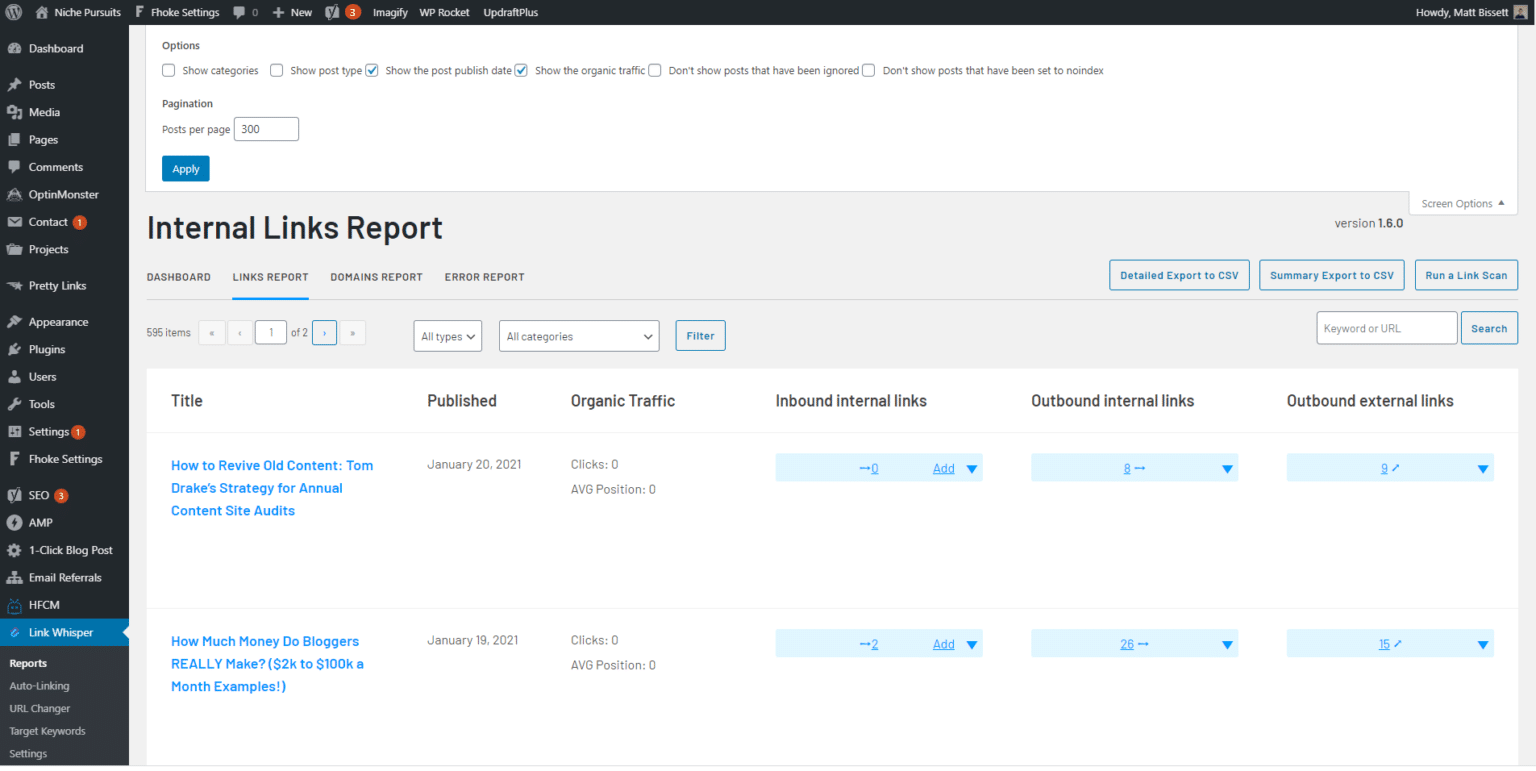
Link Whisper does not have a site-wide anchor distribution report. It reports on links, orphan pages, and broken links, but nothing tracks how often a given phrase has been used or where else it points.
If you run one site and write carefully, you may never need that report. Across a large archive, or several sites, it is the difference between catching a pattern and finding out later.
Both cover broken links. Link Whisper has a broken links report with inline editing and bulk actions. LinkStorm reports broken links, redirects, and nofollow issues as part of its audit.
Platform, and why it usually decides this
Link Whisper is a WordPress plugin, with a separate Shopify app that is rated lower than the WordPress version.
LinkStorm works with any CMS or stack, WordPress, Shopify, Webflow, and custom builds included, because it analyzes your site from the outside rather than plugging into it. It also renders JavaScript when crawling, so it can read pages built by front-end frameworks that many crawlers miss.
For most people this settles the question before any feature comparison starts. On WordPress, both are options. Anywhere else, only one is.
What each one costs
The pricing models are not comparable line for line, which makes this the part people get wrong.
Link Whisper charges annually by number of sites, from $97 for one site up to $497 for fifty. LinkStorm charges monthly by URLs and credits, from $30 a month for 1,000 URLs up to $200 a month for 50,000, with unlimited sites on every plan.
What each costs over a year
LinkStorm plans are monthly. Link Whisper plans are annual.
| Your situation | Link Whisper | LinkStorm | Cheaper |
|---|---|---|---|
| One site, 800 pages | $97/yr | $360/yr | Link Whisper by a wide margin |
| Three sites, 3,000 pages total | $197/yr | $720/yr | Link Whisper |
| Ten sites, 18,000 pages total | $297/yr | $1,440/yr | Link Whisper |
| One non-WordPress site | Not available | $360/yr and up | LinkStorm, by default |
LinkStorm bills by URLs and credits with unlimited sites. Link Whisper bills by number of sites.
On WordPress, Link Whisper is dramatically cheaper for almost any realistic setup. LinkStorm’s per-URL model only starts making sense when you are running many sites, or sites that no plugin can serve.
Worth noting on both sides. Link Whisper displays a monthly-looking figure on its pricing page but bills the full year at once. LinkStorm is genuinely monthly, which means a lower entry cost and an ongoing bill that never ends, and links that depend on that bill continuing.
Which should you choose
Which one fits
Choose Link Whisper if you are on WordPress
You are publishing on WordPress, you want the links to belong to your content, and you would rather pay once a year than monthly. At $97 for a single site it is far cheaper for most people, and the links survive you cancelling.
Choose LinkStorm if you are not on WordPress
Shopify beyond the basics, Webflow, a headless build, a custom stack, or several sites on different platforms. LinkStorm treats them all the same, and no WordPress plugin can follow you there. The Search Console data and click depth reporting are real advantages too.
If you are not on WordPress, LinkStorm is the answer by default, and the reporting it gives you is a real bonus rather than a consolation. That part is simple.
On WordPress it is less simple than the price makes it look. Link Whisper is far cheaper and your links are permanent, and those are the two things that matter most. But look at what you give up to get them.
LinkStorm shows you the anchor distribution across your site and Link Whisper does not. That is the report that catches one phrase pointing at two different pages, and the phrase you have leaned on forty times. Choosing Link Whisper means accepting that nothing watches for either.
So the WordPress reader is being asked to trade link ownership against link reporting. Worth knowing that the trade is not actually required.
The option that does not make you choose
Full disclosure before anything else. We build Linkilo, so weigh this section accordingly. Everything above stands on its own and we would rather you use the comparison than take our word for anything here.
The reason this section exists is that the WordPress choice above is a false one. You are picking between links you own and reporting that protects them, and there is no technical reason those have to be separate products.
The trade, and the third option
On WordPress only. If you are on another platform this table does not apply to you.
| Link Whisper | LinkStorm | Linkilo | |
|---|---|---|---|
| Links written into your content | Yes | No, injected | Yes |
| Links survive cancelling | Yes | No | Yes |
| Anchor distribution report | No | Yes | Yes |
| Cannibalization report | No | No | Yes |
| Crawl log for search and AI bots | No | No | Yes |
| AI on your own API key | No, credits | No, credits | Yes |
| Cost for one site | $97/yr | $360/yr | $59/yr |
Linkilo writes real links into your posts, the same as Link Whisper, so nothing you build depends on a subscription staying active. Deactivate it and every link stays where it is.
It also carries the anchor report that Link Whisper does not have, showing how often each phrase is used and where each one points, so over-optimization and split signals surface while you can still fix them cheaply.
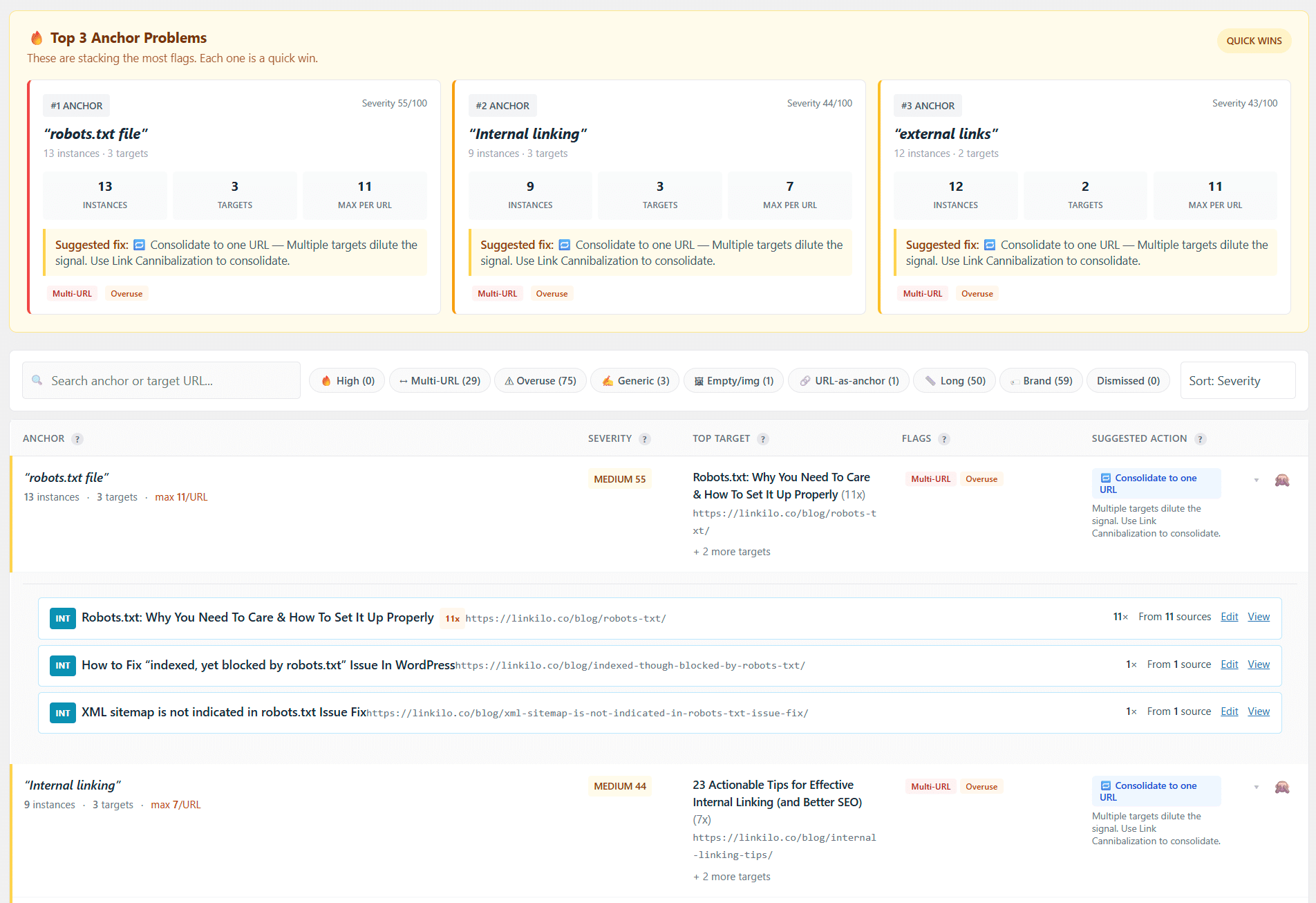
Two things go further than either tool in this comparison. The cannibalization report finds pages competing for the same term, using Search Console data to show which one actually has the authority. And the crawl log reads your server logs to show whether Googlebot, GPTBot, and ClaudeBot are reaching your pages at all, because a page nothing crawls cannot rank or be cited no matter how well you link to it.
On the suggestions themselves, Linkilo scores each candidate sentence against the target rather than only comparing pages, checks the proposed anchor against every anchor already in use, and runs a second model over the survivors to confirm the sentence is really about the destination. Each one waits for your approval in the editor.
The AI runs on your own OpenAI key, usually a dollar or two to process 500 posts, so there is no credit meter to watch on either side of the bill.
It is $59 a year for a single site, which is less than both tools in this comparison, with a 30-day money-back guarantee.
If you want the fuller side by side, the Linkilo vs Link Whisper page goes feature by feature, and there is a 30-day guarantee if it turns out not to fit.
The honest limit is that Linkilo is WordPress only. If you opened this page because you are on Shopify, Webflow, or a custom build, none of the above helps you and LinkStorm is still your answer. And if all you want is suggestions in the editor with nothing else attached, Link Whisper is a simpler tool and there is no shame in buying the simpler tool.
If bulk archive work is what you are really after, the LinkBoss vs Link Whisper comparison covers a tool built specifically for that.
Common questions
Do LinkStorm links disappear if I cancel?+
Yes, the links it inserted for you stop appearing. LinkStorm places links with a JavaScript snippet rather than writing them into your content, so removing the snippet or ending the subscription removes those links from your pages. Links you added manually and marked as implemented stay, because those live in your content.
Does JavaScript link insertion hurt SEO?+
Not for indexing, in most cases. Google renders JavaScript when it crawls, so injected links are generally seen. The practical concerns are elsewhere. Other crawlers and AI bots vary in how well they render, and the links depend on the snippet continuing to load.
Which one is cheaper?+
Link Whisper, if you are on WordPress. A single site is $97 a year against $360 a year for LinkStorm’s entry plan. LinkStorm becomes competitive when you run many sites, since every plan includes unlimited sites and bills on total URLs instead.
Can I use LinkStorm on WordPress?+
Yes. It offers a WordPress plugin that installs the snippet for you, though all management happens in the LinkStorm web app rather than in your WordPress admin.
Does either one work on Shopify?+
Both, in different ways. Link Whisper has a dedicated Shopify app, though it is rated lower than the WordPress plugin. LinkStorm supports Shopify the same way it supports any platform, through its snippet.
Linkilo does this for you
- Crawl Log File Analyzer : See exactly which pages Google and the AI crawlers actually visit, inside WordPress, with no log files to download.
- Anchor Text Reporting Tool : See every anchor pointing at every page, and catch the over-optimized ones before Google does.
- Internal Link Click Analytics : Find out which internal links people actually click, and stop guessing which ones earn their place.

Jay - Linkilo
Jay's the brains behind cool tools like Linkilo, helping marketers rock their SEO game. He's all about data-driven strategies and using AI to boost results. He's been at this for a decade and loves figuring out what works (and what doesn't) to get more leads without paying a fortune. <a href="https://www.linkedin.com/in/jay-kang-80b103309/">Linkedin</a>