Linkilo and LinkBoss both use AI to build internal links, and both are aimed at WordPress. So on the surface they look like the same tool.
They are not.
The split comes down to where the work runs, how you pay, and whether you want bulk automation or ongoing control with a view of your whole site’s health.
Short version. LinkBoss is a cloud tool with a sync plugin, built to mass-interlink a large library fast and map it into silos.
Linkilo is a WordPress plugin that suggests links with confidence scores, then adds cannibalization detection, a crawl log, and broken-link and redirect tools.
Here is the line by line, and who each one fits.
Linkilo vs LinkBoss
The core difference, where the AI runs
This is the part most comparisons skip, and it shapes everything else.
LinkBoss does the thinking in the cloud.
You install its plugin, connect it with an API key from app.linkboss.io, and it syncs your content to LinkBoss servers, where the analysis and link building run on their infrastructure.
It sends the finished links back as clean HTML written into your posts, so the links are real and stay in your content, while your WordPress site carries none of the processing load.
That is a genuine advantage on shared hosting or a large, slow library.
Linkilo does the thinking inside WordPress. It runs on your own OpenAI key, processes in the background through WP-Cron, and keeps everything on your site.
You trade a little server work for full control and a flat, predictable cost with no per-link meter.
Neither is wrong. If your host is weak and your library is huge, offloading to the cloud helps. If you want control and a price that does not move with volume, keeping it in WordPress wins.
What both do
The overlap is real, so start there. Both tools cover the core job well.
- Read content with semantic AI and suggest contextually relevant internal links, not keyword matches.
- Find orphan pages and help you link them back in.
- Build topic clusters so related content connects.
- Run on WordPress.
Where LinkBoss pulls ahead
LinkBoss is built for scale, and it shows in a few places.
- Bulk 2.0 builds up to 1,000 contextual links across 200 pages in a single run. You pull posts in by category, tag, or post type, set a semantic similarity threshold and caps on inbound and outbound links per page, and it inserts the links, even writing two or three fresh sentences with natural anchors when a post has no good spot to link from.
- One-click silo presets build Reverse, Serial, Priority, or Circle structures. You paste a pillar URL, pick up to 15 support posts ranked by relevance, and it wires the silo, with a live visual map you can rearrange by hand.
- A keyword-based Custom Network Builder finds the posts most relevant to a term and links them into a cluster.
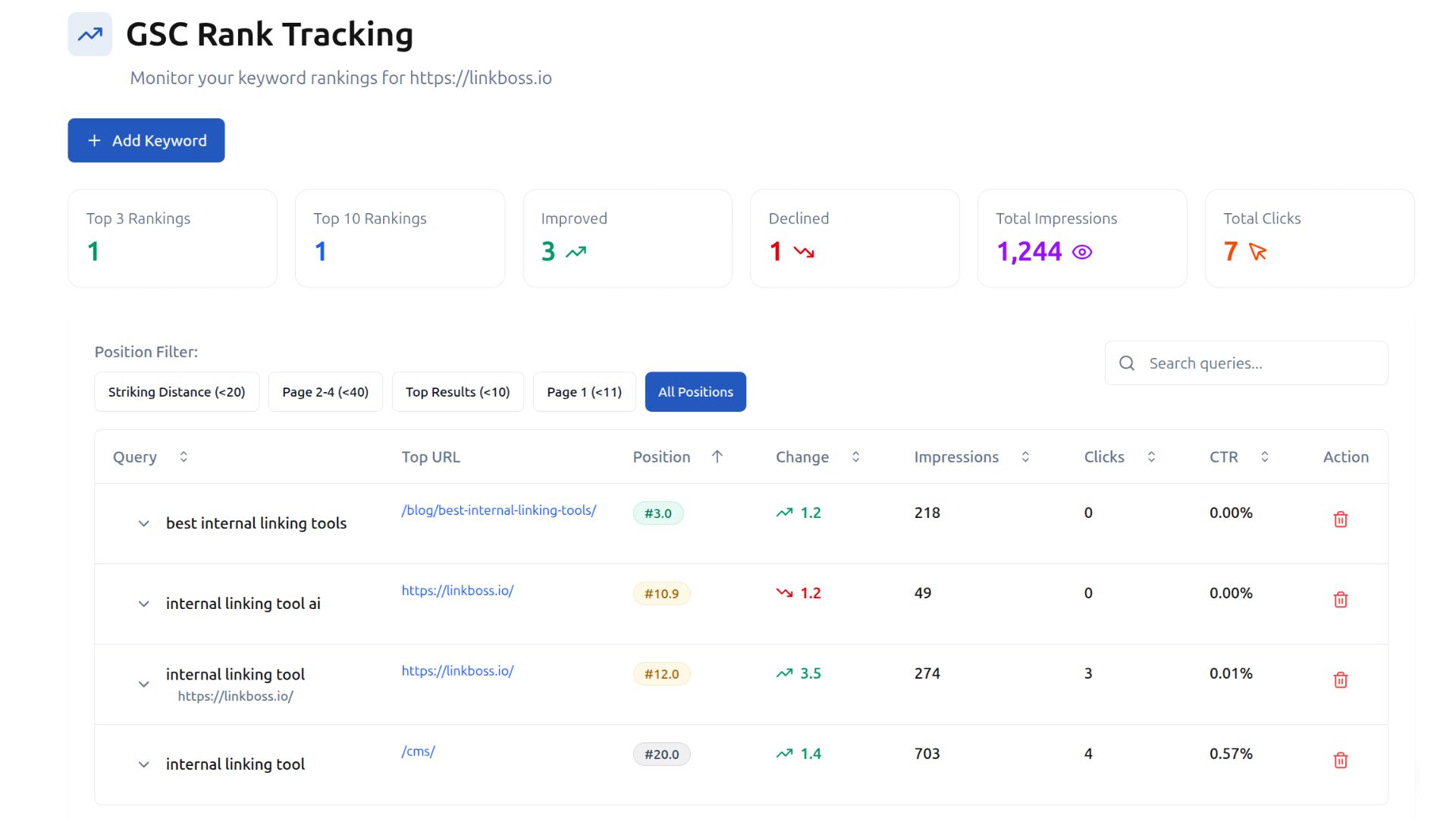
- A built-in Search Console rank tracker surfaces striking-distance keywords and tracks impressions and position alongside the linking tools.
- Cloud processing keeps even a very large library off your server, and one dashboard runs all of it across many sites, which agencies will appreciate.
For a one-time job of wiring up a large archive, or running linking across dozens of client sites from one place, that bulk power is the draw.
Where Linkilo goes deeper
Linkilo trades some of that mass automation for control and a wider view of site health.
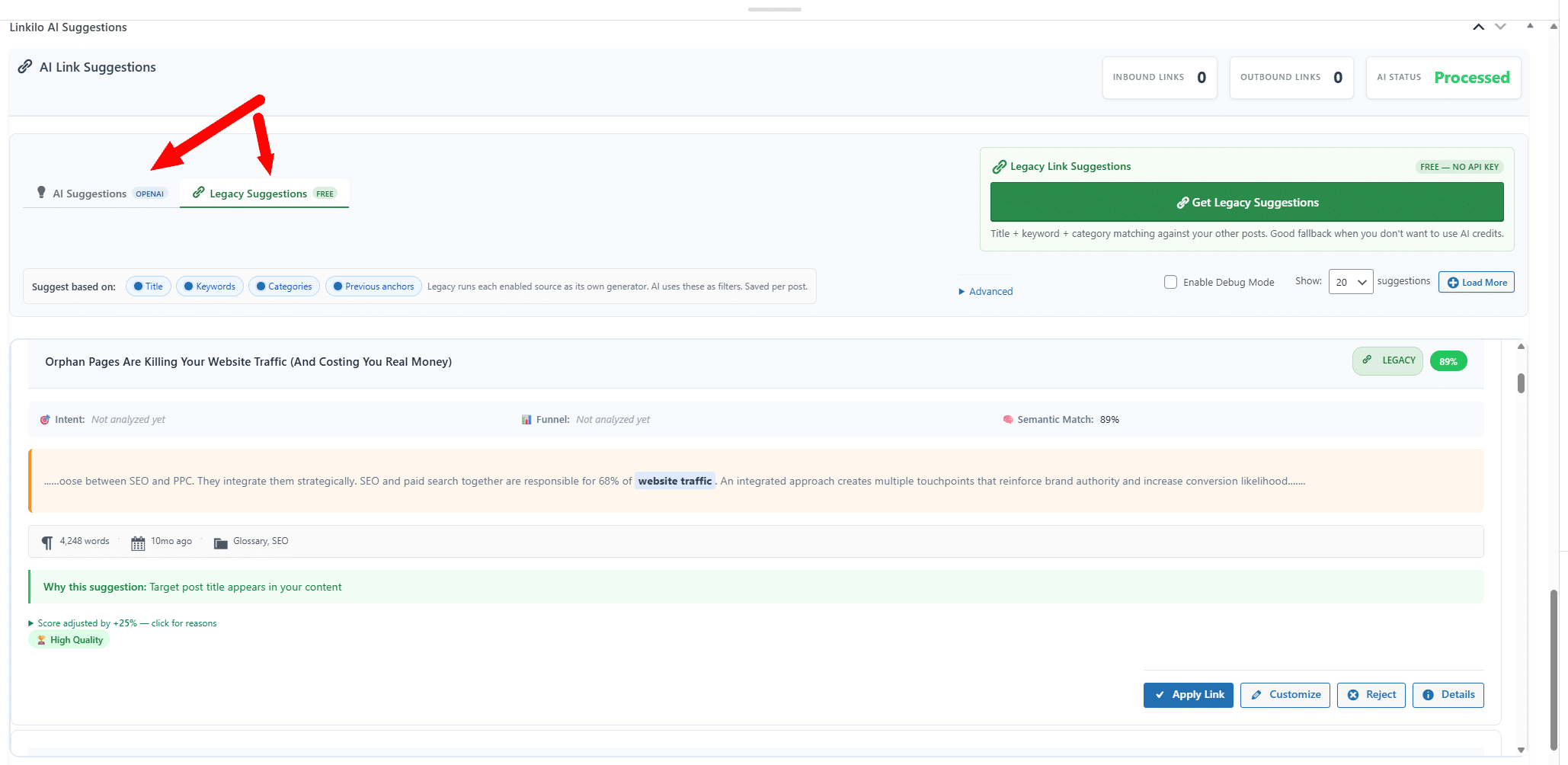
Start with the suggestions themselves. Linkilo reads the full text of each post and compares it against your whole library.
Each opportunity comes back with a relevance score and the exact anchor to use, which you approve or skip from a panel in the editor.
It runs in the background through WP-Cron on your own OpenAI key, usually a dollar or two to process a 500-post site. Nothing leaves WordPress and nothing runs on a meter.
Both tools find candidates the same way in principle, by reading meaning rather than matching phrases. What separates them is how much scrutiny a candidate gets between being found and being offered to you.
What a suggestion has to survive
Finding two related pages is the first check, not the last.
✓The sentence has to fit, not just the page
A post can be related to your target and still contain sentences that are about something else entirely. Each candidate sentence is scored on its own.
✓The anchor has to read like language
Fragments, phrases cut off mid-thought, and filler words such as best or guide are thrown out before they reach you.
✓The version has to match
A sentence about this year’s model does not get to link to last year’s review just because the two pages look alike.
✓Your site has to agree
The wording is compared against every anchor already in use, so one phrase does not end up pointing at two different pages.
✓A second model has to confirm it
A language model reads the sentence and the destination and drops the ones that do not hold up, with the reason recorded.
Those later checks exist because most bad internal links are not bad matches. The two pages really were related. The link simply landed in a sentence that was about something else, or used wording that already belongs to a different page.
Why the words you link with carry weight
Anchor text is the visible wording you turn into a link. Search engines treat those words as a description of the destination, so each link doubles as a small claim about what that page covers.
Repeat one phrase across dozens of posts and the pattern stops looking like writing. Point that same phrase at two different pages and you have told search engines those pages compete with each other, which splits the signal you were trying to build.
Neither failure looks like an error when you read the page. That is what makes them expensive.
Scale is what turns them into a real problem. LinkBoss Bulk 2.0 can insert up to 1,000 links across 200 pages in one run, and it will write two or three new sentences when a post has no natural place to put a link.
That is genuinely powerful for wiring up a dormant archive. It is also 1,000 wording decisions made without anyone reading them.
Linkilo works the other way around. Each anchor is checked against the record of what your site already uses, and then the suggestion waits for you.
The approval step is the point rather than a missing feature. A model can see that two pages are related. It cannot know that you are about to merge one of them, that a client asked you to stop linking to a product, or that the target is the weaker of two posts you wrote on the same subject.
On a bulk run those decisions get made for you. On a site where the wording matters, that is the difference worth paying attention to.
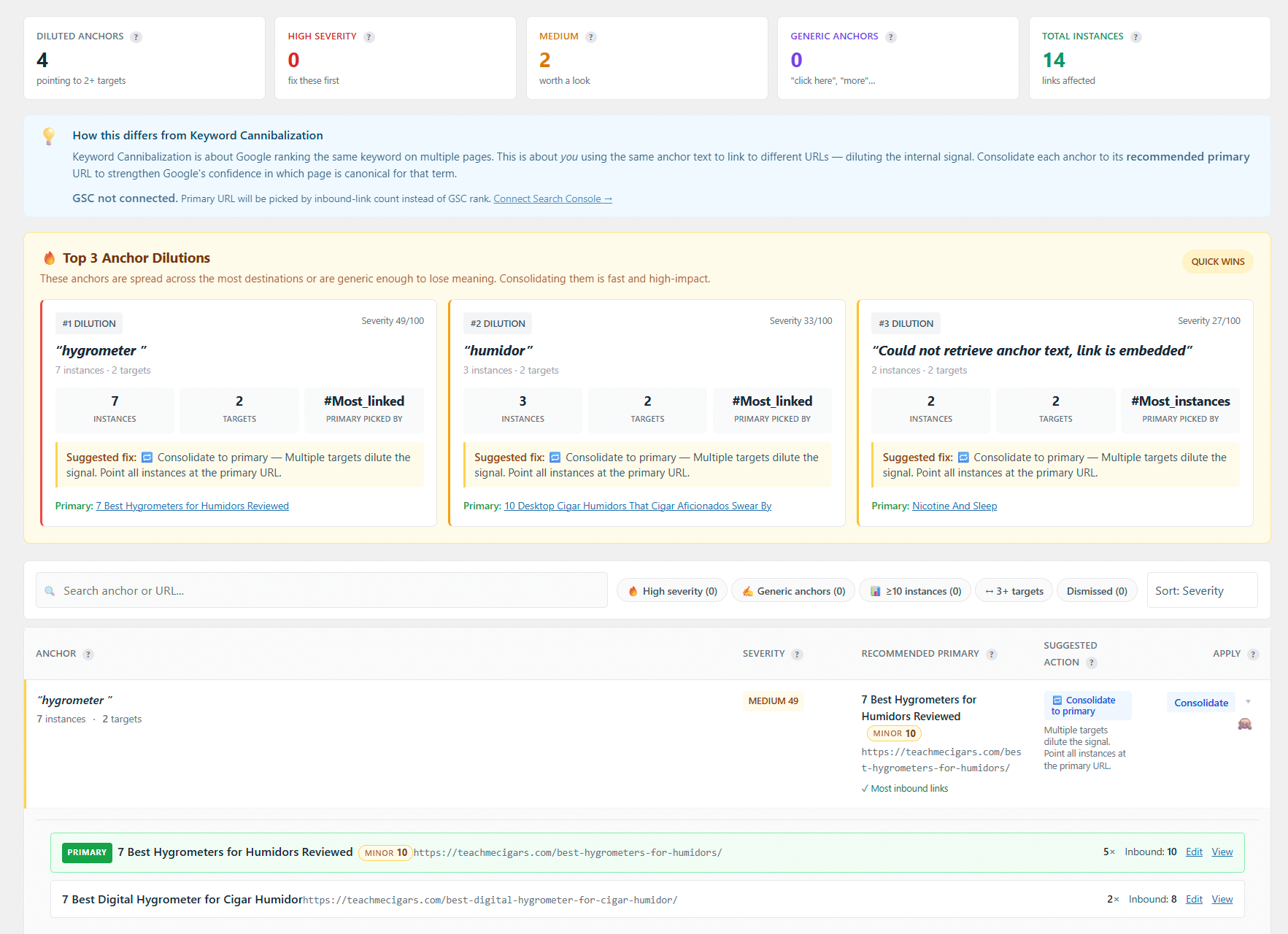
Then the parts LinkBoss handles differently. LinkBoss watches the anchors you reuse so you do not over-optimize one phrase, which is worth having. Linkilo does that too, and adds a dedicated cannibalization report that finds whole pages competing for the same term, the quiet reason a page you expect to rank keeps stalling. The guide on keyword cannibalization walks through the fix.
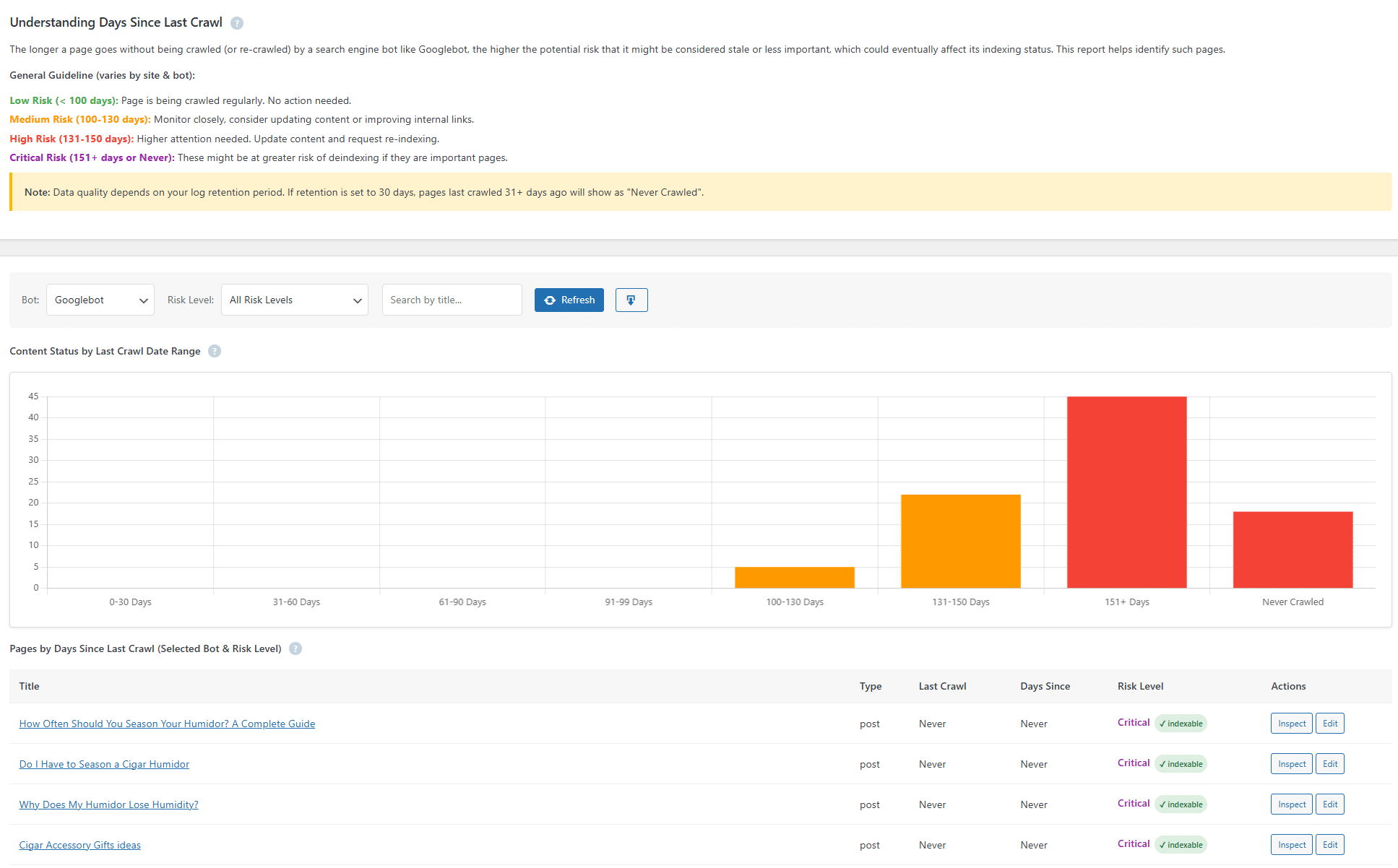
The crawl log is the widest gap, because LinkBoss does not track bots at all.
Linkilo records every bot hit at the WordPress level and rolls it into a single 0 to 100 health score.
It comes from four equal parts. Googlebot’s crawl frequency over the past week, how much of your published content it has reached in 30 days, your error rate with server errors weighted double, and your response time at the 95th percentile.
It also verifies each crawler by a reverse-DNS and forward lookup, so you get a real-versus-spoofed split with sample impostor IPs rather than trusting the user agent.
A crawl-waste view sorts bot activity into 16 categories and reads your live robots.txt to hand you a copy-pasteable block that fixes the waste.
For AI bots it labels each GPTBot or ClaudeBot visit as a live answer, training, or a real person pasting your link.
LinkBoss has a Search Console rank tracker for keywords and positions, useful for planning, but it cannot tell you whether Googlebot or an AI crawler actually reached a page.
Linkilo connects to Search Console too, adding a one-click Inspect on any URL for Google’s own verdict and chosen canonical.
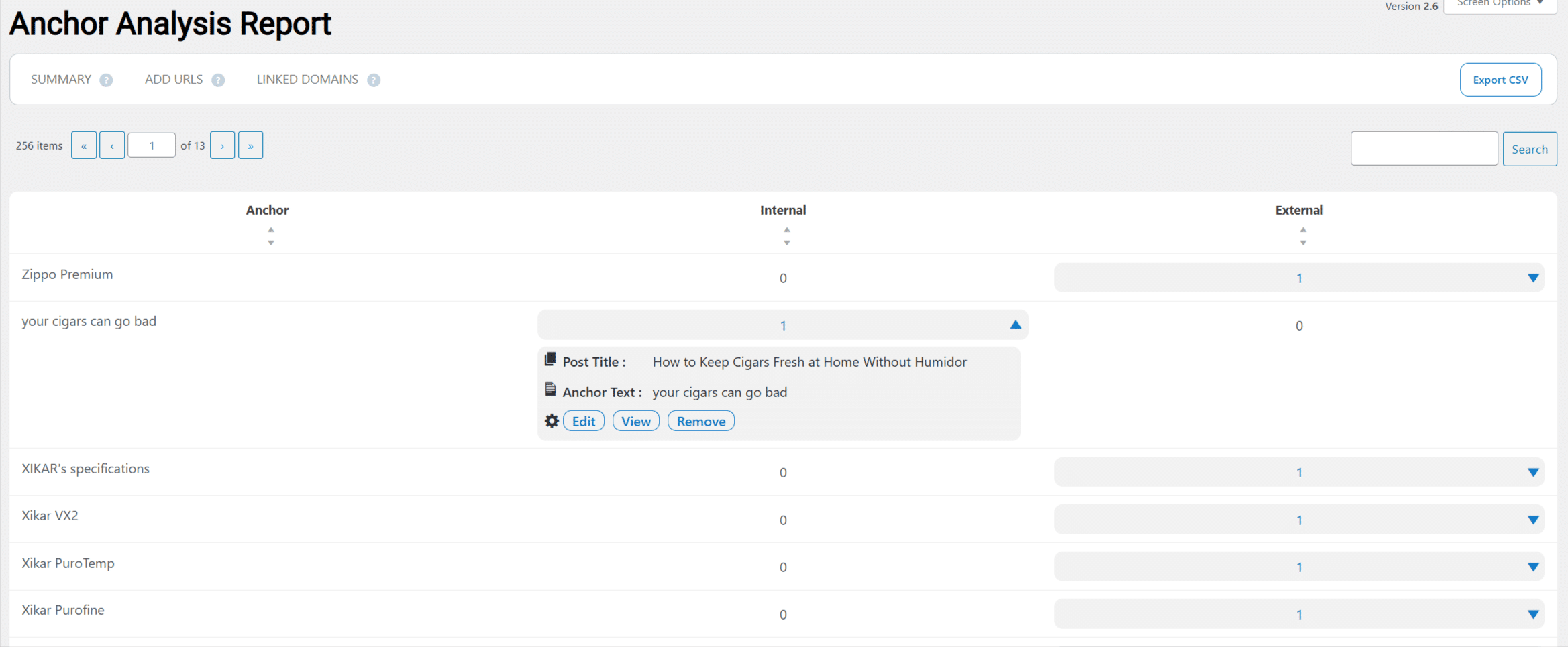
An anchor text report shows how often each phrase is used across the site, so you do not quietly over-optimize one anchor.
The links you already placed need maintenance
Link building and link upkeep are two different jobs, and LinkBoss is built for the first one. It inserts links well. It does not watch what happens to them afterwards.
Things happen to them. Posts get deleted, slugs get rewritten, and sites you linked to go offline, so a link that worked in 2023 can quietly become a dead end without anything on the page looking wrong.
A broken link is one whose destination no longer resolves. The reader hits an error page, and the ranking power you passed along that link stops reaching anything.
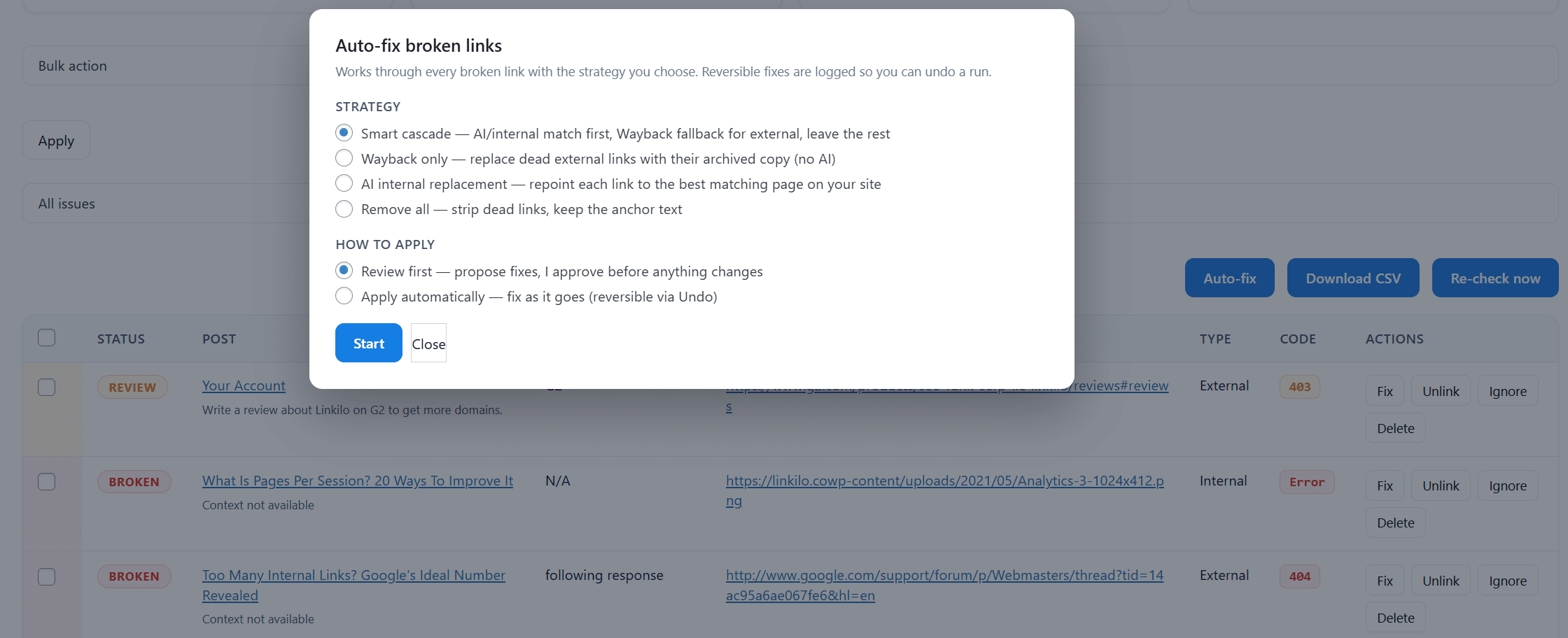
Linkilo’s broken link checker scans on a schedule, shows each one with the page it sits on and the wording used, and updates or removes it in a click without opening the post.
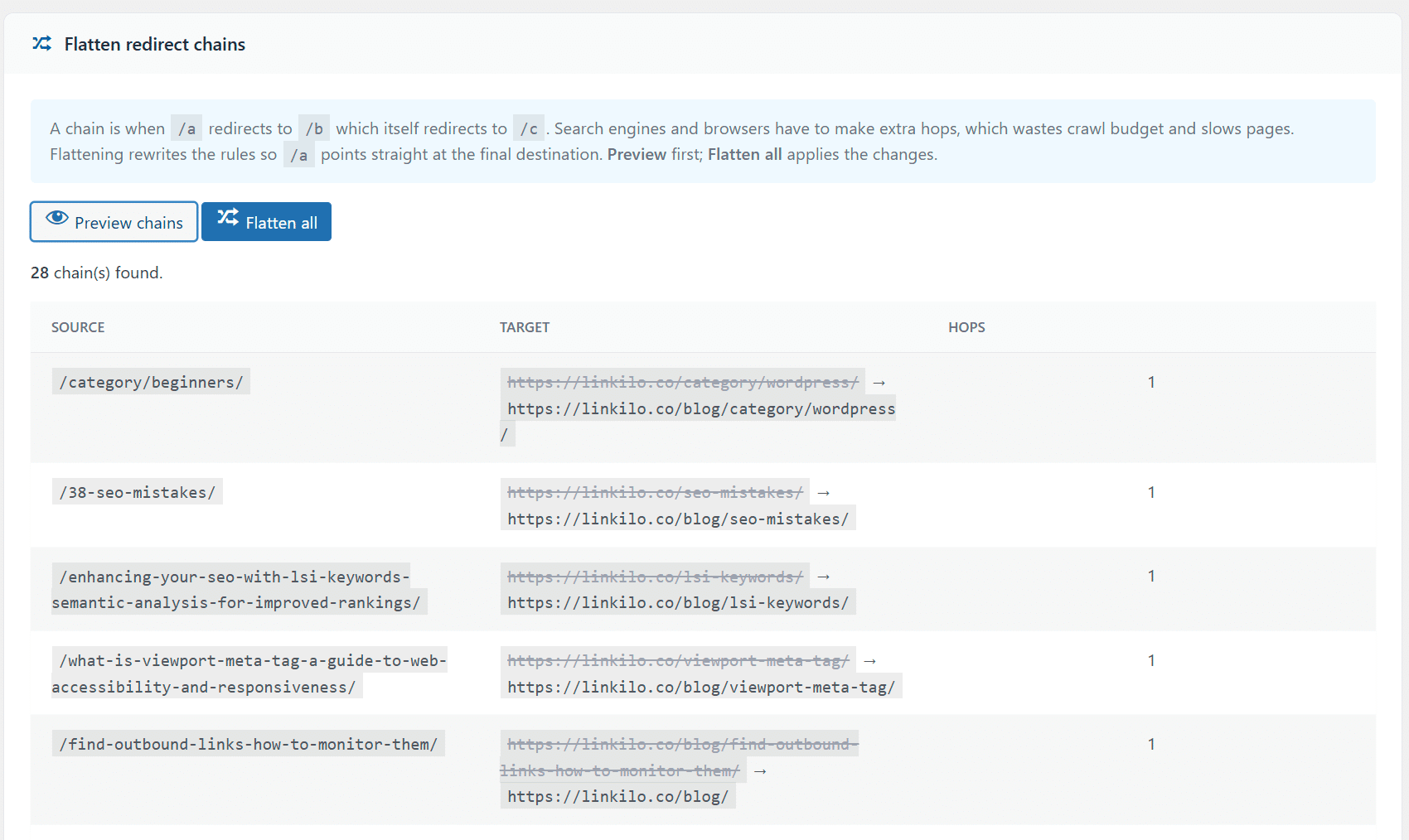
Redirects are the companion problem. Change a URL and a 301 forwards the old address to the new one so existing links survive.
Change it a few more times and those forwards stack into a chain, where one click travels through three addresses to reach a single page.
Nothing appears broken, which is exactly why chains sit undetected for years. The page still loads. Every visit is just slower than it needs to be.
Linkilo detects the chains and flattens each one back to a single hop. The 404 monitor records which missing URLs are actually being requested, so you spend your time on the ones with real traffic.
Link preview handles the last piece, showing you the destination page as you place the link so you can confirm it is still the page you meant.
None of this is link building. It is the work that keeps link building from decaying, and it lives in the same plugin rather than in a second subscription.
The honest trade is that Linkilo does not mass-insert hundreds of links in one click the way LinkBoss Bulk 2.0 does, and it runs on your own server rather than in the cloud.
It leans on suggest and approve, which is slower for a giant one-time job but gives you tighter control over every link that goes in.
The cost, two models
The pricing tells the same story from a different angle.
Linkilo is $59 a year, flat, with a 30-day money-back guarantee, plus a dollar or two of your own OpenAI usage.
It does not matter whether you build 50 links or 5,000. The price is the same.
LinkBoss is credit-based. Its audit, silo, and visualizer tools are free, and you only spend credits when it inserts links.
That starts at $11 a month for a couple hundred credits, with a free tier to try it.
So the cost scales with how many links you actually push, which is cheap for light use and climbs on a big bulk run.
Flat and predictable, or pay for what you insert. Pick the one that matches how much linking you do.
Which should you use
- You have a large existing library to interlink fast, or you run many client sites from one dashboard, LinkBoss.
- Your host is weak and you want the AI load off your server, LinkBoss.
- You want ongoing linking with confidence scores and full control over each link, Linkilo.
- You want cannibalization detection, crawl visibility, and broken-link and redirect tools in the same plugin, Linkilo.
- You want a flat cost that does not move with link volume, Linkilo.
Linkilo vs LinkBoss, quick answers
+Is LinkBoss better than Linkilo?
For one-time bulk interlinking and silo building at scale, LinkBoss is faster. For ongoing linking plus site health and a flat cost, Linkilo does more.
+Does LinkBoss run on my server?
No. It syncs your content to its cloud and processes there, so your site stays fast. Linkilo runs inside WordPress on your own OpenAI key.
+How much does each cost?
Linkilo is $59 a year flat plus a little OpenAI usage. LinkBoss is credit-based from $11 a month, with free audit tools and credits spent only when links are inserted.
+Can I use both?
You could, though they overlap heavily on the linking itself. Most people pick one based on bulk versus ongoing control.
+Does Linkilo build silos in bulk like LinkBoss?
Not with one-click mass insertion. Linkilo focuses on suggest-and-approve linking plus cannibalization, crawl, and broken-link tools.
The bottom line
So which one?
If your job is to interlink a big archive fast, build silos in bulk, and keep the load off your server, LinkBoss is built for that.
If you want ongoing, controlled linking with confidence scores, plus a view of cannibalization and whether search and AI bots actually reach your pages, all at a flat price, Linkilo is the better fit.
To see how Linkilo compares against the other main tools, the Linkilo vs Link Whisper comparison covers that side.
And if you are weighing LinkBoss against Link Whisper rather than against Linkilo, the LinkBoss vs Link Whisper comparison puts those two side by side, including how their pricing models differ.
Linkilo does this for you
- AI Internal Link Suggestions : Get link suggestions a human editor would approve, and add them in one click without leaving the editor.
- Topic Clusters : Group your content into pillars and clusters automatically, then link them the way Google expects.
- Crawl Log File Analyzer : See exactly which pages Google and the AI crawlers actually visit, inside WordPress, with no log files to download.

Jay - Linkilo
Jay's the brains behind cool tools like Linkilo, helping marketers rock their SEO game. He's all about data-driven strategies and using AI to boost results. He's been at this for a decade and loves figuring out what works (and what doesn't) to get more leads without paying a fortune. <a href="https://www.linkedin.com/in/jay-kang-80b103309/">Linkedin</a>